Contacts Google Maps Suite
Visualize your entire contact database on a map, capture new contacts from any location with a single click, and ensure every address is complete, verified, and geocoded from the moment it is entered.
Contacts map view with avatar markers — each contact pinned at their address with profile photo visible in the sidebar and info window.
Google Places autocomplete on the Contact name field fills the full address, coordinates, phone, and website in a single selection.
Combined partner + Google Places autocomplete panel on the same Contact name field — both lookup sources available simultaneously.
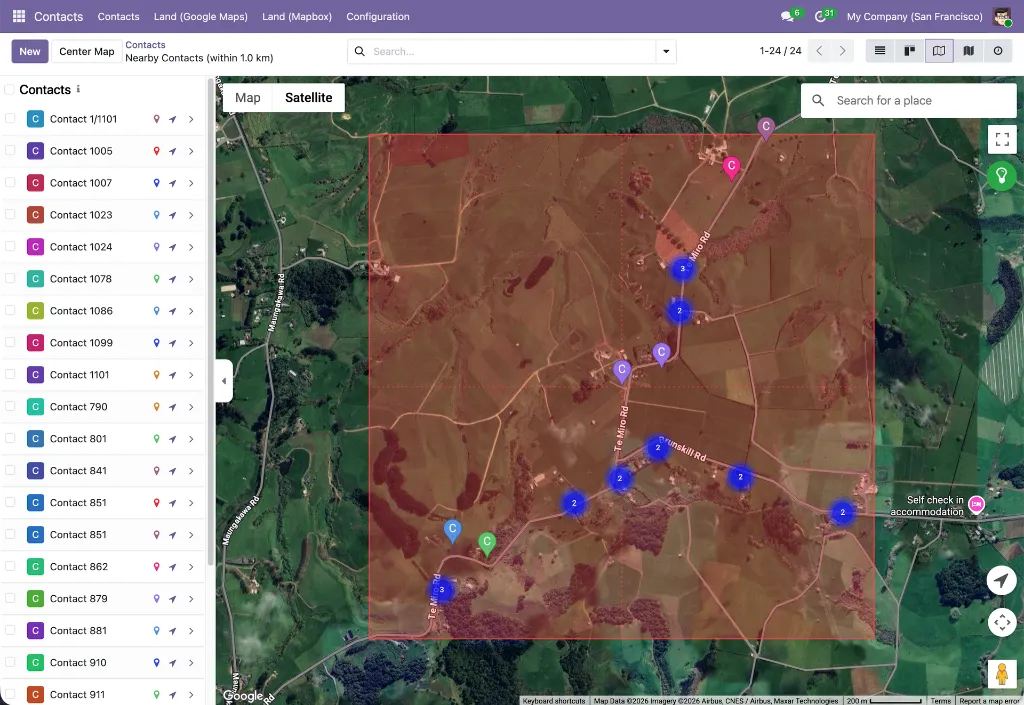
Nearby search within configurable search radius
Product Overview
Contacts Google Maps Suite is a collection of 9 Odoo modules that brings the full power of Google Maps into your Contacts workflow. It transforms a flat contact list into an interactive geographic view, replaces manual address entry with a single-selection Google Places lookup, and gives field teams a click-to-create workflow that captures a new contact — name, address, phone, website, and coordinates — directly from the map. A built-in auto-geocoding job keeps your entire contact database location-current without any manual effort.
The suite is structured in two layers. Five foundation modules handle the shared infrastructure: API key management, the map view engine, form widgets, the Places autocomplete system, and the click-to-create framework. Four Contacts application modules then wire these capabilities directly into Odoo Contacts — adding a map view with avatar markers, Google Places autocomplete to the contact form, click-to-create from the map, and a unique combined widget that merges Odoo's native partner autocomplete with a Google Places panel on the same name field.
Who It's For
Contacts Google Maps Suite is built for teams whose daily work revolves around managing, growing, and visiting a contact database — and who need location context to do it effectively.
Odoo Administrators & Implementers
System configurators deploying a Contacts-focused mapping solution without the full Google Maps Suite. This product bundles precisely the modules needed for Contacts — including the unique combined partner + Google Places autocomplete widget — with all field mappings auto-configured on install.
Operations & Data Management Teams
Teams responsible for the quality and completeness of the contact database. The auto-geocoding cron job silently processes up to 80 contacts per batch, resolving coordinates for any contact that has an address but no geolocation. Google Places autocomplete ensures new contacts are geocoded and correctly structured from the point of entry.
Marketing & Segmentation Teams
Teams who need to understand the geographic spread of their contact base for campaign targeting, event planning, or territory assignment. The map view with box-select and bulk actions makes geographic segmentation a visual, interactive process rather than a filter-and-export exercise.
Sales & Account Management Teams
Teams who plan territory visits, manage regional accounts, or need to quickly find contacts near a specific location. The map view shows the geographic distribution of their entire contact database at a glance, and the nearby contacts search surfaces relevant records within any configurable radius without leaving Odoo.
Field Representatives & Business Development
Reps who prospect in specific areas and need to capture new contacts on the go. The click-to-create workflow lets them tap any named business or location on the map and have a fully pre-populated contact form ready to save — no app switching, no typing, no missed details.
The Problem It Solves
A contact database is inherently geographic — every partner has an address, and most business workflows that depend on contacts have a physical dimension. Yet standard Odoo Contacts presents this data as a list or kanban of cards with no spatial awareness at all.
Two Useful Autocomplete Sources, But No Way to Use Both
Odoo's built-in partner autocomplete finds existing records in the Odoo database. Google Places autocomplete finds real-world businesses with verified address data. These are complementary — one prevents duplicates, the other enriches new records — but the standard Odoo interface only offers one at a time. The combined partner + Google Places widget makes both available on the same name field without removing either.
Capturing Contacts in the Field Requires Too Many Steps
A rep visiting a client's office building notices a promising business next door. The standard workflow: open Google Maps, find the business, copy the name and address, switch back to Odoo, create a new contact, type all the details in. By the time they're done, they've spent several minutes on data entry and may have introduced errors. The click-to-create feature reduces this to a single tap on the map — the contact form opens pre-filled with everything Google knows about that business.
Existing Contacts Are Not Geocoded After Import
Most Odoo instances have a backlog of contacts imported from spreadsheets or migrated from other systems — records with addresses but no latitude or longitude. These contacts don't appear on the map, can't be used in proximity searches, and represent a gap in geographic coverage. The auto-geocoding cron job silently closes this gap, processing up to 80 contacts per batch using the address data already in Odoo.
Thousands of Contacts, No Geographic View
A contact database with hundreds or thousands of records contains rich location information — addresses, cities, regions, countries — but none of it is visible spatially. Sales planners can't see which accounts cluster together, operations teams can't spot regional coverage gaps, and no one can answer "show me all contacts within 10 km of this address" without building a custom report. The Contacts map view surfaces all of this instantly, with each contact plotted as a color-coded marker at their stored location.
Manual Address Entry Leaves Data Incomplete and Incorrect
When someone creates a new contact manually, they typically fill in the name and maybe the company, then leave address fields partially complete or skip them entirely. The result is a contact database where a significant portion of records have no coordinates, no postal code, or addresses that don't match any real location. Google Places autocomplete fixes this at the source — one selection fills every address field with a verified result and stores coordinates simultaneously, so every contact created through autocomplete is map-ready from the start.
What's Inside
Nine modules in total — five shared infrastructure modules that power the map view, form widget, and autocomplete engine, plus four Contacts-specific modules covering map visualization, click-to-create, address autocomplete, and the combined partner lookup widget.
Foundation Layer — Shared Infrastructure
Base Google Map
The root module for the entire suite. Centralizes Google Maps API key, Map ID, language, region, and color scheme configuration in Settings → General Settings → Google Maps. Provides the shared JavaScript API loader — with automatic retry, library caching, and authentication error detection — and the base OWL map component that all map views inherit, including error handling, offline detection, resize support, and ARIA accessibility. Also manages autocomplete restrictions: language bias and up to 5 country filters.
Why It Exists
All Google Maps features across the suite — map views, autocomplete, form widgets — share a single API key and a single loader. Configure it once and every module inherits it automatically. No per-module API setup, no conflicting script loads, no duplicate configuration.
Web View Google Map
Registers google_map as a first-class Odoo view type. Provides record markers with color coding, a synchronized sidebar, MarkerClusterer for large datasets, overlap handling for co-located records, Alt+drag box multi-selection for bulk actions, in-map place search, a geolocation button, nearby-records search with a configurable radius, full record action support (export, archive, duplicate, delete), embedded map widgets for form views, and full dark mode styling.
Why It Exists
This is the engine behind the Contacts map view. The contacts_google_map module builds on this shared framework — inheriting all navigation, selection, clustering, and action capabilities — rather than implementing them from scratch for Contacts specifically.
Web Widget Google Map
A google_map form widget that embeds a Google Maps preview inside any Odoo form view. An edit button opens an interactive dialog with a draggable AdvancedMarkerElement and a Google Places search box, letting users visually position the marker and confirm coordinates before writing them back to the record. Zoom defaults to 14 for set coordinates, 3 for unset. Read-only mode hides the edit controls for portal and locked record views.
Why It Exists
The embedded map on the contact form's Geolocation page is powered by this widget. It gives teams a visual confirmation of a contact's stored location and a precision coordinate editor — both accessible without leaving the form view.
Web Widget Google Place Autocomplete
Provides the gplace_autocomplete_el widget and the Google Places Mapping configuration system. A data-driven engine that maps any Google Places API response property — address components, coordinates, phone, website, display name — to any field on any Odoo model via configuration records rather than code. Two modes: places (businesses and landmarks) and address (streets and routes only). All field writes are atomic. Includes a built-in live test tool, mapping validation, and a per-country street format setting.
Why It Exists
The autocomplete on the Contact form is powered by this module. It handles the partner-specific field mappings — name to name, coordinates to partner_latitude/partner_longitude, address components to street, city, state_id, zip, country_id — through configuration records that are created automatically when contacts_google_autocomplete is installed.
Base Google Map: Add Place from Map Click
The abstract foundation for the click-to-create workflow. Provides the google_map.add_place.mixin model mixin with all the logic for fetching Google Place details from the Places API, parsing addresses via the ADR microformat and a locale-aware reverse-geocoding parser supporting US/UK, Canadian, Dutch, Irish, and Russian/CIS address formats, checking for duplicates via the indexed gplace_id field, and opening a pre-populated Odoo quick-create form. Also provides the InMapClickAddPlace OWL component with its green/grey visual zoom indicator.
Why It Exists
All the complex logic for click-to-create — Places API calls, address parsing across locales, duplicate detection, form action building — lives here once and is shared across all application modules. The contacts_google_map_add_place module simply inherits this mixin and provides the partner-specific field overrides.
Application Layer — Contacts Integrations
Contacts Google Map
Adds a Google Map view to the Contacts application, available in the view switcher alongside list, kanban, and form. Each contact renders as a color-coded pin marker with their avatar displayed in both the sidebar thumbnail and the marker info window for quick identification. A per-contact marker color picker on the Geolocation page enables custom visual categorization. A "Nearby Contacts" smart button on the contact form opens the map filtered to contacts within a configurable radius of that contact's location — with antimeridian wraparound handling for global deployments. An embedded map widget on the Geolocation page provides a location preview without leaving the form. An optional daily cron job auto-geocodes up to 80 contacts with a country but no coordinates.
Why It Exists
The standard Contacts interface has no geographic dimension. This module adds one — making the spatial distribution of an entire contact database visible at a glance, and giving teams a proximity-based navigation tool that works across their full partner list.
Contacts Google Map: Click to Add Place
Activates the click-to-create workflow on the Contacts map view. When the map is zoomed in sufficiently (zoom ≥ 15, signaled by the green indicator button in the top-right corner), clicking a named Google Place fetches its full details from the Places API — display name, address components, phone, website, and coordinates — and opens a pre-populated quick-create contact form. Clicking empty map space reverse-geocodes the coordinate via the Geocoding API and opens a form with the resolved address pre-filled. The stored gplace_id field on res.partner prevents duplicate contacts for the same Google Place. After saving, the map reloads automatically and a notification with an "Open" link confirms the result.
Why It Exists
Field teams need to capture contacts quickly without interrupting their workflow. Clicking a location on the map and having the contact form pre-filled with verified Google data is significantly faster and more accurate than switching between apps and typing manually.
Contacts Google Autocomplete
Replaces the standard name and street inputs on the Contact form with Google Places autocomplete fields. The name field uses places mode — showing businesses, landmarks, and points of interest — and when a business is selected, also fills phone and website. The street field uses address mode, restricted to streets and routes. Both autocomplete fields also apply inside inline child-contact sub-forms when adding contacts linked to a company. All address fields (street, street2, city, state, zip, country), geolocation coordinates (latitude, longitude), and contact details are written in a single atomic update. Google Places mapping records for res.partner are created automatically on install — no manual configuration required.
Why It Exists
Manual address entry on contact forms is slow and produces incomplete, inconsistently formatted records. This module ensures every contact created through the name or street field is filled with verified, structured Google Places data — including coordinates — from the moment it is saved.
Partner Autocomplete with Google Autocomplete
A unique hybrid widget that combines Odoo's built-in partner autocomplete and Google Places autocomplete on the same Contact name field — without replacing either. A Google icon toggle button beside the name field opens a collapsible panel containing a Google Places autocomplete input. Selecting a place fills all address fields, geolocation, phone, and website atomically. The Odoo partner autocomplete remains active on the same field for finding existing records. The widget applies globally to all res.partner form views via a server-side _get_view() override — no per-module XML changes needed. Supports a no_manual_edit option for data-consistency workflows. Shows a clear validation error in the panel if the mapping configuration is missing rather than failing silently.
Why It Exists
Odoo's native partner autocomplete prevents duplicate records by finding existing partners. Google Places autocomplete enriches new records with verified real-world data. These are complementary needs that previously required choosing one or the other. This module makes both available simultaneously on the same field, across every partner form in the system.
How It Works
From initial setup and bulk geocoding of existing contacts through to active field capture and proximity-based workflows — the suite integrates naturally into how your team manages contacts in Odoo every day.
- Configure once. Enter your Google Maps API key in Settings → General Settings → Google Maps. Optionally set language, region, color scheme, and autocomplete country restrictions. All 9 modules inherit this configuration — no per-module setup required.
- Geocode your existing contact database. Activate the optional auto-geocoding cron job in Settings → Technical → Scheduled Actions → Auto Geolocalize Contacts. It runs every 12 hours and processes up to 80 contacts with a country but no coordinates, using Odoo's built-in geocoding service to resolve their locations silently in the background.
- Switch to the Contacts map view. Open Contacts and click the Map icon in the view switcher. Contacts with valid coordinates appear as color-coded pin markers with their profile photo visible in the sidebar and info window. Records without coordinates are excluded automatically.
- Create contacts faster with autocomplete. On any Contact form, the name and street fields now show Google Places suggestions as you type. Select a business from the name field to auto-fill the full address, phone, website, and coordinates in one action. Or use the Google icon toggle on the name field to open the Google Places panel alongside Odoo's built-in partner autocomplete — both available simultaneously.
- Capture contacts directly from the map. Zoom in on the map until the indicator button in the top-right turns green. Click any named business to fetch its full details from Google and open a pre-populated contact form. Click any empty location to reverse-geocode the coordinate and open a form with the resolved address. Save — the new contact appears on the map immediately.
- Navigate by proximity. Open any contact's form and click "Nearby Contacts" (visible when coordinates are set) to open the map filtered to contacts within a configurable radius. Use "Find Nearby" from any map marker to do the same. A rectangle overlay shows the search area and the view title updates to reflect the context.
- Segment and act geographically. Hold Alt and drag to draw a selection box around a cluster of contacts on the map. Use the action menu to export, archive, tag, or run custom actions on the selected records — making geographic segmentation a visual, interactive process.
All map views support dark mode, marker clustering for large contact databases, keyboard shortcuts, and offline detection with automatic retry — ensuring a consistent experience whether your team is in the office or in the field.
Key Features
A focused set of capabilities built around the Contacts workflow — from database visualization and address quality to field capture, proximity search, and the unique combined autocomplete widget.
Combined Partner & Google Places Autocomplete
- Dual Autocomplete on One Field — Odoo's native partner autocomplete and Google Places autocomplete are available simultaneously on the Contact name field — one prevents duplicates, the other enriches new records.
- Collapsible Google Places Panel — A Google icon toggle button opens or closes the panel; it closes automatically after a selection, keeping the form uncluttered by default.
- Global Application Without XML Changes — Applied to all
res.partnerform views across Contacts, Sales, CRM, and any other module via a server-side_get_view()override — no per-module inheritance needed. - No Manual Edit Mode — An optional
no_manual_editflag makes the name input read-only, requiring selection from either autocomplete source — useful for data-consistency workflows. - Mapping Validation — If the
res.partnermapping configuration is missing, the panel shows a clear error message rather than failing silently.
Click-to-Create Contacts from Map
- Named Place Click — Clicking a Google Place fetches display name, full address, phone, website, and coordinates from the Places API and opens a pre-populated quick-create contact form.
- Empty Location Click — Clicking any map location that isn't a named place reverse-geocodes the coordinate via the Geocoding API and opens a form with the resolved address pre-filled.
- Duplicate Detection via Place ID — The indexed
gplace_idfield onres.partneris checked before opening any form; if a matching contact exists, it opens instead of creating a duplicate. - Visual Zoom Indicator — Grey when zoom < 15, green and animated at zoom ≥ 15. Clicking it while zoomed out auto-zooms to level 15 and pans to the nearest visible contact marker.
- Auto Refresh & Notification — After saving, the map reloads automatically and a notification with an "Open" link confirms the create or update operation.
Contacts Map View & Visualization
- Map View in Contacts — Added to the view switcher alongside list, kanban, and form — no workflow disruption. Only contacts with valid coordinates are plotted; all others are excluded automatically.
- Contact Avatars on Map — Profile photos displayed as thumbnails in the sidebar and at larger size in the marker info window, using
avatar_128with lazy loading for performance — making contacts immediately identifiable without opening their record. - Marker Color Customization — Each contact has a configurable marker color set via a color picker on the Geolocation page, enabling visual categorization by region, account type, priority, or any custom scheme.
- Nearby Contacts Smart Button — Appears on the contact form when coordinates are set; opens the Contacts map filtered to contacts within a configurable radius, with a rectangle overlay and updated view title. Handles antimeridian wraparound for global contact databases.
- Embedded Map on Contact Form — A 400px map widget on the Geolocation page shows the contact's stored location, provides a draggable marker for precise coordinate adjustment, and includes a Places search box — all without leaving the form.
- Auto-Geocoding Cron — An optional daily scheduled job (inactive by default) processes up to 80 contacts per batch that have a country but no coordinates, using Odoo's built-in
geo_localize()method to resolve and store their location silently.
Google Places Autocomplete on Contact Form
- Name Field Autocomplete (Places Mode) — Applied to both name fields in the Contact form header; selecting a business also fills phone and website in addition to the full address and coordinates.
- Street Field Autocomplete (Address Mode) — Restricted to streets and routes only, ensuring clean street-level address data without irrelevant place suggestions.
- Child Contact Autocomplete — The same autocomplete applies inside inline child-contact sub-forms when adding contacts linked to a company — consistent behavior across all entry points.
- Full Address & Geolocation Auto-Fill — Street, street2, city, state, zip, country, latitude, and longitude all written in a single atomic
record.update()call on selection, preventing intermediate re-renders. - Zero Configuration on Install —
google.places.mappingrecords forres.partnerare created automatically by a post-install hook — no manual mapping setup required.
Use Cases & Benefits
Geographic Contact Visibility
See your entire contact database on a map — profile photos on each marker, color-coded pins, and a sidebar list — making regional distribution, territory gaps, and account clusters immediately visible.
One-Click Contact Capture in the Field
Tap any business on the Contacts map and a fully pre-populated contact form opens with name, address, phone, website, and coordinates from Google — ready to save in seconds without typing a single field.
Complete, Verified Address Data from Day One
Google Places autocomplete ensures every contact created through the name or street field has a verified, geocoded address — structured correctly with no missing fields or manual formatting required.
Automatic Geocoding of Existing Contacts
The optional daily cron job silently resolves coordinates for up to 80 contacts per batch that have an address but no geolocation — closing the gap on bulk-imported or historically created records without any manual effort.
Proximity-Based Visit Planning
The "Nearby Contacts" button on any contact form surfaces all contacts within a configurable radius in seconds — turning every customer visit into a planning tool for surrounding accounts.
No Duplicate Contacts
The Google Place ID stored on map-created contacts prevents the same business from being added twice. The combined partner autocomplete widget also surfaces existing Odoo records before a new one is created.
Both Autocomplete Sources, One Field
The combined widget gives users Odoo's native partner lookup to find existing records and Google Places lookup to enrich new ones — on the same name field, without choosing between them.
Geographic Segmentation & Bulk Actions
Box-select a geographic cluster of contacts on the map and apply bulk actions — export a targeted list, archive inactive accounts, or run a custom action — turning the map into an interactive segmentation tool.
Consistent Experience Across All Partner Forms
The combined autocomplete widget applies globally to every res.partner form in the system — Contacts, Sales orders, CRM, and any custom module — without requiring per-module configuration.
What's in the Bundle
Nine modules in install-dependency order — five shared infrastructure modules followed by four Contacts-specific integrations covering map views, click-to-create, address autocomplete, and the combined partner lookup widget.
Foundation Modules
base_google_map— Centralized API key configuration, JavaScript API loader, and base OWL map componentweb_view_google_map— Thegoogle_mapview type with markers, sidebar, clustering, selection, and nearby searchweb_widget_google_map— Embedded map preview widget and interactive coordinate editor for form viewsweb_widget_google_place_autocomplete— Configurable Places autocomplete widget and the Google Places Mapping systembase_google_map_add_place— Abstract mixin and UI component for the click-to-create workflow
Contacts Modules
contacts_google_map— Google Map view for Contacts with avatars, color pickers, nearby search, and auto-geocoding croncontacts_google_map_add_place— Click-to-create contacts directly from the Contacts map view with duplicate detection and auto-refreshcontacts_google_autocomplete— Google Places autocomplete on Contact name and street fields, including child contact sub-formspartner_autocomplete_with_google_autocomplete— Combined Odoo partner autocomplete + Google Places panel on the Contact name field across all partner forms