![[19.0] Route Planner with Mapbox](/web/image/product.product/26/image_1024/%5B19.0%5D%20Route%20Planner%20with%20Mapbox?unique=8c2e0f9)
![[19.0] Route Planner with Mapbox](/web/image/product.product/26/image_128/%5B19.0%5D%20Route%20Planner%20with%20Mapbox?unique=8c2e0f9)

Module 01 - Foundation Core
Base Mapbox GL
The foundation module for all Mapbox GL JS integration in Odoo. It manages your Mapbox configuration, provides geocoding services, bundles the required mapping libraries, and supplies the core building blocks that every other Mapbox module in the suite depends on.
Overview
Base Mapbox GL JS installs the Mapbox libraries into Odoo and wires up centralized settings so every map-enabled feature across your system uses the same token, style, and visual preferences. It registers Mapbox as a geocoding provider so Odoo can convert addresses to coordinates natively, and supplies a reusable location search component that any map view can embed. Developers get a base OWL component and a mixin that make building new map-enabled features straightforward.
Module dependencies: web base_setup
Key features
Centralized Configuration — Manage the Mapbox access token and default map settings from a single place in Odoo's Settings menu.
10 Preset Map Styles — Standard, Standard Satellite, Streets, Outdoors, Light, Dark, Satellite Streets, Navigation Day, Navigation Night, and OpenStreetMap — plus full support for custom Mapbox Studio style URLs.
On-Map Style Switcher — An interactive control embedded in every map that lets users change style, lighting, theme, projection, and language on the fly.
8 Map Projections — Globe (3D), Mercator, Equal Earth, Natural Earth, Albers USA, Winkel Tripel, Lambert Conformal Conic, and Equirectangular.
Lighting & Theme Customization — Four lighting presets (Dawn, Day, Dusk, Night) and three themes (Default, Faded, Monochrome) for Standard styles.
35+ Language Support — Display map labels in the language of your choice, configurable globally or per map.
Mapbox Geocoding Provider — Registers Mapbox as an address-to-coordinates provider in Odoo's native geocoder framework.
Location Search Box — A compact, expandable search component that finds addresses and points of interest and flies the map to the selected result.
Standard Navigation Controls — Zoom buttons, compass, fullscreen toggle, and a dynamic distance scale bar on every map.
Offline Detection & Auto-Retry — Detects lost connectivity, shows a clear warning, and automatically retries when the connection is restored.
Developer Foundation — A reusable BaseMapboxGlComponent OWL class, a withMapboxGl(Base) mixin for existing components, and shared color/GeoJSON utility helpers.
Use Cases & Benefits
One Token, Every Map
Configure your Mapbox access token once and every map-enabled feature across Odoo uses it automatically — no per-module setup, no duplicated credentials.
Brand-Consistent Maps
Pick from 10 presets or point the suite at a custom Mapbox Studio style — all maps across Odoo inherit the same visual identity.
International Ready
35+ supported languages and 8 projections make the suite suitable for global operations with regional or localized needs.
Resilient on Shaky Connections
Offline detection and automatic reconnection prevent the broken-map experience when connectivity drops and returns.
Reusable for Custom Development
The base OWL component, mixin, and utility helpers let developers build new map-based widgets or views without reinventing plumbing.
Who It's For
Odoo administrators who want a single place to configure Mapbox, and integrators or developers building custom map-enabled functionality on top of Odoo. Required by every other module in the suite — and useful on its own as Mapbox geocoding infrastructure.
Module 02 - View Framework
Web View Base Mapbox GL
The foundation module for Mapbox GL JS map views in Odoo. It introduces mapbox_gl as a new view type and provides the core infrastructure — controller, renderer, model, sidebar — that specialized map modules extend.
Overview
This module doesn't display maps on its own; it's the blueprint. It adds the framework needed to display Odoo records on interactive Mapbox maps, including a record sidebar that stays synchronized with the map, rich selection tools (Shift+click, box-zoom), Odoo-native search and grouping integration, and full action-menu support. Any module that wants to put records on a map builds on this framework rather than reinventing the view infrastructure.
Module dependencies: base_mapbox_gl
Key features
New Odoo View Type — Registers mapbox_gl as a first-class view type alongside form, list, and kanban.
XML View Definition Support — Define map views declaratively in XML with map-specific attributes and field configuration..
Record Sidebar — A scrollable list of records next to the map with click-to-focus synchronization in both directions.
Map-Record Sync — Clicking a record highlights it on the map; clicking the map surfaces the record in the sidebar.
Batch Selection — Select multiple records on the map for bulk operations, with a Select All option.
Box-Zoom Selection — Hold Shift and drag a rectangle to select all markers within the drawn area in a single gesture.
Shift+Click Selection — Toggle individual markers in and out of the current selection directly on the map.
Grouping Support — Group records by any field with collapsible sections in the sidebar.
Search, Filter & Favorite Support — Full integration with Odoo's search bar, saved filters, and favorites.
Action Menu Integration — Export, delete, archive, and custom actions available directly from the map view.
Popup Information — Hover popups display key record fields without leaving the map.
Automatic Bounds Fitting — The map adjusts zoom and position automatically to show all relevant features.
Debounced Updates & Batched Processing — Keeps the UI responsive with hundreds or thousands of records.
Data Caching — Caches processed record data to avoid redundant computation when paging or toggling groups.
Use Cases & Benefits
Geographic Record Browsing
Any Odoo model with location data can become a map view — customers, assets, sites, deliveries, leads — with the same familiar search, filter, and action patterns users already know.
Fast Multi-Record Selection
Box-zoom and Shift+click make it trivial to select clusters of records by geography and act on them in bulk.
Native Odoo Feel
Search bar, filters, group-by, pager, and action menu all work exactly as they do in other Odoo views, so there's nothing new to learn.
Scales to Large Datasets
Batched processing, debounced updates, and caching keep the interface responsive when visualizing thousands of records.
Extensible by Design
Other modules extend this framework to add specialized experiences — territory drawing, geolocation, route planning — without rewriting the view plumbing.
XML-Declarative
Map views are defined in XML like any other view, so they're easy to customize, inherit from, and layer into existing window actions.
Who It's For
Odoo developers and integrators who need to display records on interactive maps in a way that feels native to Odoo. Required infrastructure for the list-map view and route planner modules, and a solid foundation for any custom map-based business application.
Module 03 - List-Map Widget
Web View List with Mapbox GL
A split-screen view that combines an editable list with an interactive Mapbox map for route planning. It automatically calculates routes, displays them on the map, and writes distance and duration values back to your records in real time.
Overview
This module adds a new list_with_mapbox_gl view type purpose-built for managing ordered, route-like collections within Odoo forms. The left side shows an editable list of stops you can reorder, add, or remove; the right side displays an interactive map that automatically draws the route and shows numbered markers for each stop. It plugs into any One2many or Many2many field, so the same widget powers route planning, delivery batches, service visit schedules, or any other ordered geographic sequence.
Module dependencies: base_mapbox_glweb_view_base_mapbox_gl
Key features
Split-Screen Layout — Editable list on the left, interactive map on the right, resized fluidly inside any form.
Automatic Route Calculation — Routes are computed via the Mapbox Directions or Optimization API the moment stops change.
Live Distance & Duration Updates — Computed per-leg distance and duration are automatically saved back to each record.
Interactive Markers — Departure label, sequentially numbered stop markers, finish marker, and click-to-open popups.
Route Visualization — Cyan-colored route line with directional arrows showing travel direction along real roads.
Route Info Panel — Overlay showing total distance, duration, and a segment-by-segment breakdown.
Drag-and-Drop Reordering — Reorder stops with the handle widget; the map and metrics update automatically.
Debounced Smart Updates — A 1,000 ms debounce prevents excessive API calls during rapid editing while keeping the feedback immediate.
Route Exclusion Options — Avoid tolls, highways, ferries, unpaved roads, or cash-only tolls (Directions API).
Round-Trip Options — Option to close the loop back to the starting point (Optimization API).
Share to Google Maps — Generate a shareable Google Maps link with all waypoints preserved.
GeoJSON Export — Download the complete route as a GeoJSON file for use in GIS tools or archival.
Cooperative Gestures — The map doesn't hijack page scrolling — hold Ctrl/Cmd or use two-finger touch to pan.
Route Error Handling — Clear in-context warning when a route cannot be calculated (e.g., unreachable destination).
Use Cases & Benefits
Instant Visual Feedback
Edit the list and see the route change immediately — no save, no refresh, no context switch. Planning feels interactive rather than batch-oriented.
No Manual Distance Entry
Per-leg distance and duration are computed and saved automatically, eliminating a whole category of manual data entry and errors.
Directions or Optimization
Choose the right Mapbox API per use case: Directions when order matters, Optimization when minimizing total travel time is the goal.
Shareable Output
Share the route to Google Maps with a click or export it as GeoJSON for use in other tools — plan in Odoo, execute anywhere.
Responsible API Usage
Debounced recalculation and error handling keep Mapbox costs predictable even during heavy editing sessions.
Who It's For
Odoo developers extending forms that represent an ordered sequence of locations (deliveries, field visits, sales routes) and dispatchers who want a live, interactive planning interface inside those forms. The widget backing the Route Planner application — but equally valuable as a standalone building block for custom modules.
Module 04 - Application Core
Route Planner
The base application for multi-stop route planning in Odoo. It introduces a dedicated Route Planner application with core models, a structured state lifecycle, role-based security, and configurable route types. The other modules in the suite extend this foundation.
Overview
Route Planner provides a standalone application where dispatchers define routes with a departure point, an ordered list of stops, and optional vehicle and driver assignments. Routes progress through a five-state lifecycle (Draft, Confirmed, In Progress, Done, Cancelled) with clear validation at each transition. Each stop tracks its own travel leg and service duration, and totals are aggregated automatically on the route form. Route types let administrators enforce different requirements for different operations — a delivery route might require vehicle, driver, and departure date, while a sales visit route might not.
Module dependencies: base_geolocalize contacts hr_fleet
Key features
Dedicated Route Planner Application — A top-level application with its own menu, accessible from the main Odoo launcher.
Multi-Stop Routes — Define a departure point and an ordered list of stops, each linked to a geocoded contact address.
Five-State Route Lifecycle — Draft, Confirmed, In Progress, Done, and Cancelled, with clear transition buttons and validation at each step.
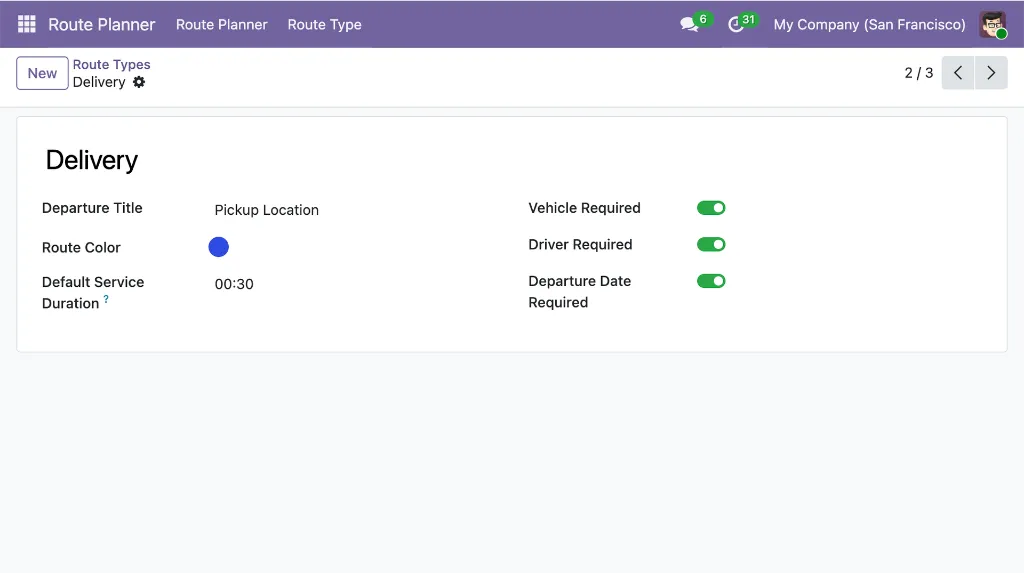
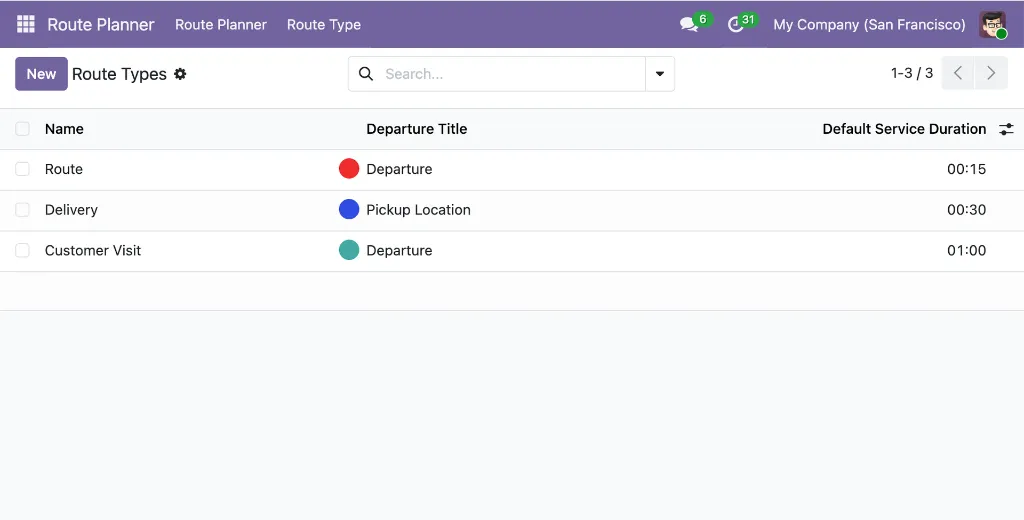
Configurable Route Types — Define categories with custom colors, departure titles, default service durations, and mandatory field requirements.
Vehicle & Driver Assignment — Integrates with Odoo Fleet; selecting a vehicle auto-fills the assigned driver.
Distance & Duration Aggregation — Per-leg values are summed into route totals shown in the summary section.
Service Duration per Stop — Track time spent at each stop separately from travel time, with type-level defaults.
Estimated Arrival Date — Automatically computed from departure date, travel time, and cumulative service duration.
Per-Stop Notes — Two note fields per stop: one for dispatcher instructions, one for driver observations.
Stop Status Tracking — Each stop has its own state (None, Arrived, Done, Cancelled/Skipped) for real-time progress visibility.
Built-in TSP Algorithms — Nearest-neighbor and 2-opt heuristics are available for local route optimization.
Calendar View — Day, week, month, and year scales, color-coded by route state.
Role-Based Access Control — Separate User and Administrator roles; users only see their own routes; only Draft routes can be deleted.
Chatter & Activities — Full message history with tracked field changes and scheduled follow-up activities on every route.
Automatic Sequence Numbering — Routes receive unique reference numbers (e.g., RP/00001) on creation.
Use Cases & Benefits
Structured Dispatch Workflow
The explicit state lifecycle prevents incomplete routes from being dispatched and gives dispatchers clear visibility into where every route stands.
Realistic Arrival Estimates
By separating service time from travel time, the estimated arrival date reflects real-world operations — a route with five 30-minute stops takes 2.5 hours longer than driving time alone suggests.
Operation-Specific Rules
Route types let you configure different requirements for deliveries, field service, and customer visits without custom development, keeping data quality consistent.
Scheduling Visibility
The calendar view surfaces conflicts, busy periods, and gaps at a glance — helping teams balance workload without switching tools.
Foundation for Extensions
A stable data model and API surface so map visualization, automated routing, and portal modules can build on top without duplication.
Who It's For
Operations managers, dispatchers, and Odoo administrators who need a structured way to plan and track multi-stop routes inside Odoo — without relying on spreadsheets or external tools. Suitable as a standalone module for teams that manage their own route sequencing, and as the foundation for teams that want to layer on map visualization and driver-facing features.
Module 05 - Visualization & Routing
Route Planner -- Mapbox GL
Extends the Route Planner application with interactive Mapbox map visualization and API-based route calculation. Stops become numbered markers connected by route lines, and per-segment distance and duration are fetched automatically from Mapbox.
Overview
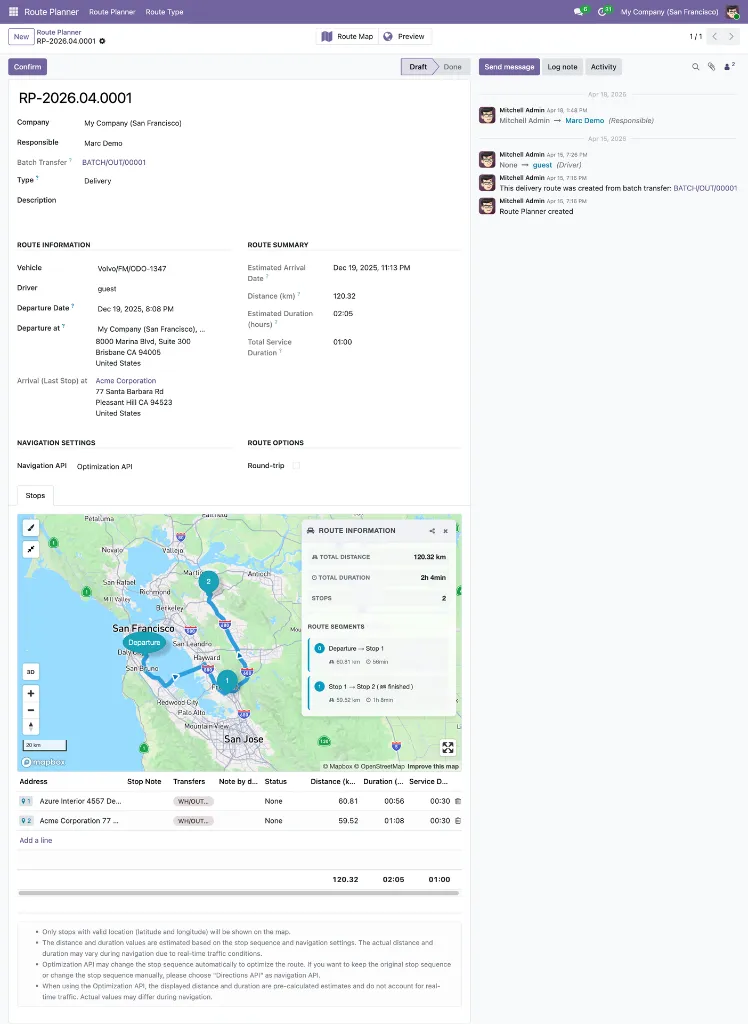
This module replaces the plain stop list with an integrated Mapbox map view on the route form, powered by the list-map view widget from the foundation layer. Dispatchers see routes rendered on real road geometry and can choose between two Mapbox APIs depending on the operation: the Directions API respects the manually-set stop order and supports route exclusions (tolls, highways, ferries), while the Optimization API reorders stops automatically to minimize total travel time. A dedicated Optimize Route action is available with both APIs, using the Mapbox Matrix API combined with the base application's nearest-neighbor and 2-opt algorithms for local optimization without an additional Optimization API request.
Module dependecies: route_planner web_view_list_with_mapbox_gl
Key features
Interactive Route Map -- An embedded Mapbox map below the stop list, with numbered markers and route lines rendered on real road geometry.
Per-Segment Distance & Duration -- Each leg's distance (km) and duration (hours) are fetched from Mapbox and displayed inline on every stop row, with totals shown at the bottom of the list.
Service Duration per Stop - A Service Duration field on each stop row records expected on-site time for delivery, unloading, or service tasks. The default value is configurable on the route type via its Default Service Duration field, and a total service duration is summed at the bottom of the stop list for an accurate picture of total route time.
Directions API Mode -- Respects the manual stop order, supports drag-to-reorder, and unlocks route exclusion options.
Optimization API Mode -- Mapbox determines the optimal visit sequence automatically; drag handles are hidden since ordering is handled by the API.
Optimize Route Action -- A one-click optimization available in the Draft state for both the Directions API and the Optimization API, using the Matrix API plus nearest-neighbor and 2-opt algorithms to reorder stops for shorter total travel time.
Round-Trip Option -- Available with the Optimization API; includes the return leg from the last stop back to the departure point.
Alternative Routes -- (Direction API) Enable Enable Route Alternative in Navigation Settings to fetch up to two alternative route geometries alongside the primary route. On the driver portal, alternatives appear as dashed lines and drivers can switch the active route — the selected route is rendered with the full solid primary style. Useful when the primary route is blocked, congested, or otherwise unsuitable.
Turn-by-Turn Steps -- (Both API) Enable Enable Route Steps in Navigation Settings to fetch detailed step-by-step maneuver instructions for each segment. On the driver portal, each segment shows an expandable steps panel with a direction icon, instruction text, and distance for every maneuver — helpful for drivers in unfamiliar areas without needing a separate navigation app.
Route Exclusions -- Avoid tolls, highways, ferries, unpaved roads, or cash-only tolls when using the Directions API.
25-Stop Limit Enforcement -- Validation prevents routes from exceeding Mapbox's 25-waypoint API limit.
Visual Route Verification -- Dispatchers can spot inefficient paths or misplaced stops before dispatching.
Use Cases & Benefits
Fewer Dispatch Errors
Seeing the route drawn on real road geometry makes it easy to catch misplaced stops, impossible orderings, or suboptimal paths before a driver leaves the depot.
Choose the Right API per Operation
Use the Directions API for time-sensitive deliveries with fixed stop order, or the Optimization API when minimizing total travel time matters more than sequence.
Automated Segment Metrics
No more manual distance lookups or rough time estimates — Mapbox supplies accurate per-leg values that roll up into route totals.
Operational Flexibility
Route exclusions let you adapt to vehicle constraints, driver preferences, or regional concerns (e.g., avoiding ferries for time-sensitive freight).
Local Optimization Without Lock-in
The built-in TSP algorithms (nearest-neighbor + 2-opt) let you optimize stop order with a single Matrix API call — cheaper and faster than a full Optimization API request for routine re-sequencing.
API Limits Handled for You
Server-side validation enforces the 25-waypoint cap with a clear error message, preventing opaque Mapbox failures at runtime.
Who It's For
Dispatchers who need to visually verify routes before sending them out, operations teams that want automated distance and duration calculation instead of manual estimates, and any team where the choice between fixed-order delivery and travel-time optimization matters from one route to the next. Requires a Mapbox access token configured in the foundation module.
Module 06 - Driver Experience
Website Route Planner -- Mapbox GL
A mobile-friendly customer-portal interface that lets drivers view and manage their assigned routes through any web browser — no Odoo backend access required. Drivers see routes on interactive maps, update stop status in real time, and record delivery notes from the field.
Overview
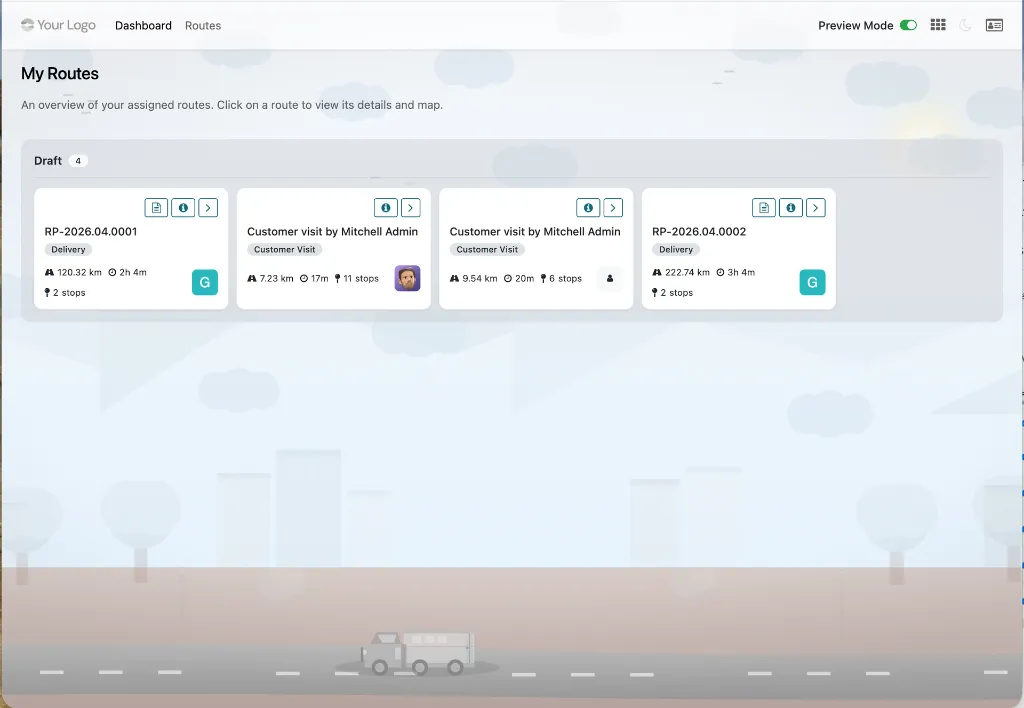
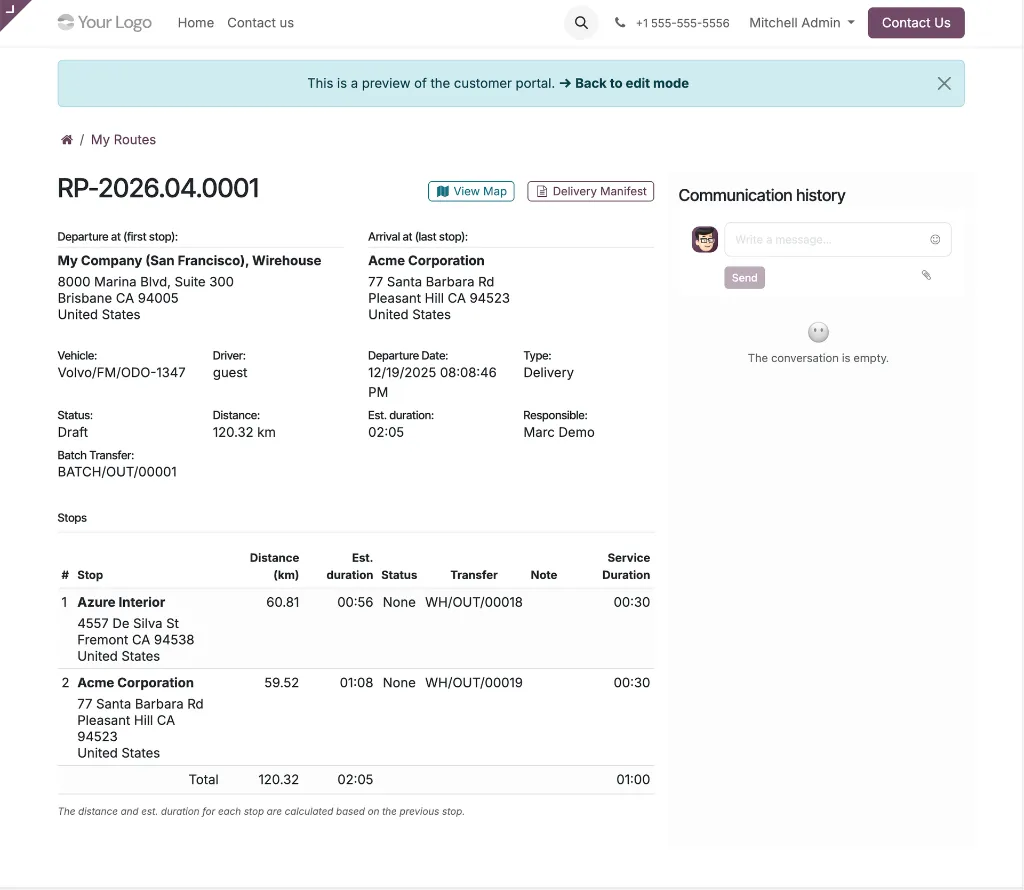
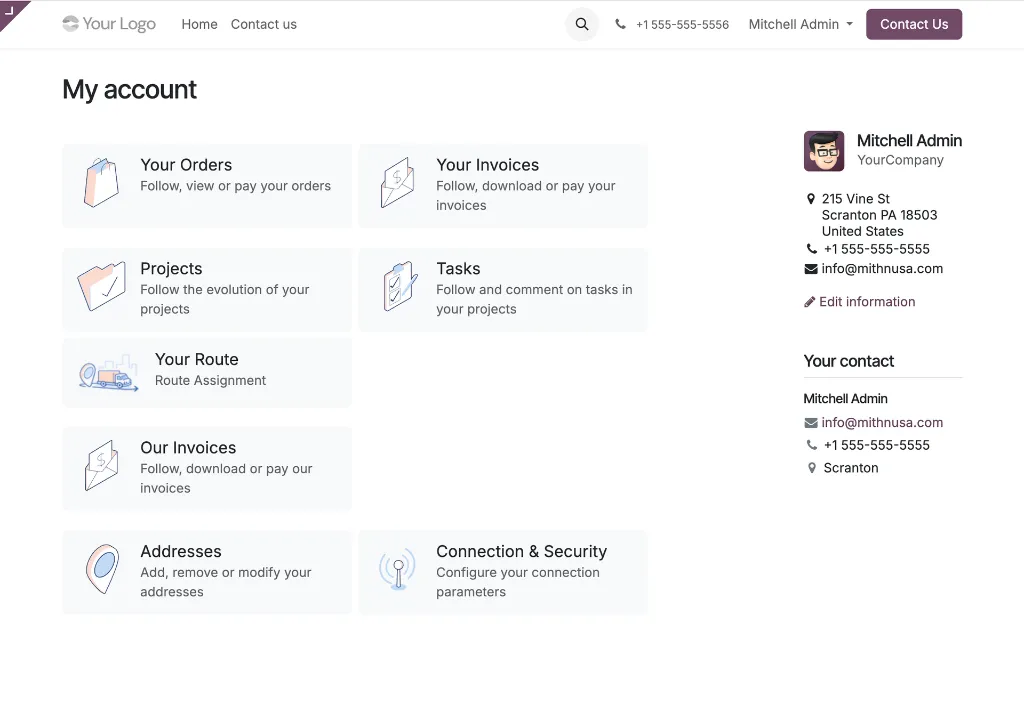
This module extends Route Planner with a dedicated driver portal built on Odoo's portal framework. Drivers access a kanban-style dashboard of their assigned routes, open an interactive Mapbox map for each route, and update stop status as they complete their work. Route planners can preview the portal in a read-only review mode to verify what drivers will see before sharing a secure, token-based URL. Every driver action is logged to the route's chatter automatically, creating a full audit trail without requiring drivers to post messages manually.
Module dependencies: portal base_mapbox_gl route_planner_mapbox_gl
Key features
Driver Portal Dashboard -- A kanban-style overview of assigned routes grouped by state, with progress bars, departure/arrival info, and key route details.
Route Type Badge -- Each route card on the dashboard displays the assigned route type as a small badge below the route name, letting drivers and dispatchers immediately identify the category (delivery, service, collection, etc.) at a glance. Routes without a type show no badge.
Interactive Route Map -- Full route visualization with numbered markers, route paths with directional arrows, and segment-by-segment navigation.
Stop Status Updates -- Drivers mark stops as Arrived, Done, or Cancelled/Skipped from a single dialog, with required notes for skipped stops.
One-Click Route Actions -- Start and complete routes directly from the portal, with automatic chatter notifications.
Real-Time Progress Tracking -- Completion percentage updates automatically as stops are marked.
Review Mode -- Route planners can preview the portal exactly as drivers see it, with all driver actions safely disabled.
Secure Token-Based Access -- Each route has a unique UUID embedded in its URL; login is still required, and drivers only see their own routes.
Record-Level Security -- Portal users only access routes where they are the assigned driver and the state is Confirmed, In Progress, or Done.
Mobile-Friendly Responsive Design -- Optimized for smartphones with touch-friendly controls and adaptive layouts.
Google Maps Navigation Links -- Direct "Navigate" links open destinations in Google Maps for turn-by-turn guidance.
Geolocation Support -- The driver's current GPS position is shown on the map as a pulsing indicator.
Route Info Overlay -- A collapsible panel with total distance, duration, and a per-segment breakdown.
Alternative Routes Panel -- When the backend toggles on Enable Route Alternative (Directions API only), the map overlay shows an Available Routes panel listing Route 1 (primary) and any alternatives (Route 2, Route 3) with their distance and duration. Alternatives appear as dashed lines on the map; selecting one swaps it to the full solid primary style and updates the overlay totals and segment breakdown to match.
Turn-by--Turn Step Instructions -- When the backend toggles on Enable Route Steps (both APIs supported), each segment row in the Route Info overlay gets a Steps button that opens a dialog listing every maneuver for that leg with a direction icon, instruction text, and distance — so drivers can follow turn-by-turn guidance without leaving the portal or opening a separate navigation app.
Segment Maps Directions -- Each segment row in the Route Info overlay has a Maps button that opens Google Maps driving directions for that specific leg — from the segment's start stop to its end stop — in a new browser tab, with origin and destination coordinates prefilled. Drivers get live Google Maps navigation for any single leg without manual address entry.
Animated Segment Highlighting -- Clicking a segment plays animated arrows along that portion of the route for easy identification.
Dark/Light Theme Toggle -- Drivers can switch themes via the navbar; preference persists across sessions.
Automatic Chatter Logging -- Every driver action (start, complete, stop updates, notes) is posted to the route chatter with full context.
Backend Quick-Access Buttons -- "Preview", "Route Map", and "Portal Dashboard" buttons on the backend give route planners instant access to the portal view.
Use Cases & Benefits
Drivers Without Backend Access
The portal is designed for users who shouldn't (or don't need to) log into the Odoo backend — just a portal account and a browser is enough.
Real-Time Dispatch Visibility
As drivers update stops in the field, status changes sync back to Odoo immediately. Dispatchers can track progress without phone calls or chase-up messages.
Complete Audit Trail
Every driver action is automatically posted to the route chatter, giving operations teams full traceability for deliveries and follow-up on issues.
Safe Preview for Planners
Review mode lets route planners verify the driver experience — map, stops, notes, instructions — without accidentally triggering a status change.
Who It's For
Operations teams with drivers, delivery personnel, or field technicians who work outside the office and need a lightweight, mobile-friendly way to consume and update route information. Best suited for organizations that already use Route Planner with the Mapbox GL module and want to close the loop between planning and execution without exposing the full Odoo backend to field users.