Skip to Content
Mithnusa
  • Home
  • Google Maps
  • Mapbox
  • Services
  • Shop
  • About
  • 0
  • Sign in
  • Request a Demo Contact
Mithnusa
  • 0
    • Home
    • Google Maps
    • Mapbox
    • Services
    • Shop
    • About
  • Sign in
  • Request a Demo Contact
  1. All products
  2. Address Validation
  3. [19.0] Contacts Address Validation - PostGrid
  4. Address Validation
Pricelist: Pricelist USD Pricelist
[19.0] Contacts Address Validation - PostGrid
Address-Validation-Settings-PostGrid.webp
Contact-Odoo-Farm3-Intl-Verify-Address-PostGrid.webp
Contact-Ready-Mat-Verify-Status-PostGrid.webp
  1. [19.0] Contacts Address Validation - PostGrid
  2. Address-Validation-Settings-PostGrid.webp
  3. Contact-Odoo-Farm3-Intl-Verify-Address-PostGrid.webp
  4. Contact-Ready-Mat-Verify-Status-PostGrid.webp

[19.0] Contacts Address Validation - PostGrid

(0 review)

Contact Address Validation — PostGrid


US/CA and International address verification, standardization, and geocoding — directly from the Odoo Contact form, on a provider-agnostic framework.

Contact Validation PostGrid brings the PostGrid Address Verification API to the Odoo Contact form. It checks whether an entered address refers to a real, deliverable place, standardizes it, and geocodes it — without leaving Odoo. US and Canadian addresses use PostGrid's standard verification API; every other country is routed automatically to the International API.

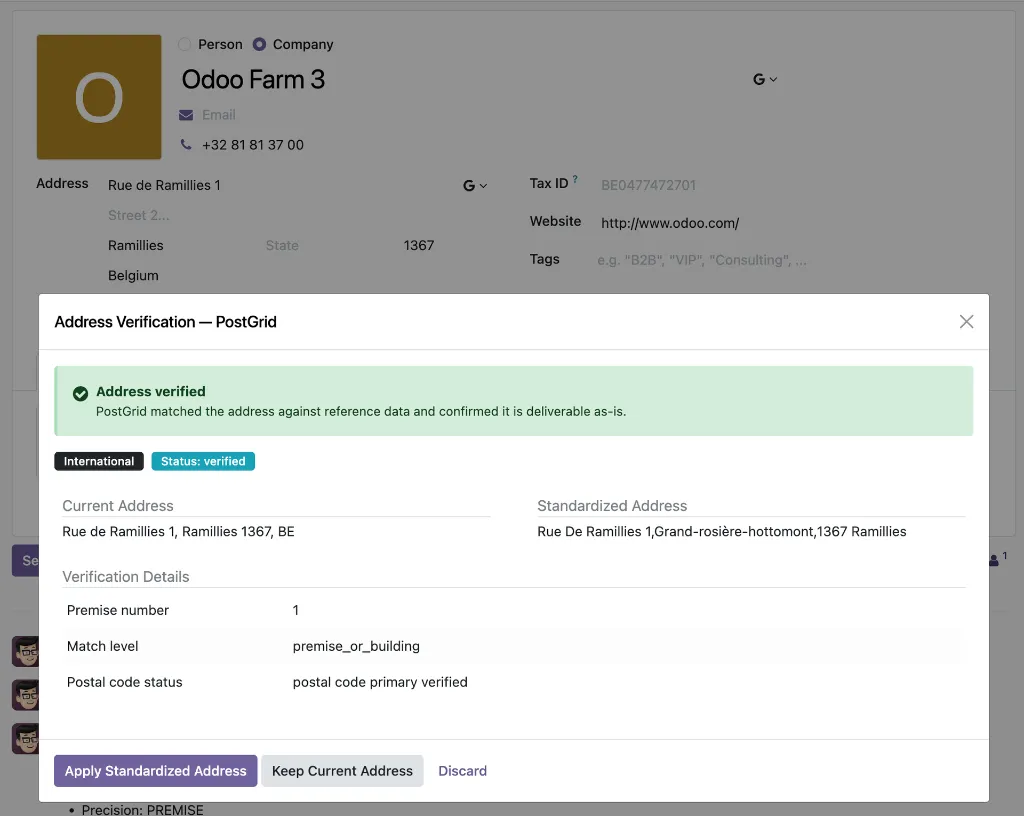
A Verify Address button appears on every Contact form. One click sends the address to PostGrid via a secure server-side request (the API key never reaches the browser), and a review dialog shows a severity-coded verdict kept verbatim as PostGrid returns it (Verified / Corrected / Failed for US/CA, plus the International API statuses), a side-by-side comparison of the entered vs. standardized address, USPS DPV confirmation for US addresses, and delivery details — residential/commercial indicator, vacancy flag, and county.

A dedicated sandbox mode with separate test keys returns mock data, so teams can test and train without spending verification credits. PostGrid's terms permit permanent storage of standardized addresses, so the standardized result is kept on the contact for reference.

What's included (3 modules):

  • Foundation — the provider-agnostic validation framework (registry, mixin, widget, review dialog)
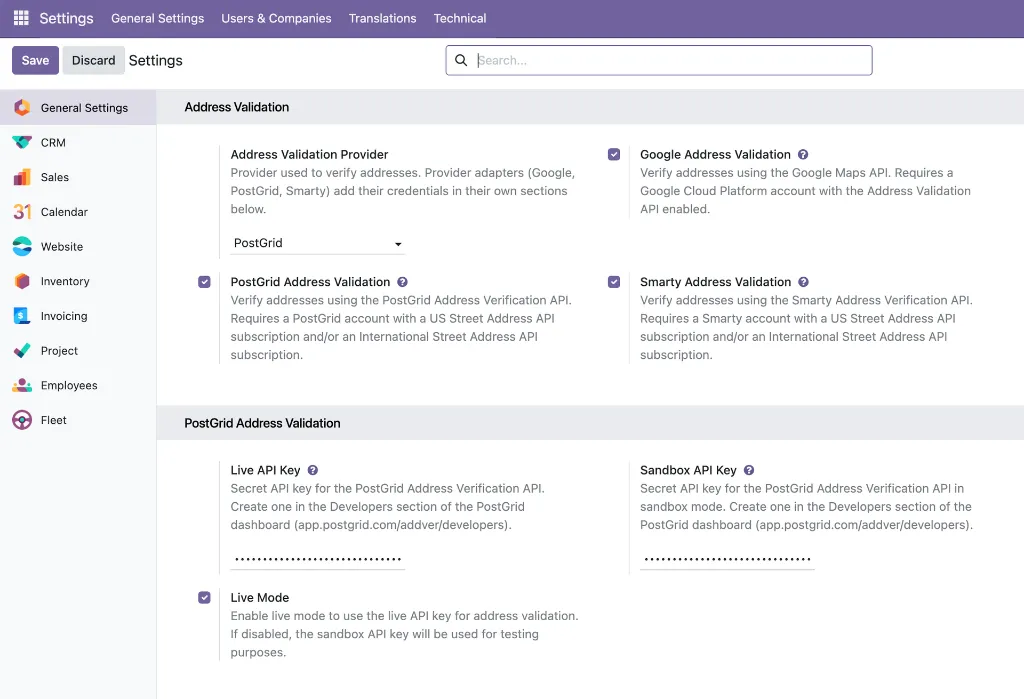
  • Provider Adapter — PostGrid US/CA + International API integration with automatic country routing, USPS DPV, and live/sandbox key management
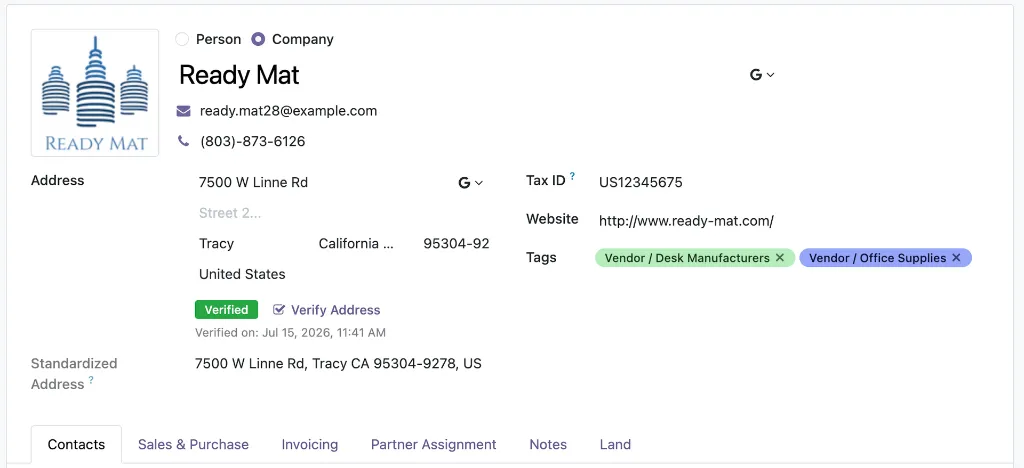
  • Contacts Application — Verify Address button, status badge, search filters, chatter audit trail
Key benefits:

  • One provider, worldwide — US/CA and International APIs behind a single button, routed automatically by country
  • USPS DPV confirmation for US contacts, refining severity based on actual delivery-point status
  • Risk-free rollout — sandbox keys run the full workflow on mock data for training, demos, and QA
  • Standardized addresses stored permanently on the record, ready for labels and exports
  • No vendor lock-in — switch to Google or Smarty from Settings anytime; workflow stays identical
  • Full audit trail via chatter, searchable by verification outcome
Built for logistics & delivery teams, marketing & direct mail teams, teams with international contact data, and QA/implementation teams rolling out address validation without burning paid credits.
$ 50.00 $ 50.00

Add to cart

Product Overview

Contact Validation Google brings the Google Address Validation API to the Odoo Contact form. It checks whether an entered address refers to a real, deliverable place, standardizes it for mailing, and geocodes it — directly from the Contact form, without leaving Odoo.

Unlike a single-purpose connector, this product is built on a provider-agnostic address validation framework. The button, the review dialog, the stored verdict, and the search filters are shared framework components; Google plugs in as a provider adapter. If your requirements ever change — different regions, different pricing, different compliance needs — you can switch to the PostGrid or Smarty adapter from Settings, and your users' workflow stays exactly the same. Read more

Your Dynamic Snippet will be displayed here... This message is displayed because youy did not provide both a filter and a template to use.

Customer Reviews

×

Request a Demo


Submit


©2026 Mithnusa
Powered by Odoo - The #1 Open Source eCommerce

We use cookies to provide you a better user experience on this website. Cookie Policy

Only essentials I agree