![[v19.0] Contacts Google Place Autocomplete](/web/image/product.product/20/image_1024/%5Bv19.0%5D%20Contacts%20Google%20Place%20Autocomplete?unique=2feb633)
![[v19.0] Contacts Google Place Autocomplete](/web/image/product.product/20/image_128/%5Bv19.0%5D%20Contacts%20Google%20Place%20Autocomplete?unique=2feb633)
PRODUCT OVERVIEW
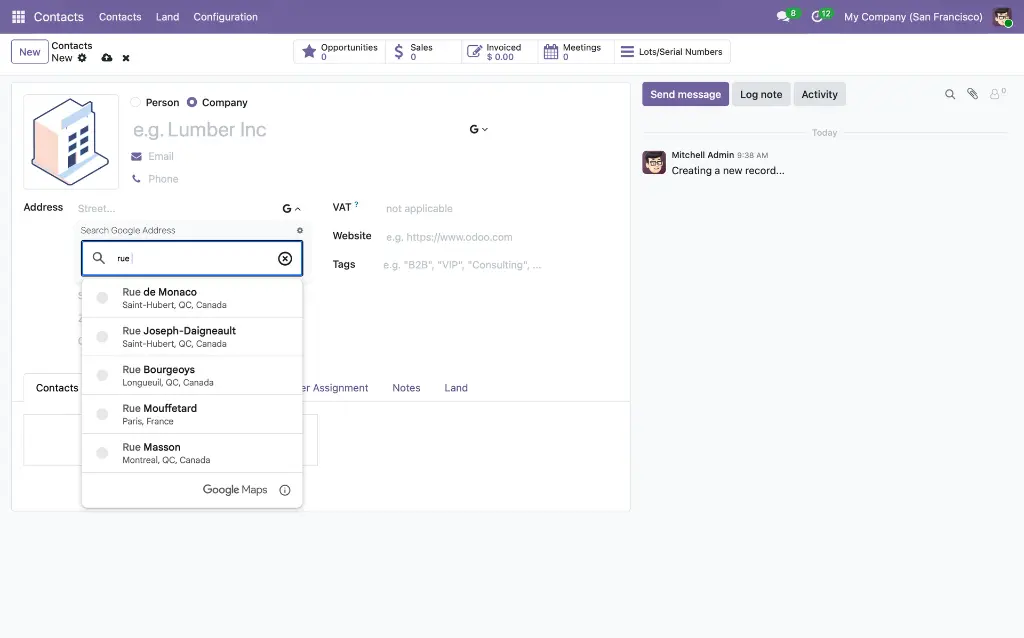
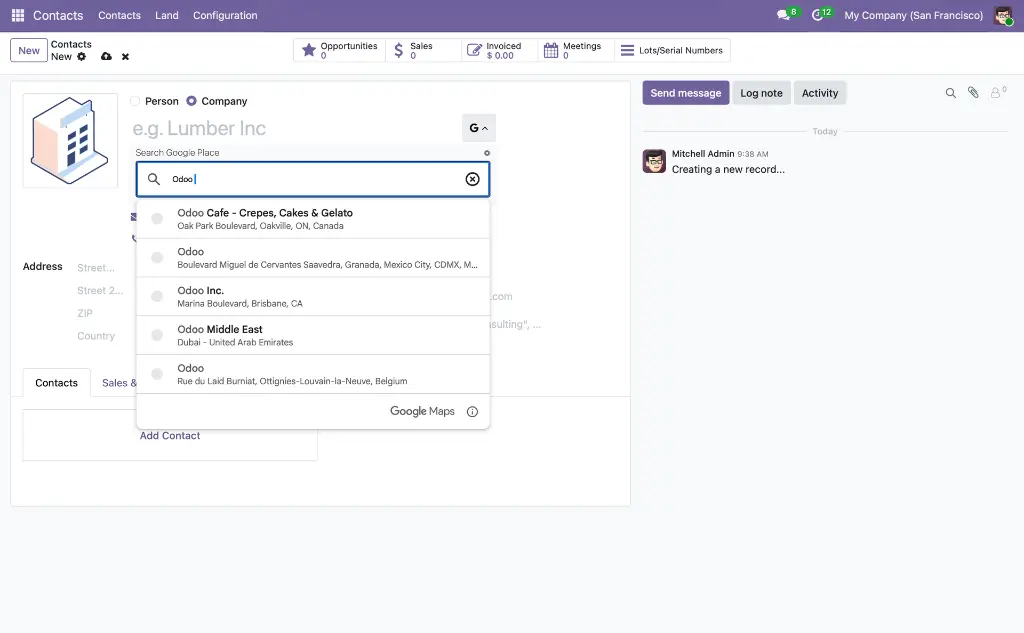
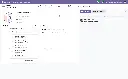
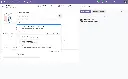
Google Place Autocomplete for Contacts brings the Google Places API directly into the Odoo contact form. As a user types a company name or address into a designated field, a suggestion panel appears — powered by Google's global places database. When they select a result, all mapped fields on the record update in a single atomic write: street, city, state, postal code, country, latitude, longitude, phone number, and website URI — no tab-switching, no copy-pasting, no geocoding step.
The core of the product is a flexible, admin-configurable mapping system. Rather than hardcoding which Google Places data goes to which Odoo field, administrators define mapping configurations that control exactly how address components, coordinates, and other place data are routed to fields on any model. The same widget engine works across Contacts, CRM, Sales, and custom models — each with its own mapping tailored to its field structure.
For teams already using Odoo's built-in partner autocomplete, the partner_autocomplete_with_google_autocomplete module merges both suggestion sources seamlessly, so users see Google Places results alongside Odoo's own partner lookup without any workflow change.
WHO IT'S FOR
Data Entry & Operations Teams
Anyone who creates or updates contact records at volume. Selecting from a Google Places suggestion instead of typing each address component eliminates a class of errors entirely — wrong postal codes, misspelled city names, and missing country entries become rare rather than routine.
Sales & Account Management
Creating a new customer or prospect record during or after a call should take seconds. With autocomplete, typing the company name surfaces the matching Place, and a single click populates the full address, phone, and website — the contact is ready before the call ends.
Marketing & Segmentation Teams
Accurate, consistently structured address data is the foundation of geographic segmentation and campaign targeting. Autocomplete enforces that structure at the point of entry, so the data is clean before it reaches a report or mailing list — not after a deduplification pass.
Administrators & Integrators
The mapping configuration system, the no-manual-edit option, the built-in test tool, and the per-country street format setting give administrators precise control over how the widget behaves on each form — without touching Python or JavaScript.
THE PROBLEM IT SOLVES
Manual Address Entry Is Slow & Inconsistent
Typing street, city, state, postal code, and country into separate fields takes time and produces inconsistent results — "St." vs "Street", wrong postal codes, missing states. Every variation makes filtering, reporting, and mailing less reliable. Autocomplete replaces that friction with a single verified selection.
Coordinates Are Never Stored at Entry Time
Most address fields in Odoo store text only. Latitude and longitude — needed for map views, territory filtering, and proximity searches — require a separate geocoding step that rarely happens consistently. Autocomplete stores coordinates atomically in the same save operation as the address.
Hardcoded Integrations Break When Models Change
A Google Places widget that maps data to fixed field names works until someone renames a field, adds a custom address model, or installs a localization module. This product's mapping configuration is stored as data, not code — changing a field mapping is an admin action, not a development task.
Street Format Varies by Country
"123 Main Street" is correct in the US; "Main Street 123" is correct in many European countries. Without country-aware formatting, addresses assembled from Google's route and street-number components come out in the wrong order for roughly half the world's address conventions. A per-country street format setting solves this without custom code.
Two Autocomplete Sources with No Way to Use Both
Odoo ships with its own partner autocomplete. Installing a Google Places widget alongside it typically forces a choice between the two. The partner_autocomplete_with_google_autocomplete module merges both sources so users see a combined suggestion panel with no duplicate infrastructure.
WHAT'S INSIDE
One shared foundation module, one advanced widget framework, and two Contacts-specific application modules — all working together to bring verified Google Places data into Odoo contact records.
MODULE 01 - FOUNDATION
Base Google Map
The core infrastructure module that registers the google_map view type, initialises the Google Maps JavaScript API using the dynamic library import approach, and provides the shared OWL component library used by every other module in this suite. Libraries are loaded on demand via google.maps.importLibrary() — only what is needed is fetched. Acts as the single, version-controlled entry point to the Google Maps platform for all downstream modules.Why It Exists
Centralising the API initialisation and shared components in one module prevents each downstream module from loading the Maps API independently, ensures a single consistent API key configuration, and makes version upgrades a one-place change.Module dependencies: base
MODULE 02 - FOUNDATION - WIDGET FRAMEWORK
Web Widget Google Place Autocomplete
The autocomplete widget engine for the entire suite. This module provides the gplace_autocomplete_el Char field widget and the google.places.mapping configuration model that controls how Google Places API data maps to fields on any Odoo model. Every autocomplete interaction in this suite — and across CRM, Sales, and custom models — runs through this framework.The gplace_autocomplete_el Widget
The widget extends Odoo's standard CharField. When added to a form view field, it renders a Google Places suggestion panel as the user types. On selection, the widget calls record.update() with all mapped field values simultaneously — address components, geolocation, and any other mapped fields — in a single atomic write. No intermediate saves, no partial updates.The widget accepts a mapping_code or mapping_mode option that tells it which google.places.mapping configuration to load. On first open it fetches that configuration from the backend, then uses its settings for every subsequent autocomplete interaction on that form.
Two Autocomplete Modes
Places Mode
Suggests businesses, landmarks, and addresses. Ideal for a company name field where the user wants to find a real registered place — not just a street address. Returns the full range of Google Places data including display name, phone, and website.
Address Mode
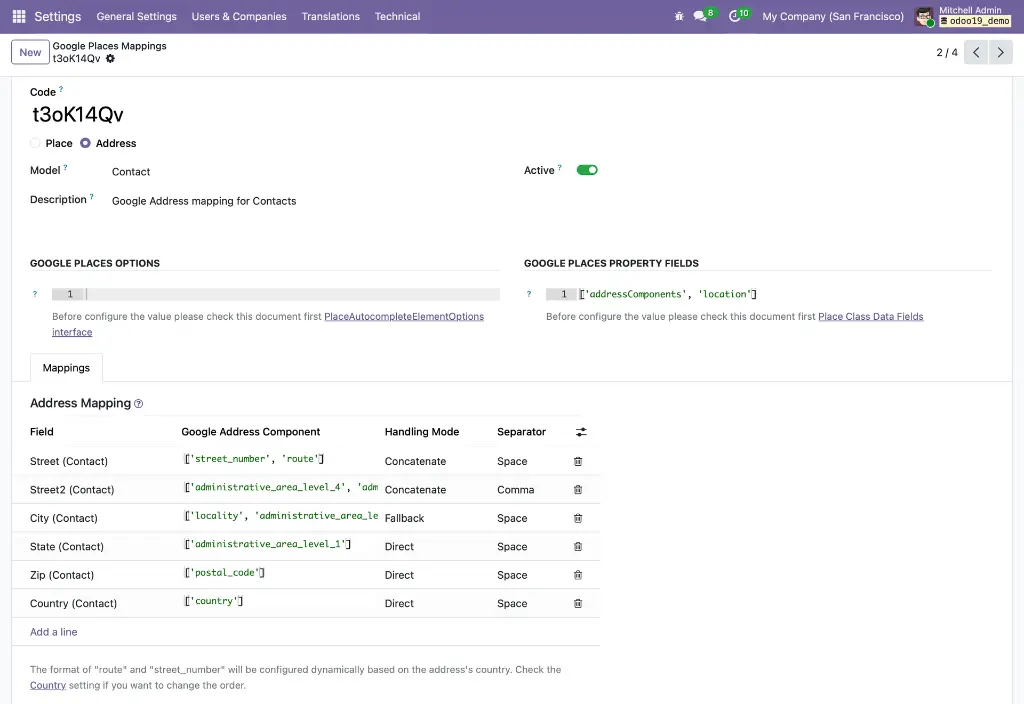
Restricts suggestions to street addresses and routes only. Best for a dedicated address field where landmark results would be noise. Fetches only addressComponents and location to minimise API cost.
Street Format per Country
A google_street_format selection field added to res.country controls whether the assembled street value is formatted as Route + Number (e.g. "Main Street 123") or Number + Route (e.g. "123 Main Street"). When the widget assembles the street value from route and street-number components, it reads this field from the resolved country and applies the correct ordering — no custom code needed for country-specific address conventions.The Mapping Configuration System (google.places.mapping)
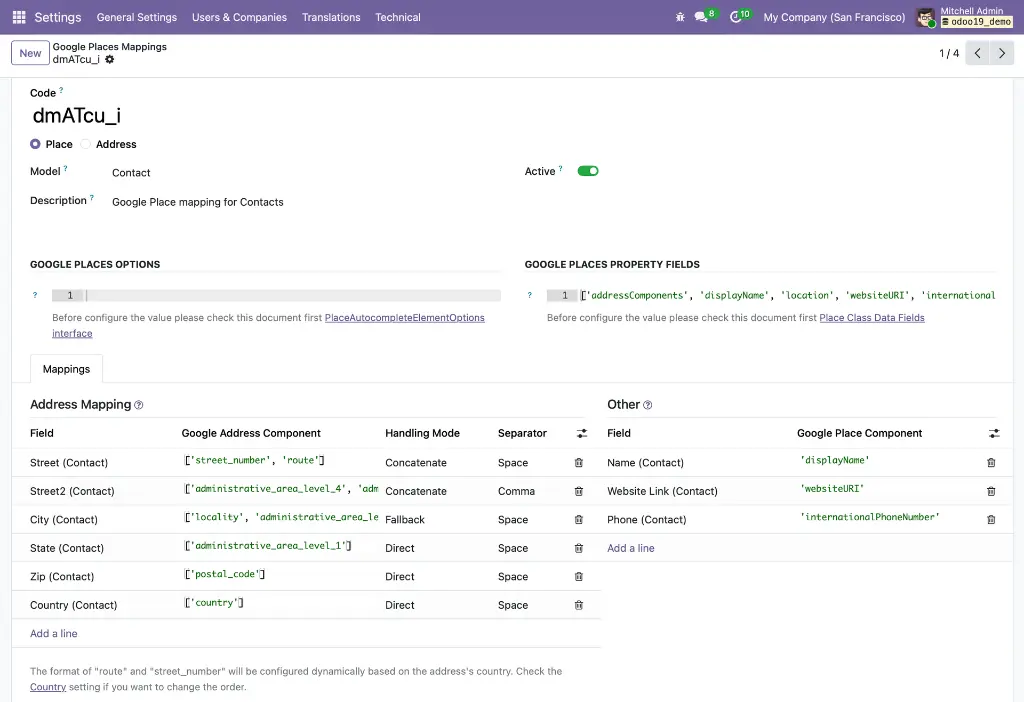
Each mapping record stores a unique code, the target model_id, the autocomplete mode, optional PlaceAutocompleteElement options, and the list of data fields to request from the API. The widget looks up the mapping by code or by mode + model at render time — making the same widget engine reusable across every model without code changes.Address Field Mapping
Each google.places.mapping.address.line record links a Google address component type (route, street number, city, state, postal code, country) to an ir.model.fields entry on the target model. A configurable separator (space, comma, hyphen, or none) controls how multiple components are joined when writing to a single Odoo field. Many2one fields for country and state are resolved automatically by name — no manual ID lookup required.
Geolocation Storage
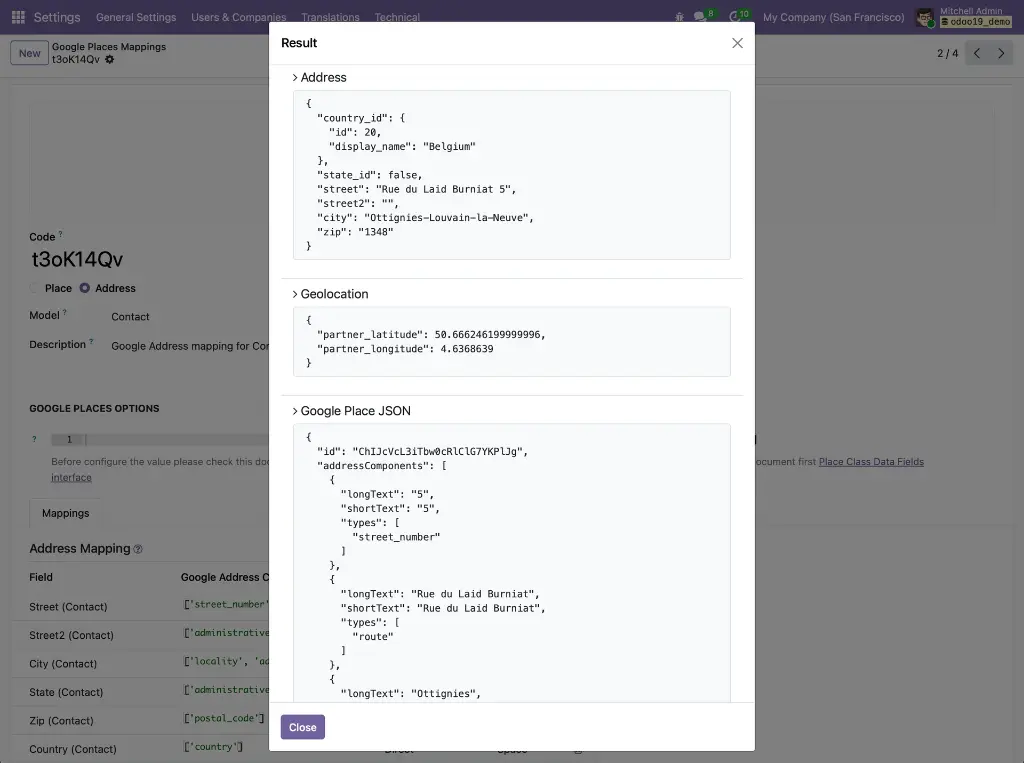
Each mapping configuration designates two Float fields on the target model to receive the selected place's latitude and longitude. Coordinates are extracted from the place's location data and written in the same atomic call as the address — no separate geocoding step, no cron job, no API round-trip.
No Manual Edit
When the no_manual_edit option is set on the widget, the Char input becomes read-only. Users must select from the Google Places suggestion panel — free-text entry is blocked and a tooltip explains the restriction. This enforces data consistency on fields where unverified values must be avoided, such as a company name field that must resolve to a real Google Place.
Other Field Mapping
Beyond address components, google.places.mapping.other.line records map non-address place data — such as displayName, internationalPhoneNumber, and websiteURI — to additional Odoo fields. These values are merged with address data in the same record.update() call. The mapping validates that no field appears in both the address and other sections to prevent conflicts.
MODULE 03 - APPLICATION - CONTACTS
Contacts Google Autocomplete
Applies the gplace_autocomplete_el widget to the res.partner form, enabling Google Places autocomplete on the contact and company name fields. Includes a pre-configured google.places.mapping record for the partner model, mapping Google address components and geolocation to the standard Odoo partner address fields out of the box.Why It Exists
The widget framework is model-agnostic. This module provides the Contacts-specific wiring — view inheritance, default mapping configuration, and field assignments — so the autocomplete works immediately on partner records without any administrator setup for the standard use case.Module dependencies: web_widget_google_place_autocomplete contacts
MODULE 04 - APPLICATION - CONTACTS
Partner Autocomplete with Google Autocomplete
Bridges Odoo's built-in partner_autocomplete module and the Google Places widget so both suggestion sources are available in a single, unified input. When a user types in the company name field, they see a combined suggestion panel — Odoo's own partner lookup results alongside Google Places results — without any additional workflow steps or duplicate field widgets.Why It Exists
Many Odoo instances already rely on the built-in partner autocomplete for looking up existing customers or pulling company data. Installing a Google Places widget alongside it without this bridge module forces a choice between the two sources or results in two separate input fields. This module merges them so neither source is sacrificed.
HOW IT WORKS
From initial configuration to a verified contact record, every step happens inside Odoo.
KEY FEATURES
A fully configurable autocomplete framework that populates every relevant field from a single Places selection — with no hardcoded field assumptions.
Autocomplete Widget
- Atomic multi-field update
A single Places selection writes all mapped fields — address, coordinates, phone, website — in one record.update() call. No partial saves, no missing fields. - Places and Address modes
Places mode returns businesses and landmarks; Address mode restricts to street addresses and routes, reducing API cost and filtering irrelevant suggestions. - No Manual Edit mode
The no_manual_edit option makes the field read-only until a suggestion is selected, enforcing verified data entry on fields where free-text must be blocked. - Lookup by mapping code or mode + model
The widget resolves its configuration at runtime, allowing multiple widgets on the same form to use different mapping rules.
Mapping Configuration
- Model-agnostic configuration
Each google.places.mapping record targets a specific model and field set. The same widget works across Contacts, CRM, Sales, and custom models without code changes. - Address component mapping
Map route, street number, city, state, postal code, and country to individual Odoo fields with configurable separators for multi-component values. - Other field mapping
Map non-address place data — display name, international phone number, website URI — to additional fields in the same save operation. - Automatic Many2one resolution
Country and state Many2one fields are resolved by name from the Google Places response. No manual ID mapping required. - Geolocation auto-population
- Latitude and longitude are written to designated Float fields from the place's location data — making records immediately usable in map views.
- Built-in mapping test tool
Verify any mapping configuration against a real place search before deployment, with full visibility into parsed address data, other field values, coordinates, and raw JSON.
Address Formatting & Integration
- Per-country street format
The google_street_format field on res.country controls whether addresses assemble as Route + Number or Number + Route — applied automatically at write time based on the resolved country. - Unified partner autocomplete
When installed alongside partner_autocomplete, Google Places results and Odoo's own partner suggestions appear in the same panel with no duplicate widgets. - Pre-configured Contacts Mapping
contacts_google_autocomplete ships with a ready-to-use mapping for res.partner, so the standard contact form works immediately without any administrator setup.
USE CASES & BENEFITS
Clean Address Data from Day One
Every address entered through the autocomplete widget is a verified Google Places result — correctly structured, correctly spelled, with country and state resolved to the matching Many2one record. No post-import cleanup required.
Coordinates Without a Geocoding Step
Latitude and longitude are stored at the moment a place is selected. Records appear correctly on map views immediately — no batch geocoding job, no API backlog, no missing pins.
Faster Contact Creation
Typing a company name and selecting the matching Place populates the full address, phone, and website in one action. A contact that used to take two minutes of manual entry takes seconds.
No Development Needed to Change a Field Mapping
Mapping configurations are Odoo records, not code. Adding a field, changing a separator, or switching a mapping to a different model is an admin action — no Python, no JavaScript, no deployment.
Verified Data Enforcement
The no_manual_edit option ensures specific fields only ever contain values from Google Places — useful for company name fields, primary address fields, or any field where unverified free-text creates downstream problems.
Correct Street Order for Every Country
The per-country street format setting means addresses assembled from Google components come out in the right order regardless of locale — without writing country-specific logic in code.
Reusable Across The Entire Odoo Instance
The widget framework is not tied to Contacts. The same mapping engine powers autocomplete on CRM leads, Sales orders, and any custom model — each with its own tailored configuration, all maintained in one place.
No Disruption for Existing Partner Autocomplete Users
Teams already relying on Odoo's built-in partner lookup keep their existing workflow intact. Google Places results are added to the same suggestion panel — nothing is removed, nothing is duplicated.
WHAT'S IN THE BUNDLE
Four modules — one shared foundation, one advanced widget framework, and two Contacts application modules — delivering verified Google Places data into Odoo contact records with fully configurable field mapping.
FOUNDATION
1. base_google_map
Google Maps API loader, OWL component library, and google_map view type declaration
2. web_widget_google_place_autocomplete
gplace_autocomplete_el widget, google.places.mapping configuration model, address and other field mapping, geolocation storage, no-manual-edit mode, mapping test tool, and per-country street format
APPLICATION - CONTACTS
3. contacts_google_autocomplete
Google Places autocomplete applied to res.partner with a pre-configured mapping for standard contact fields
4. partner_autocomplete_with_google_autocomplete
Unified suggestion panel merging Odoo's built-in partner autocomplete with Google Places results