Skip to Content
PT Mithra IT Mandiri Nusantara
  • Home
  • Shop
  • Services
  • About
  • 0
  • Sign in
  • Contact Us   
PT Mithra IT Mandiri Nusantara
  • 0
    • Home
    • Shop
    • Services
    • About
  • Sign in
  • Contact Us   
  1. All products
  2. Google Maps
  3. [v19.0] Bundle of Google Maps Addons
  4. Google Maps
Pricelist: Pricelist USD Pricelist
[v19.0] Bundle of Google Maps Addons
Screenshot 2025-10-30 at 22.46.43.webp
Screenshot 2025-10-30 at 22.48.03.webp
Screenshot 2025-10-30 at 21.48.14.webp
Screenshot 2025-10-30 at 22.20.13.webp
Screenshot 2025-10-30 at 22.18.13.webp
Screenshot 2025-10-30 at 22.18.28.webp
Screenshot 2025-10-30 at 22.16.28.webp
Screenshot 2025-10-30 at 22.16.05.webp
Screenshot 2025-10-30 at 21.57.10.webp
Screenshot 2025-10-30 at 22.05.28.webp
Screenshot 2025-10-30 at 22.03.31.webp
Screenshot 2025-10-30 at 22.04.27.webp
Screenshot 2025-10-30 at 22.46.12.webp
Screenshot 2026-03-05 at 10.27.09.webp
Screenshot 2026-03-05 at 10.26.26.webp
  1. [v19.0] Bundle of Google Maps Addons
  2. Screenshot 2025-10-30 at 22.46.43.webp
  3. Screenshot 2025-10-30 at 22.48.03.webp
  4. Screenshot 2025-10-30 at 21.48.14.webp
  5. Screenshot 2025-10-30 at 22.20.13.webp
  6. Screenshot 2025-10-30 at 22.18.13.webp
  7. Screenshot 2025-10-30 at 22.18.28.webp
  8. Screenshot 2025-10-30 at 22.16.28.webp
  9. Screenshot 2025-10-30 at 22.16.05.webp
  10. Screenshot 2025-10-30 at 21.57.10.webp
  11. Screenshot 2025-10-30 at 22.05.28.webp
  12. Screenshot 2025-10-30 at 22.03.31.webp
  13. Screenshot 2025-10-30 at 22.04.27.webp
  14. Screenshot 2025-10-30 at 22.46.12.webp
  15. Screenshot 2026-03-05 at 10.27.09.webp
  16. Screenshot 2026-03-05 at 10.26.26.webp

[v19.0] Bundle of Google Maps Addons

(0 review)
The complete Google Maps integration for Odoo — Google Map views, autocomplete, drawing tools, and location intelligence across Contacts, CRM, Sales, Projects, and Inventory.

List of modules:
  1. base_google_map
  2. base_google_map_add_place
  3. contacts_google_autocomplete
  4. contacts_google_map
  5. contacts_google_map_add_place
  6. crm_google_autocomplete
  7. crm_google_map
  8. crm_google_map_add_place
  9. partner_autocomplete_with_google_autocomplete
  10. project_google_map
  11. sale_google_map
  12. stock_google_map
  13. web_view_google_map
  14. web_view_google_map_drawing
  15. web_widget_google_map
  16. web_widget_google_map_autocomplete

Includes previous version (v18.0, v17.0, and v16.0)

Note:
Access to Github repository https://github.com/mithnusa
Some modules are only available in a specific version.


$ 135.00 $ 135.00

Add to cart

Take a look at the demo

Demo (v19.0)

Login: guest | Password: guest

Product Overview

Google Maps Suite is a comprehensive collection of 16 Odoo modules that brings the full power of Google Maps directly into your Odoo workspace. Whether you need to visualize contacts on a map, auto-fill addresses as you type, capture new leads by clicking on a map, draw and store territory boundaries, or track deliveries geographically — this suite has a dedicated module for every use case.

The suite is built in two layers. Six foundation modules provide the shared infrastructure: API key management, the google_map view type, form widgets, the Places autocomplete engine, the drawing toolkit, and the click-to-create framework. Ten application modules then wire these capabilities directly into Contacts, CRM, Sales, Projects, and Inventory, each with its own tailored UI, field mappings, and workflow integrations. Install only the modules your team needs, or deploy the full suite for organization-wide location intelligence.


Who It's For

Google Maps Suite is built for Odoo businesses that work with location data every day — whether that means managing a large contact database, running a field sales team, coordinating deliveries, or overseeing multi-site projects. It serves both the people who use Odoo and the teams who configure it.

Sales & Business Development Teams

Sales reps who prospect by territory, plan customer visits, or need to quickly capture a lead spotted in the field. The suite lets them see their entire pipeline on a map, click a business to create a pre-filled lead, and use proximity search to find nearby opportunities — all without leaving Odoo.

Operations & Logistics Teams

Operations managers who need a geographic view of deliveries, project sites, or field service tasks. With delivery map views across all picking lists and project map views with status-colored markers, teams get an immediate visual picture of where work is happening and how it is progressing.

Customer Success & Account Management

Teams managing large contact databases who need accurate address data, fast entry, and the ability to find nearby contacts when planning visits. Autocomplete on the Contact and Lead forms eliminates manual address entry.

Odoo Developers & System Integrators

Developers extending Odoo with custom modules. The foundation layer is fully reusable — any model with latitude and longitude fields can gain a Google Maps view, and any Char field on any model can be enhanced with Google Places autocomplete using the no-code mapping configuration system. The GeoJSON drawing tools and custom JSONB field operators open the door to geographic data management on any custom model.


The Problem It Solves


Most Odoo instances hold thousands of records — contacts, leads, orders, tasks, deliveries — that are inherently geographic, yet the standard interface presents all of them as flat lists and kanban columns. Location context is invisible, address data is often incomplete, and any geographic analysis requires exporting to a separate tool.

Location Data Is Trapped in Lists

A salesperson looking at 500 leads in a list view has no way to see which ones are clustered near tomorrow's customer visit, which territories are underserved, or how revenue is distributed geographically. The data exists in Odoo — the interface just doesn't expose it spatially. Google Maps Suite adds a map view to every relevant application, turning list data into an interactive geographic picture without changing how records are stored or managed.

Address Entry Is Slow and Error-Prone

Manually typing a company name, street, city, state, zip, and country into separate fields — for every new contact or lead — is both time-consuming and unreliable. Typos, inconsistent formatting, missing postal codes, and unresolved coordinates are common outcomes. The Places autocomplete engine fixes this at the source: one selection from Google's verified database fills every address field and stores the coordinates simultaneously.

No Native Way to Draw or Store Geographic Boundaries

Sales territories, service coverage areas, delivery zones, and project site boundaries are typically managed in spreadsheets or external GIS tools, then manually translated back into Odoo fields. Google Maps Suite introduces GeoJSON-native drawing directly inside Odoo, with storage, server-side filtering, real-time measurements, and high-performance rendering — so geographic boundaries live alongside the records they describe.

Creating Records from Real-World Locations Is Cumbersome

When a field rep wants to log a prospect spotted on a street or a business noticed during a visit, the typical workflow is to switch to Google Maps, find the business, copy the details, switch back to Odoo, and type everything in. The click-to-create feature collapses this into a single map click — the name, address, phone, website, and coordinates are fetched automatically from Google and presented in a pre-populated form ready to save.


What's Inside

Sixteen purpose-built modules — six shared infrastructure modules and ten application integrations — covering every Google Maps capability your Odoo instance needs.

Foundation Layer - Shared InfrastructureApplication Layer -- App-Specific Integrations

Foundation Layer - Shared Infrastructure


MODULE 01 - FOUNDATION

Base Google Map

The root of the entire suite. Centralizes Google Maps API key and Map ID configuration in Settings, provides the shared JavaScript API loader with retry logic and library caching, and supplies the base OWL map component that all Google Maps views inherit — including error handling, offline detection, resize awareness, and accessibility (ARIA) support.

Module dependencies:  web base_geolocalize

Why It Exists

Without a single configuration point, every module would manage its own API key and loader — creating conflicts, duplication, and inconsistent error handling. This module ensures the Google Maps API is loaded once, correctly, for every module in the suite.

MODULE 02 - FOUNDATION

Web View Google Map

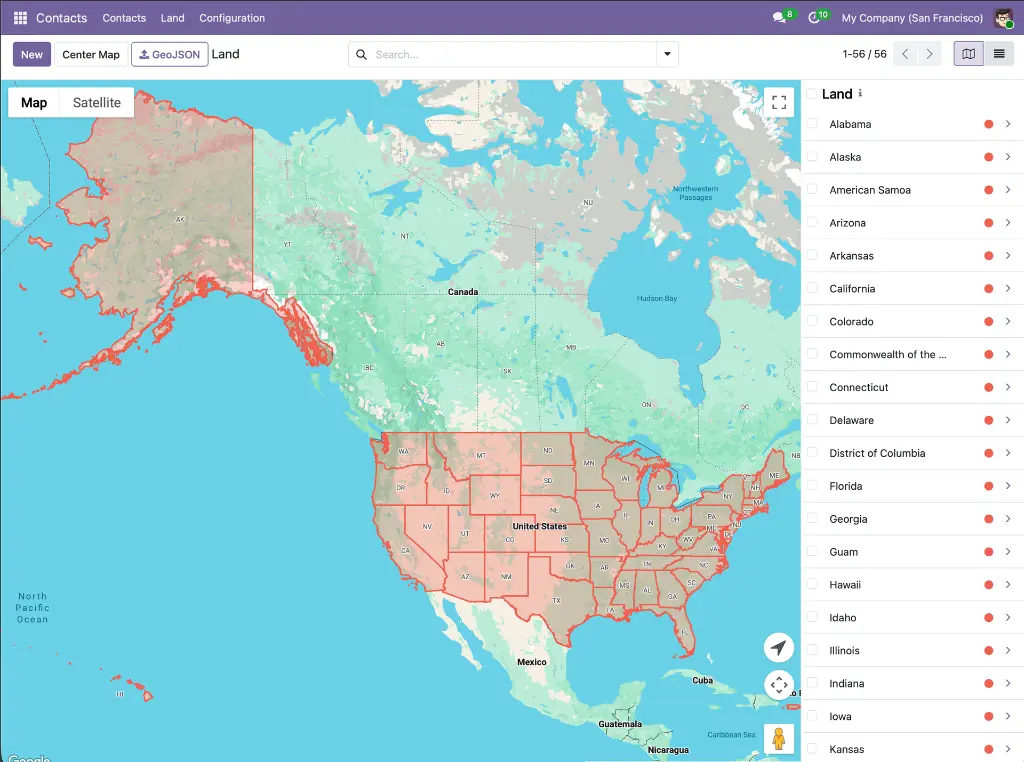
Registers google_map as a first-class Odoo view type — the core framework used by every Google Maps view in the suite. Provides record markers, a synchronized sidebar, marker clustering, overlap handling, multi-selection (box-select), in-map place search, geolocation button, nearby-records search, bulk record actions, embedded map widgets for form views, and full dark mode support.

Module dependencies:  base_google_map

Why It Exists

Any Odoo model with latitude and longitude fields can gain a fully featured interactive map view simply by adding google_map to its action's view_mode. This module provides all the rendering, interaction, and UX infrastructure so application modules don't need to build any of it themselves.

MODULE 03 - FOUNDATION

Web Widget Google Map

Provides a google_map form widget that embeds a Google Maps preview directly inside any Odoo form view. An edit button opens an interactive dialog with a draggable marker and a place search box, letting users set or refine coordinates visually before writing them back to the record.

Module dependencies:  base_google_map web_view_google_map

Why It Exists

Form views need a compact, read-safe map preview and a precise coordinate editor without requiring users to navigate away. This widget provides both in a single reusable component, used by the Contacts, CRM, and Projects form views throughout the suite.

MODULE 04 - FOUNDATION

Web Widget Google Place Autocomplete

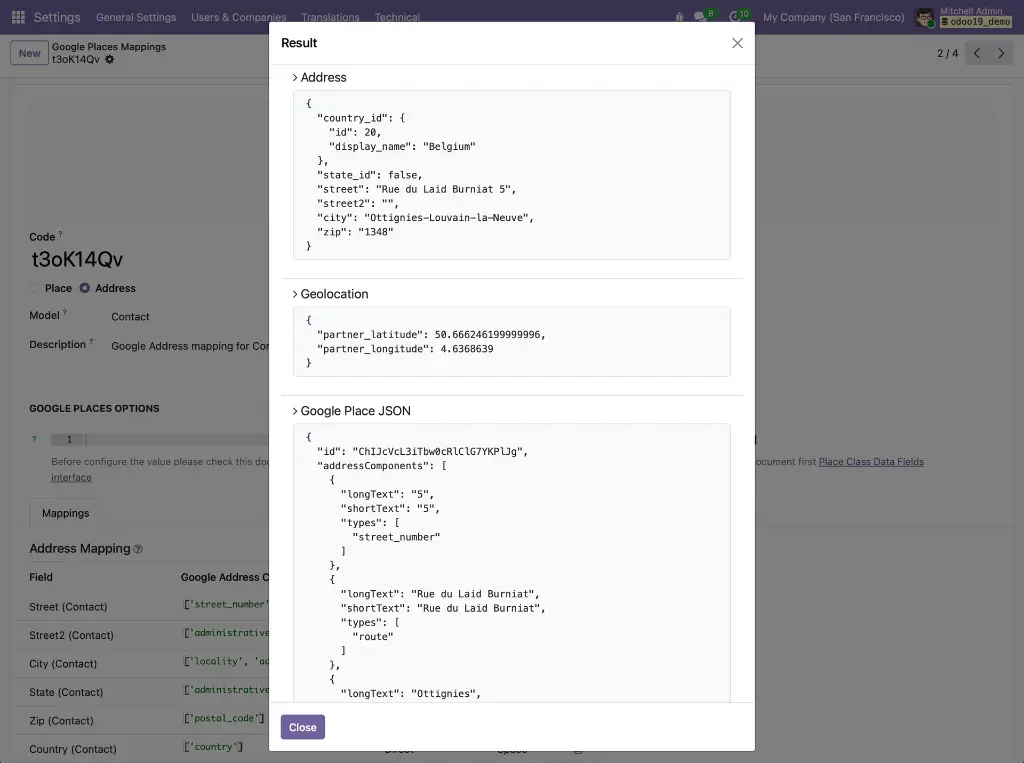
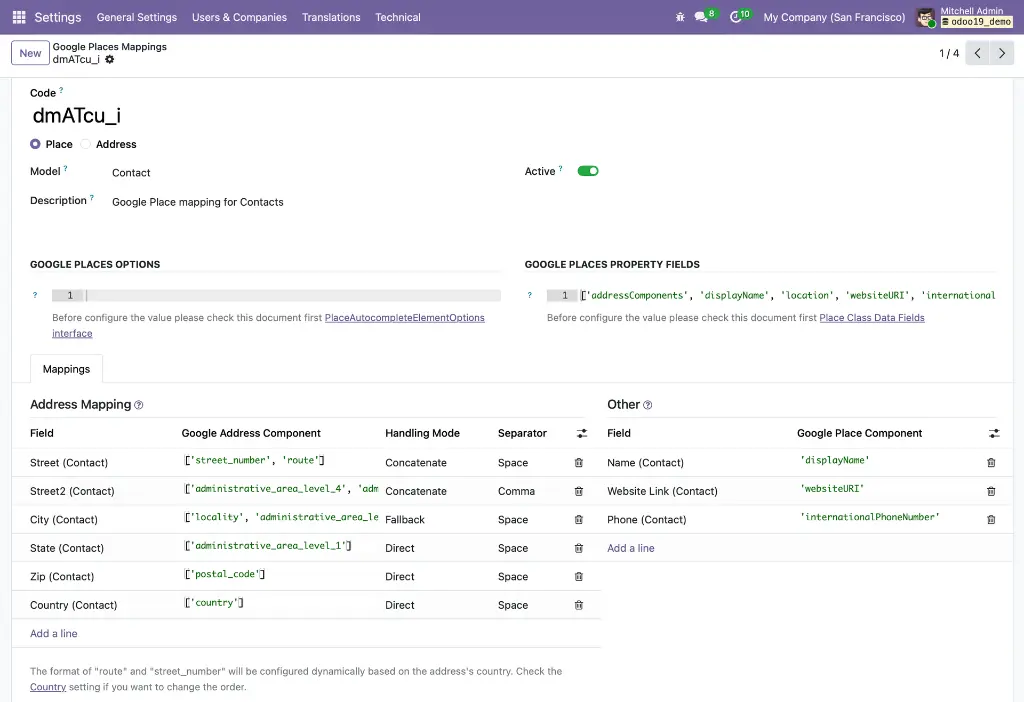
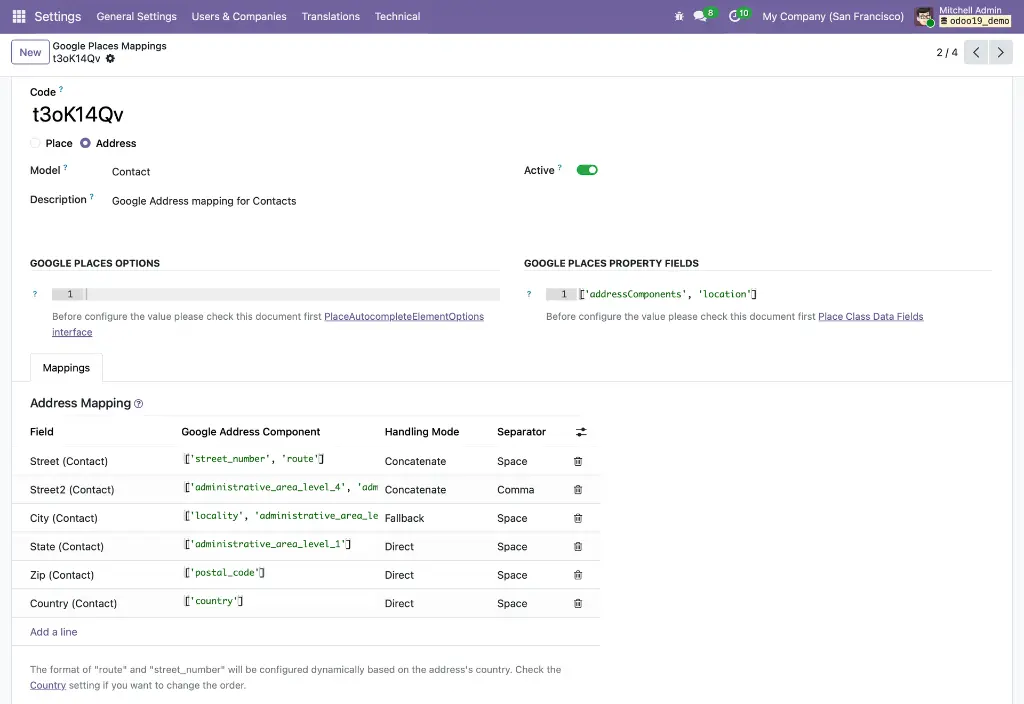
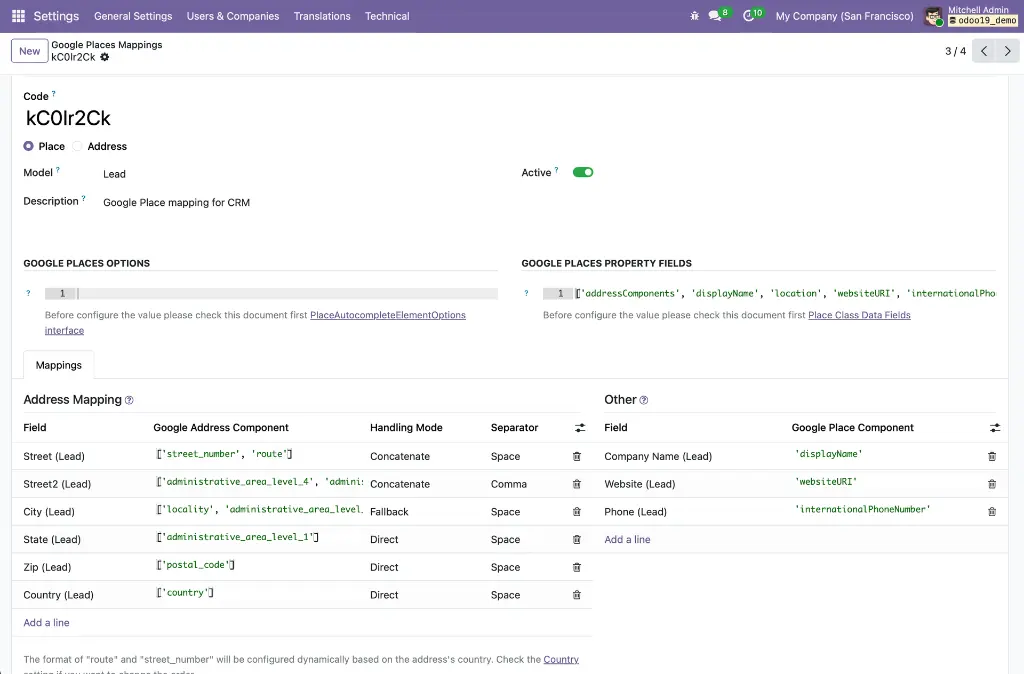
Provides the gplace_autocomplete_el widget and the Google Places Mapping configuration system. A fully data-driven engine that connects the Google Places API (New) to any field on any Odoo model — mapping address components, coordinates, phone, website, and any other place data to the correct model fields in a single atomic write. Includes a built-in live test tool so administrators can verify mappings before deploying.

Module dependencies:  base_google_map

Why It Exists

Autocomplete needs to work differently for every model — contacts use res.partner fields, leads use crm.lead fields, and street format varies by country. The mapping configuration system decouples the widget from hardcoded field names, making it universally reusable without code changes.

MODULE 05 - FOUNDATION

Base Google Maps: Add Place from Map Click

Abstract foundation for the click-to-create workflow. Provides a model mixin (google_map.add_place.mixin) with all the logic for fetching Google Place details, parsing addresses via the ADR microformat and a locale-aware reverse-geocoding parser, detecting duplicates via a stored gplace_id, and opening a pre-populated quick-create form. Also provides the visual zoom indicator UI component shared across all click-to-create implementations.

Module dependencies:  web_view_google_map

Why It Exists

The click-to-create logic is identical whether you're creating a contact or a CRM lead — only the field mappings differ. Keeping the core in one abstract module means all application implementations share a single, well-tested code path.

MODULE 06 - FOUNDATION

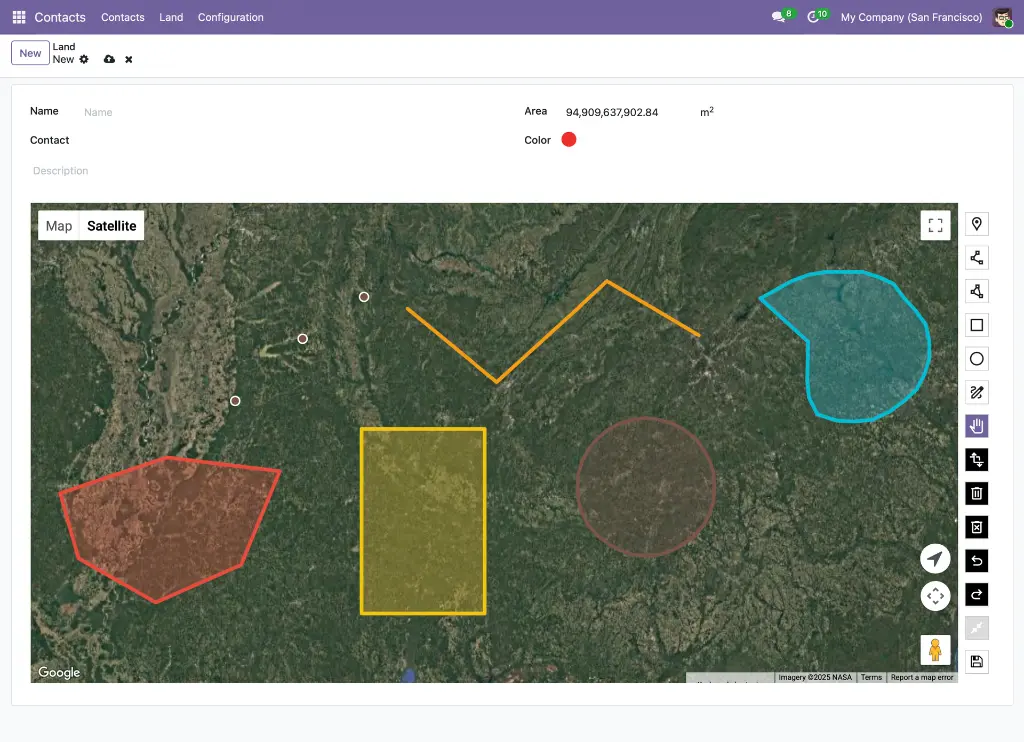
Web View Google Maps Drawing

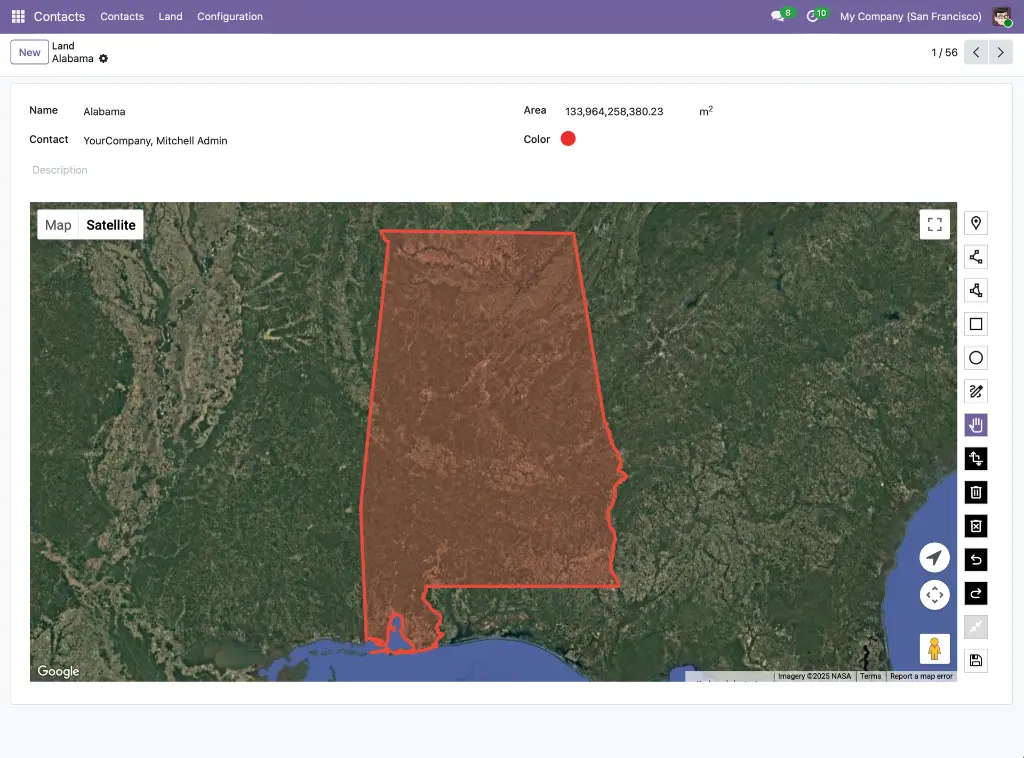
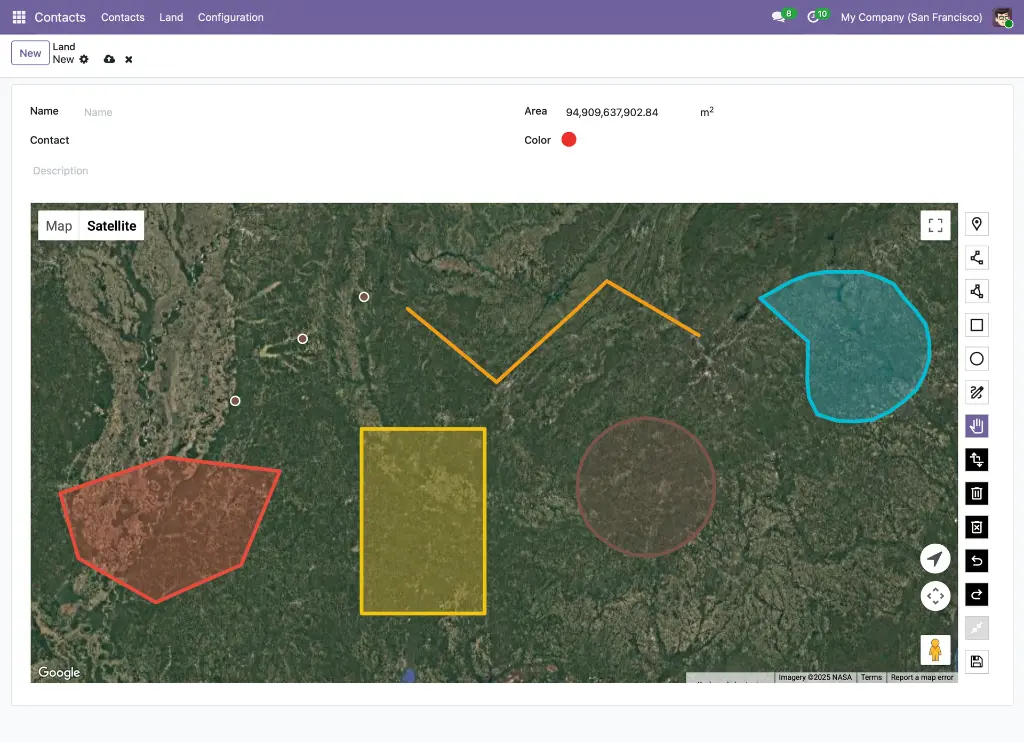
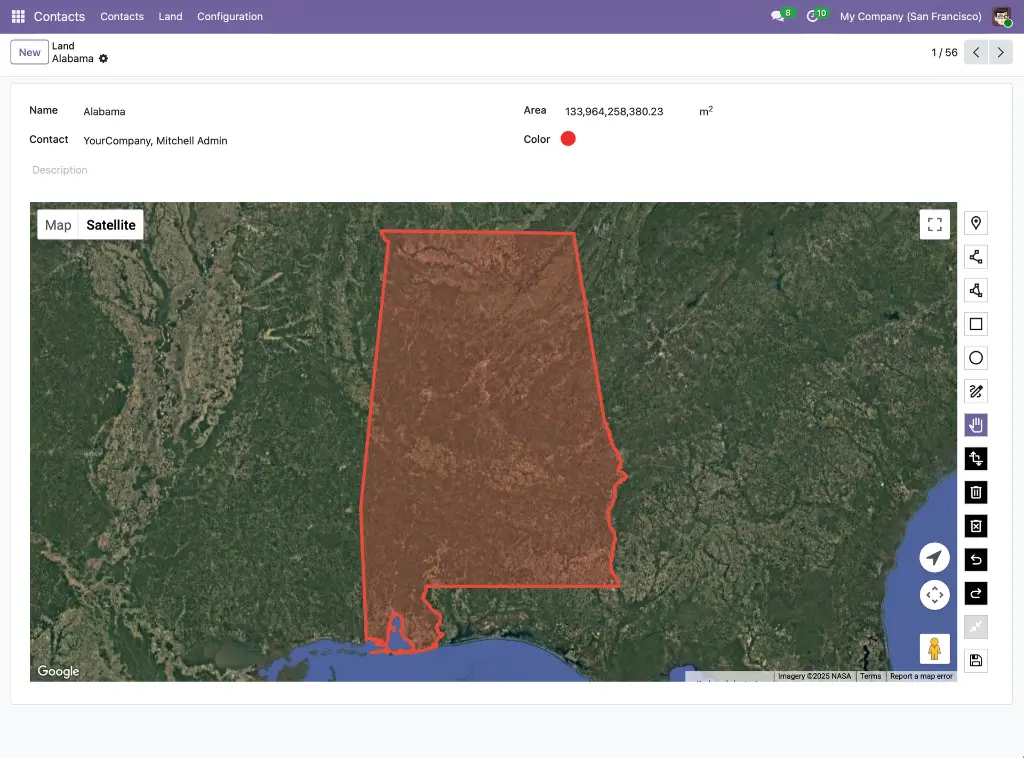
Extends the Google Map view with full GIS-style drawing capabilities. Seven drawing modes (Point, LineString, Polygon, Rectangle, Circle, Freehand, Select), GeoJSON storage with custom PostgreSQL JSONB operators, real-time area and perimeter measurements via Turf.js, import/export of .geojson files, and geometry simplification using the Douglas-Peucker algorithm. Automatically switches between Terra Draw (editable) and Deck.gl (GPU-accelerated, read-only) based on dataset complexity.

Module dependencies:  web_view_google_map

Why It Exists

Google's built-in Maps Drawing Library was deprecated in August 2025. This module replaces it with Terra Draw — Google's own recommended alternative — and adds Deck.gl for datasets too large for browser-based editing, making geographic shape management production-ready at any scale.

Application Layer -- App-Specific Integrations


MODULE 07 - APPLICATION

Contact Google Map

Adds a Google Map view to the Contacts application, plotting every contact as a color-coded pin at their stored coordinates. Includes contact avatar display in markers and sidebar, a per-contact marker color picker, a "Nearby Contacts" smart button on the contact form and an embedded map widget on the Geolocation tab.

Module dependencies:  contacts web_view_google_map web_widget_google_map

Why It Exists

Sales and field teams need to see their contact database geographically — not just as a scrollable list. This module makes that possible with zero additional configuration beyond a valid API key.

MODULE 08 - APPLICATION

Contacts Google Autocomplete

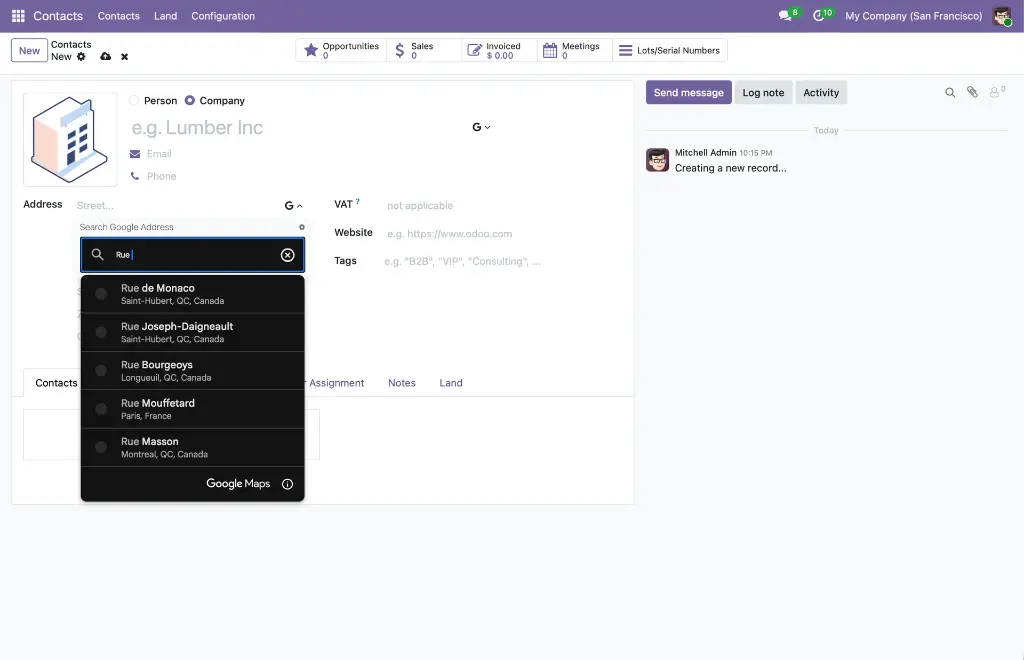
Replaces the standard name and street inputs on the Contact form with Google Places autocomplete fields. Selecting a suggestion auto-fills the full address (street, city, state, zip, country), geolocation (latitude, longitude), phone, and website in a single operation. Works in both the main contact form and inline child-contact sub-forms. Field mappings are configured automatically on install — no manual setup required.

Module dependencies:  contacts web_widget_google_place_autocomplete

Why It Exists

Manual address entry is slow and error-prone. This module eliminates it for contacts by turning every name and street field into a live Google Places lookup that populates all related fields automatically.

MODULE 09 - APPLICATION

Contacts Google Maps: Click to Add Place

Activates the click-to-create workflow on the Contacts Google Maps view. Zoom in, click any named business or empty location on the map, and a pre-populated contact form opens instantly. Named places fetch name, address, phone, website, and coordinates from the Places API. Empty locations are reverse-geocoded. Duplicate detection prevents creating a second contact for the same Google Place ID. The map refreshes automatically after saving.

Module dependencies:  web_view_google_map base_google_map_add_place contacts_google_map

Why It Exists

Creating a contact for a business you can see on the map should take one click, not a manual data-entry session. This module makes that possible for any named place or physical location in Google's database.

MODULE 10 - APPLICATION

Partner Autocomplete with Google Autocomplete

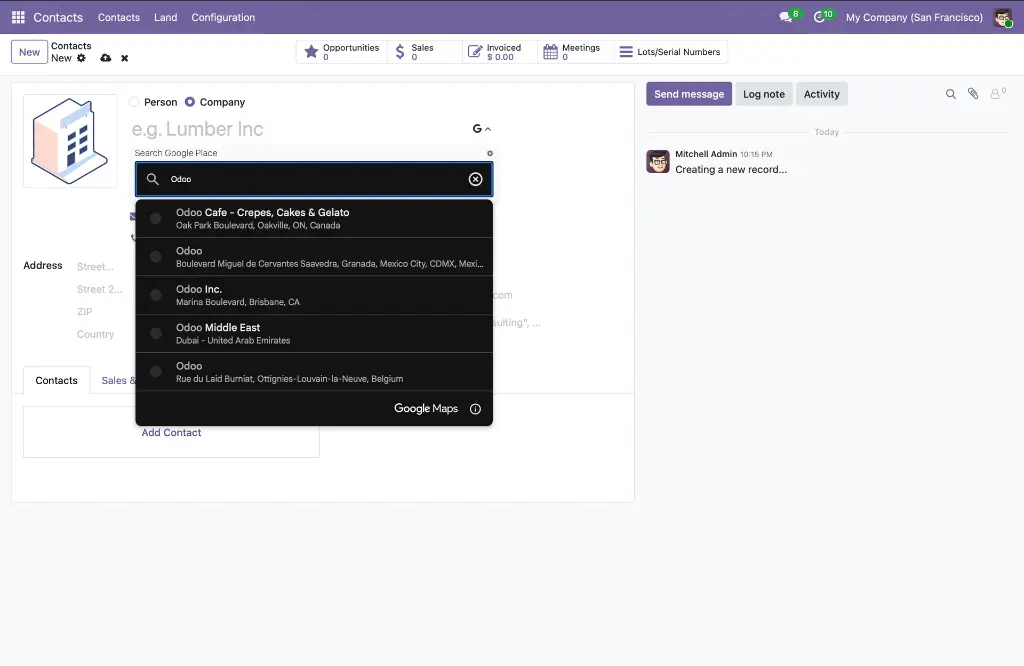
Combines Odoo's built-in partner autocomplete with Google Places autocomplete on the same Contact name field. A collapsible Google Places panel opens via a toggle button, giving users both Odoo's company database lookup and a Google Places search side by side — without removing either. Supports a no_manual_edit option for data-consistency workflows. Applies globally to all res.partner form views without per-module XML changes.

Module dependencies:  partner_autocomplete contacts_google_autocomplete

Why It Exists

Odoo's native partner autocomplete and Google Places serve complementary purposes — the former finds existing Odoo records, the latter enriches new ones with verified real-world data. This module makes both available without conflict on every partner form in the system.

MODULE 11 - APPLICATION

CRM Google Maps

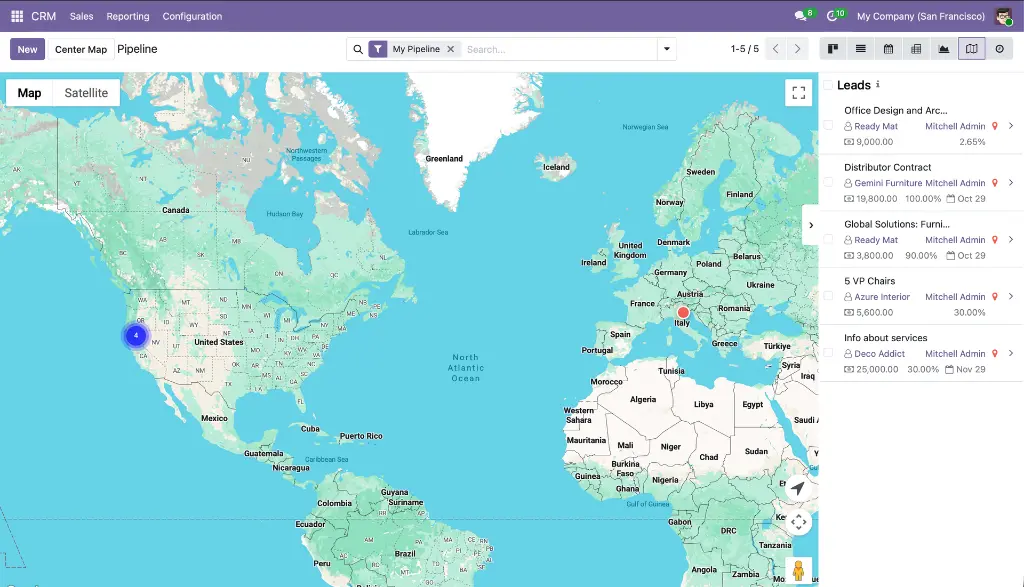
Adds a Google Map view to CRM Leads, Opportunities, My Activities, Pipeline, and Forecast menus. Each lead appears as a custom color-coded marker showing deal name, stage, contact, salesperson, expected revenue, probability, and closing date. Includes overlap handling for co-located leads, a CRM sidebar with revenue and stage, a Geolocation tab on the lead form with embedded map preview, auto-geolocation from linked partner, geocode-from-address button, and a Google Map smart button.

Module dependencies:  crm web_view_google_map web_widget_google_map

Why It Exists

Sales pipelines have a geography — territory gaps, visit clusters, and revenue concentrations are invisible in a kanban view. This module makes the geographic distribution of your pipeline immediately visible.

MODULE 12 - APPLICATION

CRM Google Autocomplete

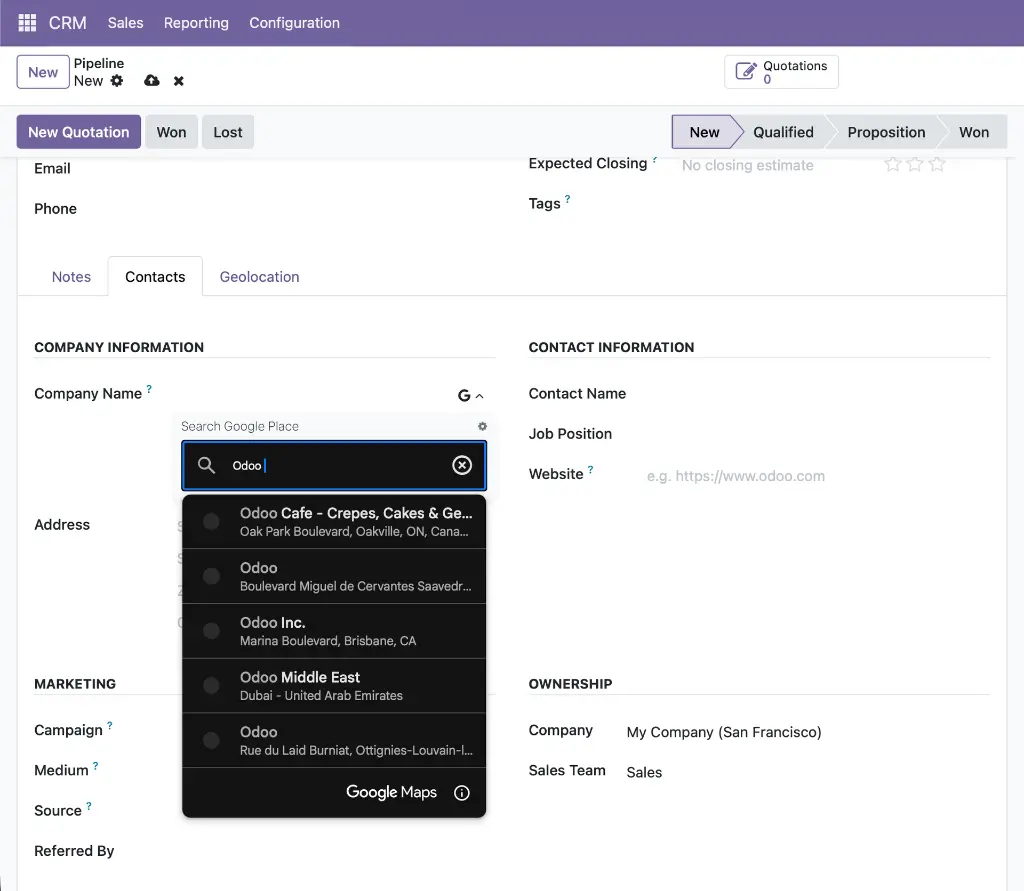
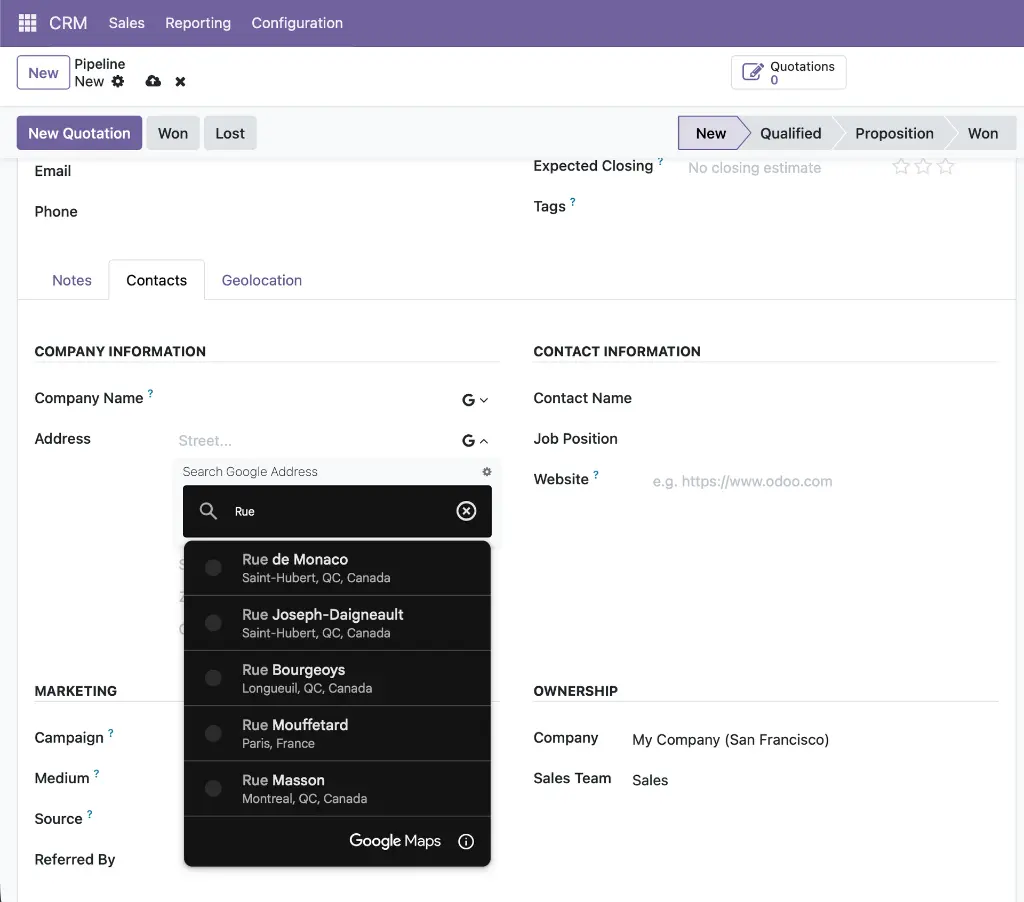
Adds Google Places autocomplete to the Lead/Opportunity form, applied to both the quick-entry group and the detailed lead tab. The company name field uses places mode (also populating phone and website); the street field uses address mode. All address fields and geolocation coordinates are auto-filled on selection so new leads appear on the CRM map immediately without a separate geocoding step.

Module dependencies:  crm web_widget_google_place_autocomplete

Why It Exists

Sales reps create leads quickly and often skip address details. Autocomplete removes that friction by filling the entire address and coordinates the moment a company name is selected.

MODULE 13 - APPLICATION

CRM Google Maps: Add Lead from Map Click

Activates click-to-create on the CRM map view. Clicking a named Google Place opens a pre-populated lead form with the opportunity name auto-set as "[Place Name]'s opportunity," contact name, full address, phone, website, and coordinates all pre-filled. Clicking empty map space reverse-geocodes the coordinate. Duplicate detection checks gplace_id on crm.lead. The map auto-refreshes after save.

Module dependencies:  web_view_google_map base_google_map_add_place crm_google_map

Why It Exists

Prospecting in a new area is faster when a sales rep can scan the map, click a business, and have a fully pre-populated lead ready to review — without switching apps or typing a single field.

MODULE 14 - APPLICATION

Project Google Maps

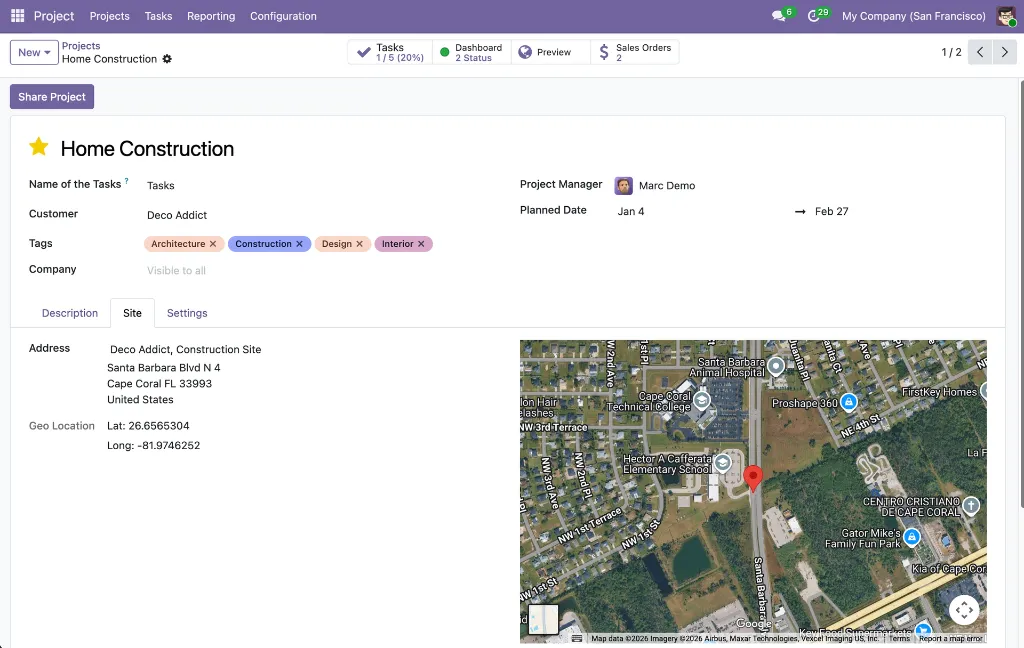
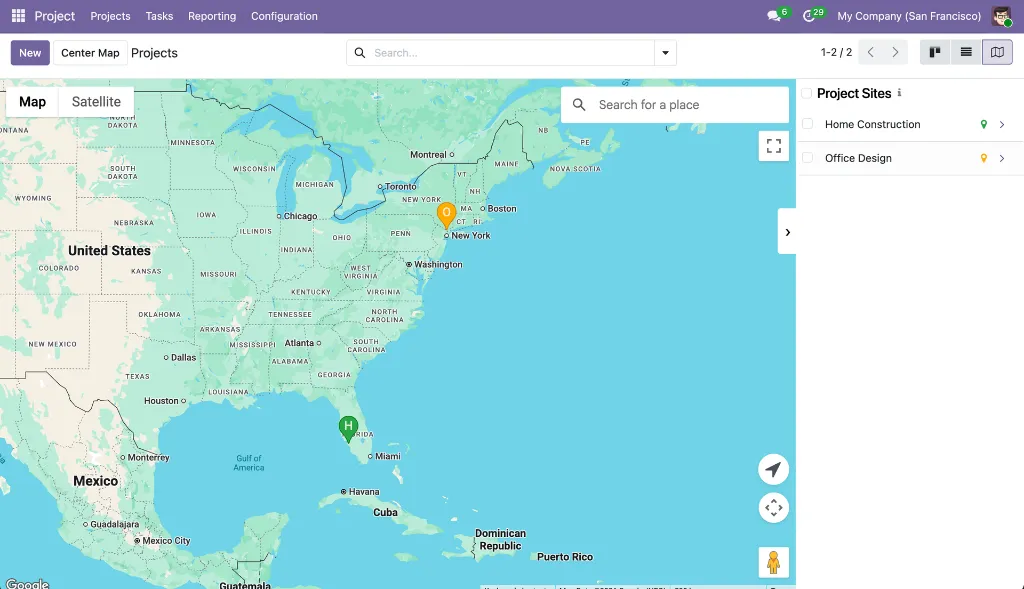
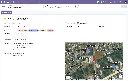
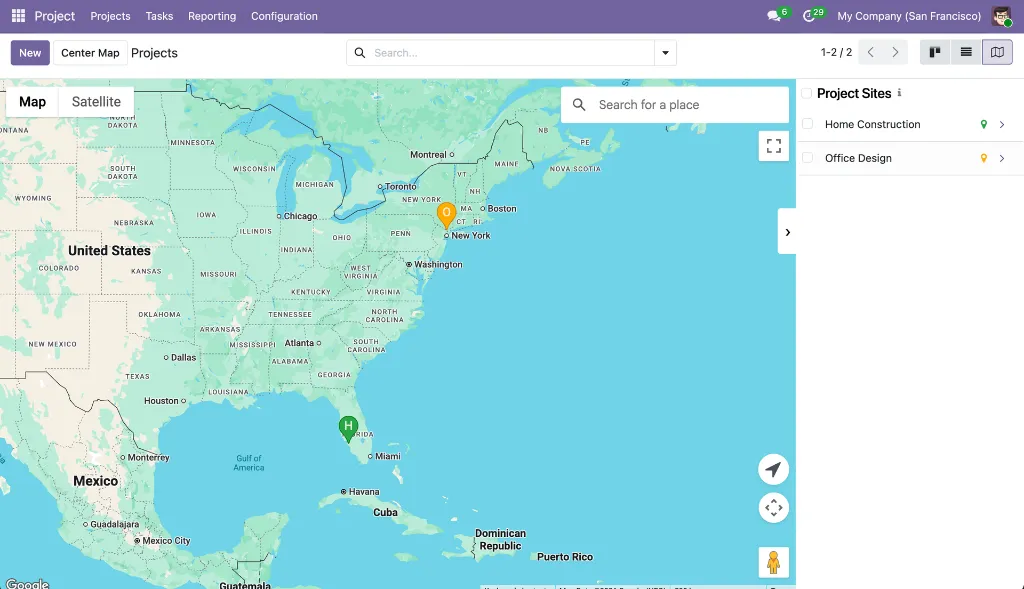
Adds Google Map views to both projects and tasks. Project markers are automatically color-coded by health status (green = on track, orange = at risk, red = off track, cyan = on hold, purple = done, gray = no status). Each project and task can have its own site address linked to a partner record, with an embedded satellite map in the form. Introduces a dedicated "Site" partner type with its own icon to keep site addresses separate from regular contacts.

Module dependencies:  project web_view_google_map web_widget_google_map

Why It Exists

Construction, field service, and infrastructure teams manage work that happens at physical locations. This module makes the geographic spread of projects and tasks visible at a glance, with health status instantly readable from marker color alone.

MODULE 15 - APPLICATION

Sales Google Maps

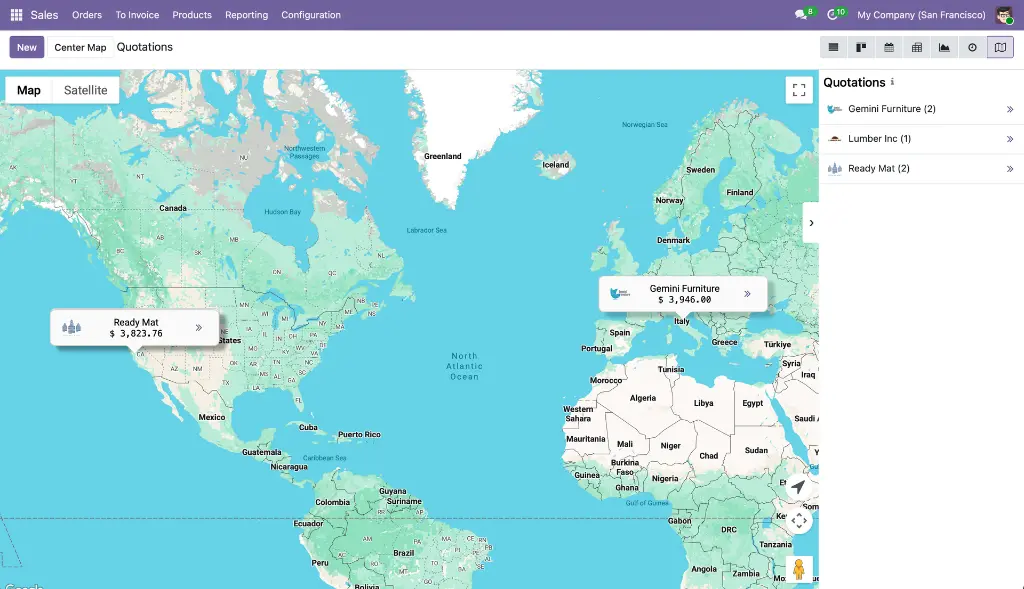
Adds a Google Map view to Quotations, Orders, Orders to Invoice, Orders to Upsell, and Customers lists. Records are grouped by customer — one marker per customer showing name, order count, and aggregated order total with avatar. Includes an "Open Orders" action, a "Find Nearby" proximity search, a sidebar with revenue totals, hover animations, and automatic group loading so all markers appear immediately on open.

Module dependencies:  sale_management web_view_google_map

Why It Exists

Revenue has geography. A sales manager should be able to see in seconds which regions generate the most business and where visit opportunities are clustered — without building a custom dashboard.

MODULE 16 - APPLICATION

Delivery Google Maps

Adds a Google Map view to Delivery Orders and all picking lists in Inventory (Deliveries, Ready to Transfer, Waiting Transfer, Late Transfers, Backorders, All Operations). Each picking is plotted as a teal marker at the destination partner's address, pulled directly from the linked partner record — no manual coordinate entry needed on the picking itself. A sidebar lists all pickings with reference and address.

Module dependencies:  sale_stock stock_delivery web_view_google_map

Why It Exists

Logistics teams need to see the geographic spread of pending deliveries to plan routes and spot gaps. This module provides that view with zero additional data entry — coordinates come from partner records already in Odoo.


How It Works

From initial setup to advanced location intelligence, the suite guides users through a logical end-to-end flow that works across every Odoo application.

1. Configure Once. Enter your Google Maps API key (and optional Map ID, language, region, and color scheme) in Settings → General Settings → Google Maps. Every module in the suite inherits these settings automatically — no per-module setup required.

2. Geocode your existing data. Use the geocode-from-address button on individual contact and lead forms to resolve coordinates from existing address fields.

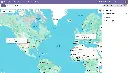
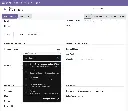
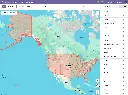
3. Switch to Google Maps view. Open Contacts, CRM, Sales, Projects, or Inventory and click the Map icon in the view switcher. Records with valid coordinates appear as color-coded markers on the interactive Google Map alongside a synchronized sidebar.

4. Capture new records from the Google Maps. Zoom in until the indicator button turns green, then click any named business or empty location. A pre-populated form opens with name, address, phone, website, and coordinates already filled in from Google. Save to create the record — the map refreshes instantly.

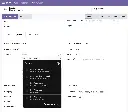
5. Speed up data entry with autocomplete. On Contact and Lead forms, the name and street fields now show Google Places suggestions as users type. Selecting a result fills all address fields, geolocation, and contact details in one action — no manual typing needed.

6. Draw territories and boundaries. Use the drawing view to create polygons, routes, circles, or freehand shapes on the map. Shapes are stored as GeoJSON on any Odoo model, with live area and perimeter measurements, import/export support, and GPU-accelerated rendering for large datasets.

6. Find nearby records and act in bulk. From any marker or sidebar entry, click "Find Nearby" to filter the map to records within a configurable radius. Use Alt+drag box-select to highlight a geographic cluster, then archive, export, or run custom actions on the selection — without leaving the map.

All map views support dark mode, keyboard shortcuts, clustering for large datasets, and offline detection with automatic retry — so the experience remains consistent across devices and environments.


Key Features

A comprehensive set of capabilities spanning map visualization, address intelligence, geographic drawing, and location-based workflows — all built on the same shared infrastructure.

Interactive Google Maps Views
  • Universal Google Maps View Type
  • The google_map view works on any Odoo model with latitude and longitude fields; available across Contacts, CRM, Sales, Projects, and Inventory out of the box.
  • Custom Marker Cards
  • Each record renders as a styled marker showing model-specific data — deal revenue and stage for CRM, order totals for Sales, project health status for Projects — directly on the map without opening the record.
  • Marker Clustering
  • MarkerClusterer automatically groups nearby markers at low zoom levels, keeping the map readable with thousands of records. Clusters expand as users zoom in.
  • Overlap Handling
  • Records at identical coordinates are spread apart in a circular pattern with a visual indicator; clicking a spread marker zooms in and draws a line to the actual coordinate.
  • Marker Color Customization
  • CRM leads, Contacts, and Tasks each support per-record color pickers for visual categorization by priority, territory, stage, or any custom scheme.
  • Synchronized Sidebar
  • A collapsible panel lists all records beside the map with model-specific fields; clicking a row highlights its marker, and clicking a marker highlights its row.
  • Enterprise Dark Mode Support
  • Map tiles, sidebar, markers, and info windows automatically adapt to Odoo's dark mode via a dedicated asset bundle stylesheet.
Google Places Autocomplete
  • Two Autocomplete Modes
  • Places mode returns businesses and landmarks (also populating phone and website); address mode restricts suggestions to street addresses and routes for cleaner address-only fields.
  • Configurable Field Mapping
  • The google.places.mapping system maps any Google Places API property to any Odoo field on any model — no code changes required. Supports direct, fallback, and concatenate handling for address components.
  • Country-Aware Street Formatting
  • A per-country street format setting controls whether addresses are assembled as "Route + Number" or "Number + Route," ensuring correct formatting across all locales.
  • Atomic Multi-Field Write
  • All mapped fields — address, geolocation, phone, website — are written to the record in a single record.update() call, preventing intermediate re-renders and partial saves.
  • Built-in Mapping Test Tool
  • Administrators can search for any place from within the mapping configuration form and see the exact parsed values that will be written to each field, before deploying to production.

Click-to-Create from Map
  • Named Place Click
  • Clicking a Google Place on the map fetches its full details from the Places API and opens a pre-populated quick-create form for contacts or CRM leads.
  • Empty Location Click
  • Clicking any map location that isn't a named place reverse-geocodes the coordinate via the Geocoding API and opens a form with the resolved address pre-filled.
  • Duplicate Detection
  • The stored gplace_id field on each record prevents creating duplicates; clicking a place that already exists in Odoo opens the existing record instead.
  • Visual Zoom Indicator
  • A button in the map's top-right corner turns green when the zoom level is sufficient for click-to-create to be active; clicking it while zoomed out auto-zooms to the threshold and pans to the nearest marker.

Geographic Drawing Tools
  • Seven Drawing Modes
  • Point, LineString, Polygon, Rectangle, Circle, Freehand, and Select, all with keyboard shortcuts. Shapes are smoothed, editable, and stored as GeoJSON.
  • Smart Rendering
  • Automatically selects Terra Draw for editable shapes or Deck.gl GPU rendering for datasets exceeding 3,000 features or 5,000 vertices — maintaining 60fps interaction regardless of dataset size.
  • Real-Time Measurements
  • Area and perimeter are calculated live during drawing using Turf.js, displayed in metric or imperial units and written back to a configurable Float field on save.
  • GeoJSON Import/Export
  • Upload .geojson files from QGIS, geojson.io, or any GIS tool (up to 5 MB). Export current shapes as clean GeoJSON with internal metadata stripped. Geometry simplification via Douglas-Peucker reduces vertex count on complex imports.

Location Intellegence & Proximity Tools
  • Nearby Records Search
  • From any marker or sidebar row, filter the map to records within a configurable radius (default 1,000 m). A rectangle overlay shows the search area; the view title updates to reflect the search context.
  • Geolocation Button
  • Places the user's current location on the map in one click via the browser Geolocation API — useful for field teams orienting themselves relative to nearby records.
  • In-Map Place Search
  • A Google Places search box inside the map lets users navigate to any address or landmark without leaving the view, placing a distinctive orange marker at the result.
  • Box Multi-Selection
  • Hold Alt (or Cmd on Mac) and drag to draw a selection rectangle around multiple markers, enabling bulk archive, export, delete, or custom actions on geographically clustered records.


Use Cases & Benefits

Sales Territory Planning

See revenue and pipeline concentration on a map, draw territory boundaries as GeoJSON polygons, and assign leads by geographic area — without leaving Odoo.

Faster Contacts & Lead Creation

Click a business on the map or select it from the autocomplete dropdown to create a fully pre-populated contact or lead in seconds — name, address, phone, website, and coordinates included.

Geographic Pipeline Visibility

Sales managers get an instant visual overview of deals by stage and location. Color-coded CRM markers show expected revenue, probability, and closing date without opening any record.

Field Operations at a Glance

Project managers see the health status of every site on a map — green for on track, red for off track — and can drill into a project's tasks with one click from the map view.

Proximity-Based Prospecting

Visiting a customer? Use "Find Nearby" to instantly surface other contacts, leads, or customers within a configurable radius — turning every field visit into a prospecting opportunity.

Address Data Quality

Google Places autocomplete ensures every address entered in Contacts and CRM is a real, verified location — eliminating typos, incomplete addresses, and missing coordinates at the point of entry.

Extensible to Any Model

The foundation layer is designed for reuse. Any Odoo model with latitude and longitude fields can gain a full map view, and any Char field on any model can be enhanced with Google Places autocomplete using the mapping configuration system.

Enterprise-Ready GIS Capabilities

Store service territories and coverage areas as GeoJSON on any record, import shapes from professional GIS tools, and run server-side geographic queries using the custom JSONB field operators.


WHO IT'S FOR

Google Maps Suite is designed for Odoo businesses of any size that work with location data — sales teams managing geographic territories, operations teams coordinating field service and deliveries, project managers tracking multi-site work, and developers looking to extend Odoo with map views and address intelligence on custom models.


What's in the Bundle

Sixteen modules in install-dependency order — six shared infrastructure modules followed by ten application integrations covering Contacts, CRM, Sales, Projects, and Inventory.

Foundation Modules

1. base_google_map
Centralized API key configuration, JavaScript API loader, and base OWL map component
2. web_view_google_map
The google_map view type with markers, sidebar, clustering, selection, nearby search, and dark mode
3. web_widget_google_map
Embedded map preview widget and interactive coordinate editor for form views
4. web_widget_google_place_autocomplete
Configurable Places autocomplete widget and the Google Places Mapping system
5. web_widget_google_map_drawing
GeoJSON drawing tools, Terra Draw editor, Deck.gl GPU renderer, and Turf.js measurements
6. base_google_map_add_place
Abstract mixin and UI component for the click-to-create workflow

Contacts Modules

7. contacts_google_map
Google Map view for Contacts with avatars, color pickers, and nearby search.
8. contacts_google_autocomplete
Google Places autocomplete on the Contact name and street fields
9. contacts_google_map_add_place
Click-to-create contacts directly from the Contacts map view
10. partner_autocomplete_with_google_autocomplete
Combined Odoo partner autocomplete + Google Places panel on the Contact name field

CRM Modules

11. crm_google_map
Google Map view for Leads and Opportunities with CRM marker cards, geolocation tab, and smart button
12. crm_google_autocomplete
Google Places autocomplete on Lead company name and street fields
13. crm_google_map_add_place
Click-to-create CRM leads directly from the CRM map view

Other Application Modules

14. project_google_map
Google Map views for Projects and Tasks with status-colored markers and site address management
15. sale_google_map
Customer-grouped Google Map view for Sales orders and quotations with revenue totals
16. stock_google_map
Google Map view for Delivery Orders and all Inventory picking lists


Your Dynamic Snippet will be displayed here... This message is displayed because youy did not provide both a filter and a template to use.

Customer Reviews

©2026 Mithnusa
Powered by Odoo - The #1 Open Source eCommerce

We use cookies to provide you a better user experience on this website. Cookie Policy

Only essentials I agree