Skip to Content
PT Mithra IT Mandiri Nusantara
  • Home
  • Shop
  • Services
  • About
  • 0
  • Sign in
  • Contact Us   
PT Mithra IT Mandiri Nusantara
  • 0
    • Home
    • Shop
    • Services
    • About
  • Sign in
  • Contact Us   
  1. All products
  2. Mapbox
  3. [19.0] Contacts Route Planner with Mapbox
  4. Mapbox
Pricelist: Pricelist USD Pricelist
[19.0] Contacts Route Planner with Mapbox
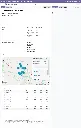
Screenshot 2026-04-23 at 22.06.51.webp
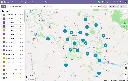
Screenshot 2026-04-23 at 22.09.17.webp
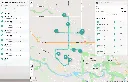
screencapture-35-209-158-83-8069-odoo-contacts-6-route-planner-5-2026-04-23-22_07_39.webp
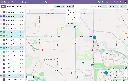
Screenshot 2026-04-23 at 22.05.54.webp
Screenshot 2026-04-23 at 22.08.38.webp
Screenshot 2026-04-23 at 22.06.35.webp
  1. [19.0] Contacts Route Planner with Mapbox
  2. Screenshot 2026-04-23 at 22.06.51.webp
  3. Screenshot 2026-04-23 at 22.09.17.webp
  4. screencapture-35-209-158-83-8069-odoo-contacts-6-route-planner-5-2026-04-23-22_07_39.webp
  5. Screenshot 2026-04-23 at 22.05.54.webp
  6. Screenshot 2026-04-23 at 22.08.38.webp
  7. Screenshot 2026-04-23 at 22.06.35.webp

[19.0] Contacts Route Planner with Mapbox

(0 review)

See your Odoo contacts on an interactive Mapbox map, pick the ones you want to visit directly from the map or the list, and turn them into a ready-to-dispatch multi-stop route in a single action. An extended version of the Route Planner Suite purpose-built for customer visits, field sales, and outreach operations.

List of modules:
1. base_mapbox_gl
2. web_view_base_mapbox_gl
3. web_view_mapbox_gl_geolocate

4. web_view_list_with_mapbox_gl
5. route_planner
6. route_planner_mapbox_gl
7. website_route_planner_mapbox_gl
8. contacts_mapbox_gl
9. contacts_route_planner_mapbox_gl

$ 0.00 $ 0.00

Add to cart
Contact Us

Take a look at the demo

Demo (v19.0)
Login  |  Password
1. guest  |  guest
2. portal  |  portal

Product Overview

Contacts Route Planner — Mapbox GL is the CRM-to-dispatch bridge for Odoo. It adds three modules on top of the Route Planner Suite, turning the Odoo Contacts application into a map-first customer browser and wiring selected contacts directly into the Route Planner through a one-click wizard.

The result: account managers, field sales, and outreach teams plan their day on a map, pick the customers they want to visit, and get a fully geocoded, travel-time-aware route — ready to review, confirm, and send to the driver or representative's portal.

BUILT ON

Route Planner Suite

This product includes everything in our Route Planner Suite — the full Mapbox GL foundation layer, the Route Planner application, the Mapbox visualization extension, and the driver portal. All six suite modules are bundled in so you get the complete planning, visualization, and driver-facing experience out of the box, plus two delivery-specific extensions on top.

For the full feature breakdown of those six modules, see the dedicated product page: Route Planner with Mapbox

This page focuses on what Contacts Route Planner adds on top of that suite.


What Contacts Route Planner Adds

Three purpose-built extension modules — one foundation-layer, two application-layer — that turn geocoded records into maps, Odoo Contacts into a map-first application, and selected contacts into routes.

EXTENSION 01 - FOUNDATION

Web View Mapbox GL Geolocate

A reusable coordinate-based Mapbox view type. Introduces mapbox_gl_geolocate as a new view that renders any Odoo model with latitude and longitude fields as point markers on an interactive map — with smart overlap handling, optional clustering, and optional heatmap density visualization.

Module dependencies:  web_view_base_mapbox_gl

Why it Exists

Many Odoo records have geographic coordinates — customers, warehouses, service locations, field assets — but until now, displaying them on a map required custom development. This module provides a declarative mapbox_gl_geolocate view that any model can reuse, with the overlap handling, clustering, heatmap, and selection interactions already built in. It's the infrastructure that powers the Contacts map view, and it's equally useful for any other Odoo model with coordinate data.

EXTENSION 02 - APPLICATION

Contacts Mapbox GL

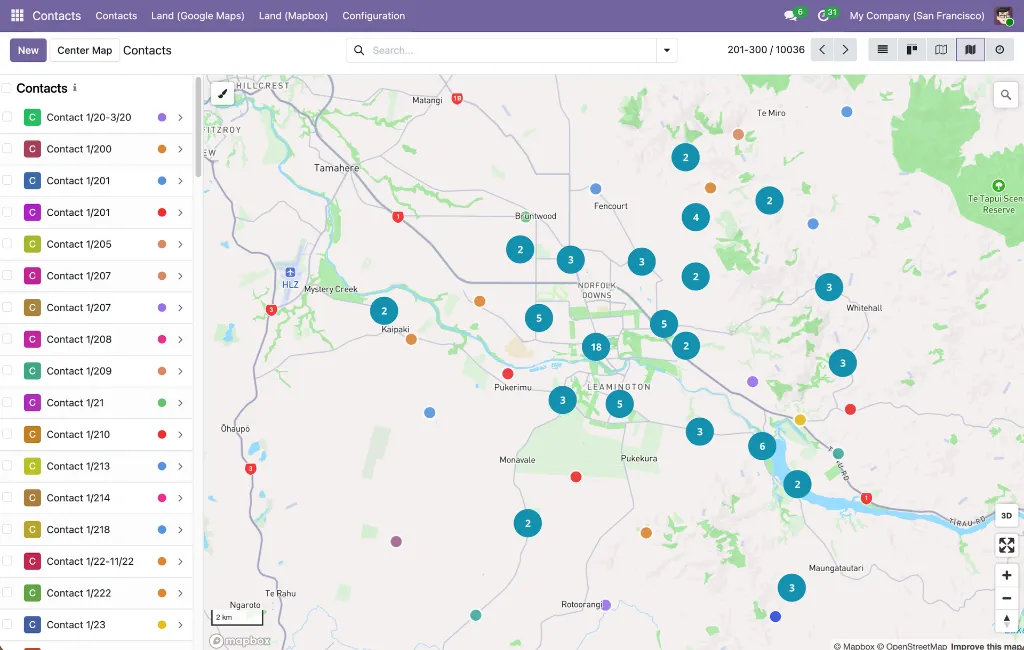
Adds a Map view to the Odoo Contacts application. Every geocoded contact appears as a color-coded marker on an interactive Mapbox map, with contact photos visible in both the sidebar list and the click popup. Clustering, overlap separation, and multi-selection work out of the box.

Module dependencies:  base_geolocalize contactsweb_view_mapbox_gl_geolocate

Why it Exists

Contact lists tell you who; they don't tell you where. This module makes geography a first-class dimension of contact management — so a sales rep can see customer density at a glance, a territory manager can spot coverage gaps, and an account manager can instantly find every customer within a given area. Because the view is built on web_view_mapbox_gl_geolocate, contacts get the full interactive treatment: marker clustering, heatmap potential, box-zoom selection, and intuitive overlap handling for contacts sharing an address.

EXTENSION 03 - APPLICATION

Contacts Route Planner -- Mapbox GL

Bridges the Contacts map view and the Route Planner. Adds a Route Planner action to both the Contacts list view and the Contacts map view that opens a wizard with the selected contacts pre-loaded as waypoints, ready to be turned into a route.

Module dependencies:  contacts_mapbox_gl route_planner_mapbox_gl

Why it Exists

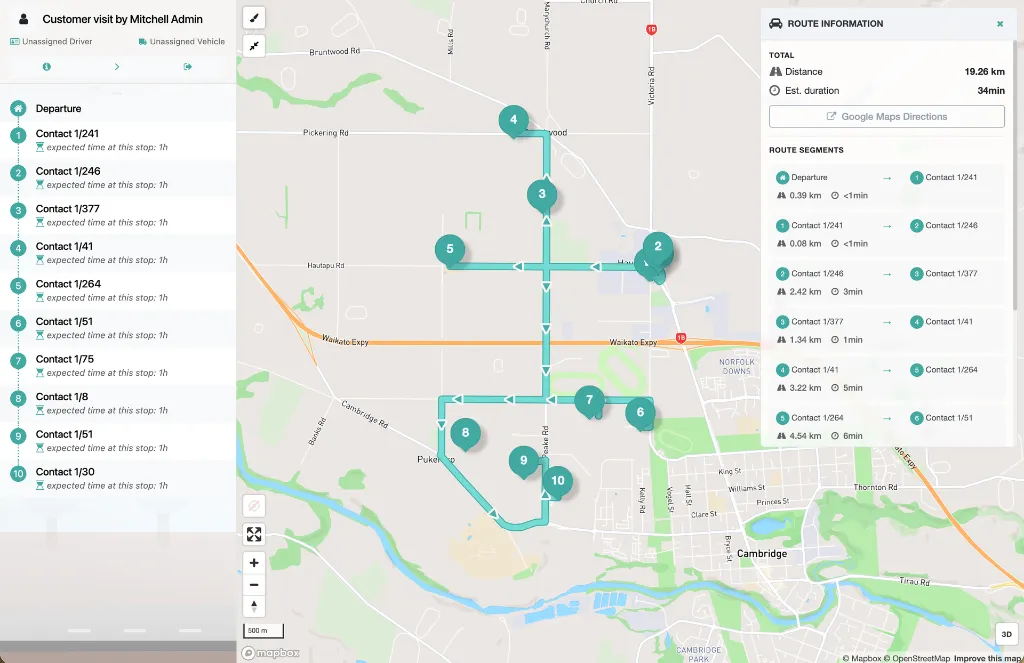
Before this module, creating a customer-visit route meant opening the Route Planner, creating a new route, and typing in each contact one by one. This module reverses the flow: start from the customers you want to visit (selected directly on the map or in the list), click one action, review the suggested waypoint order, and the route is created — already typed as "Customer Visit" with sensible defaults that don't force a vehicle, driver, or departure date.


How It Works

The end-to-end workflow from the Contacts app to a dispatched customer-visit route:

1. Open the Contacts application and switch to the Map view from the view switcher

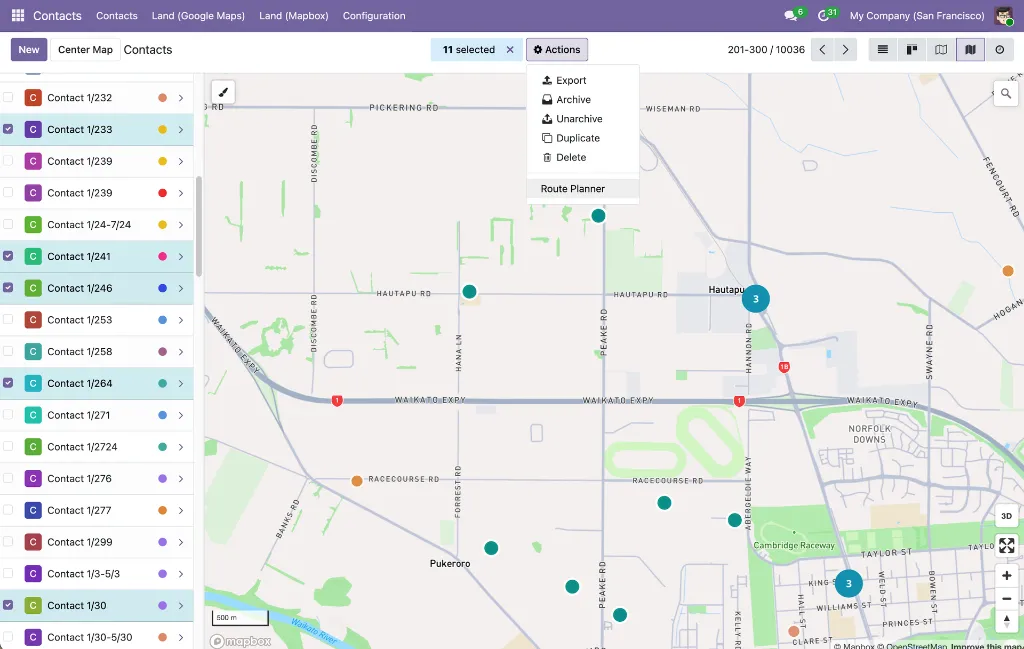
2. Geocoded contacts appear as color-coded markers; zoom in and out, hover for popups, click markers or sidebar entries for full details.

3. Select the contacts you want to visit — Shift-click individual markers, or hold Shift and drag a rectangle to box-select a whole area at once. Selection also works in the classic list view.

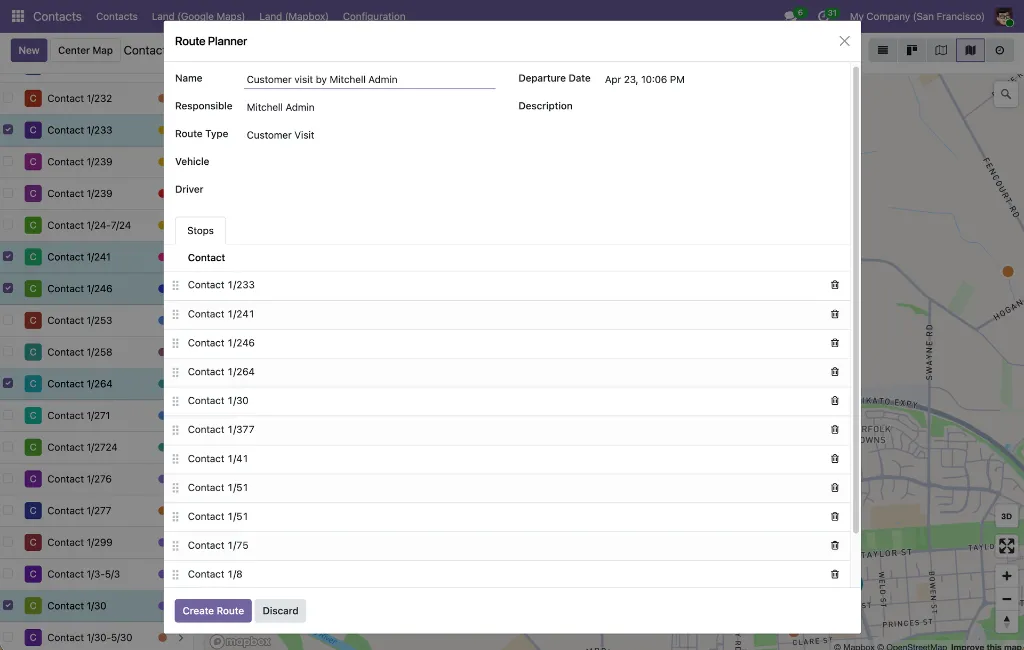
4. Click Action → Route Planner. A wizard opens with your selected contacts already loaded as waypoints, in the order you selected them.

5. Review the route: drag to reorder waypoints, set the route name and optional driver/vehicle/departure date, and adjust the description.

6. Click Create Route. The wizard creates a Customer Visit route, auto-selecting the Directions API so your chosen stop order is preserved.

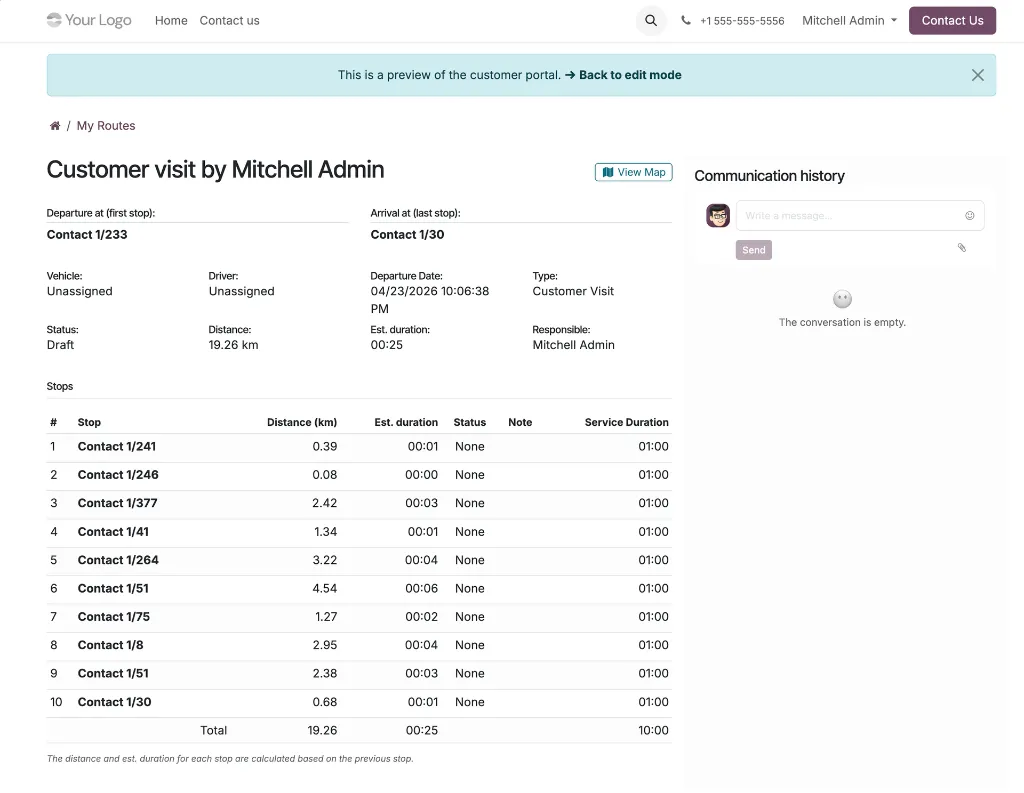
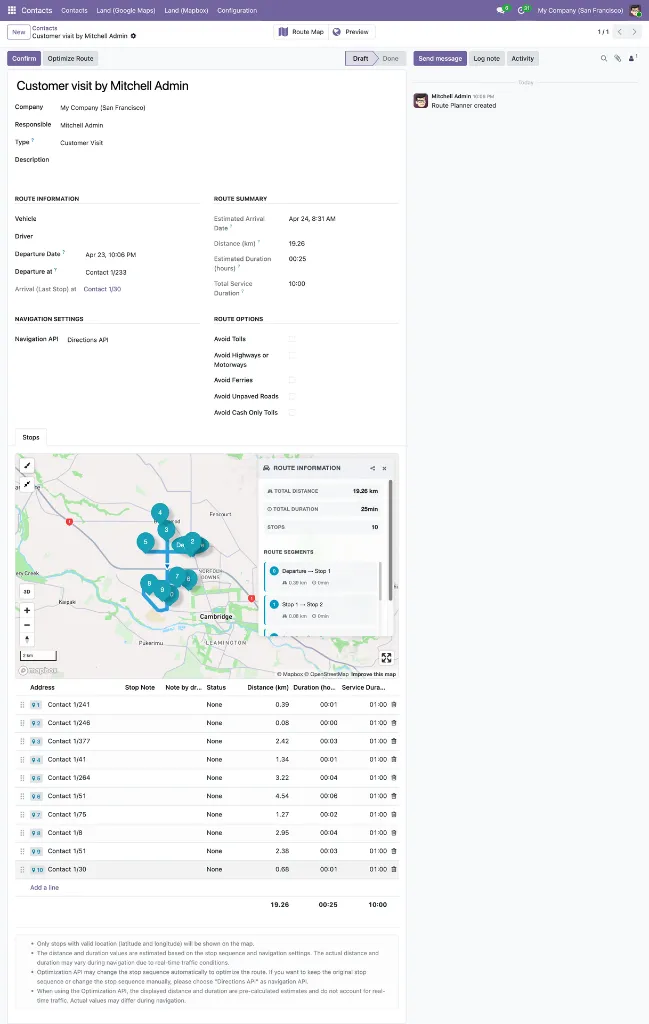
7. The route opens on an interactive Mapbox map with travel time and distance per segment, ready to confirm and dispatch to the driver or field rep's mobile-friendly portal.

Validation runs automatically along the way: contacts without coordinates or with duplicate coordinates are surfaced in an orange warning banner in the wizard with the affected names, route creation is blocked until you resolve the issues, and the Mapbox 25-waypoint limit is enforced with a clear message. The Route Planner action only appears for users with the Route Planner User role, so the workflow respects your existing access controls.


Key Features

All features below are additions contributed by the three Contacts Route Planner extension modules on top of the underlying Route Planner Suite.

Geolocate Map ViewRoute Creation From Contacts

Geolocate Map View


  • Coordinate-Based Mapping
    Display any Odoo model with latitude and longitude fields as point markers — no GeoJSON conversion needed.

  • Smart Overlap Handling
    Markers at the same location are automatically spread in a ~10 meter circular pattern so every record stays individually clickable.

  • Connection Lines
    Dotted lines link distributed markers back to their shared location at zoom level 17+; line color matches the marker's stroke color.

  • Shifted Marker Indicator
    A blue info icon in the popup of any offset marker, with a tooltip explaining the shift and pointing to the original location.

  • Optional Heatmap Layer
    Visualize point density at zoom levels 0–9, fading out as you zoom in (mutually exclusive with clustering)

  • Optional Clustering Layer
    Groups markers into numbered clusters up to zoom 14; clusters are color- and size-coded by record count (blue <100, yellow 100–750, pink 750+)

  • Box-Zoom Selection
    Hold Shift and drag a rectangle to select every marker within it — including individual records inside visible clusters (up to 100 per cluster)

  • Shift+Click Selection
    Toggle markers in and out of the current selection directly on the map, without opening the record.

  • Color-Coded Markers
    Style markers using Odoo color index integers, named colors, or hex codes via a configurable field.

  • Human-Readable Coordinates
    Coordinates displayed with N/S/E/W indicators and 6-decimal precision (~0.11 m) in popups and the sidebar.

  • Declarative XML Configuration
    Define new map views with a simple <mapbox_gl js_class="mapbox_gl_geolocate" lat_field="..." lng_field="..."> block; install-time validation catches missing field declarations.

  • Perfomance Optimized
    Batch marker processing (100/batch), throttled mouse events (100 ms), and debounced map operations for smooth interaction with thousands of records.

Route Creation From Contacts


  • Route Planner Action
    A dedicated action on the Contacts list and map views that opens a wizard pre-populated with the selected contacts as waypoints.

  • Preserved Selection Order
    Contacts are added in the order they were selected; the first contact becomes the departure point, and the rest become the ordered stops.

  • Customer Visit Route Type
    Routes are automatically typed as "Customer Visit" with a default service duration of 30 minutes per stop; vehicle, driver, and departure date are all optional at confirmation.

  • Directions API Routing
    The wizard sets the navigation API to Directions, so the stop order as arranged by the user is preserved — no automatic reordering.

  • Reorderable Waypoints
    Drag-and-drop the wizard's stops list to fine-tune the sequence before creating the route.

  • Smart Default Route Details
    Route name defaults to "Customer visit by {current user}"; departure date defaults to now. Responsible, vehicle, driver, and description can all be set upfront in the wizard.

  • Geolocation Validation Warning
    An orange warning banner surfaces contacts with missing or duplicate coordinates, listed by name, and blocks route creation until the data is corrected.

  • Minimum & Maximum Stop Enforcement
    At least 2 waypoints required; maximum 25 to match the Mapbox API limit, each with clear error messages.

  • Geolocated Contacts Only
    The stop contact field in the wizard is filtered to only partners with non-zero latitude and longitude.

  • Access Controlled
    The Route Planner action is visible only in list and map views, and only to users with the Route Planner User role or higher.


Use Cases & Benefits


Map-First Contact Management

Shift the mental model from list-first to map-first. Customers, suppliers, partners, and leads are instantly browsable by geography, with color, clustering, and density visualization on tap

One-Action Route Creation

Select the contacts you want to visit and click a single action to generate a complete, geocoded, travel-time-aware route — eliminating the manual stop entry that made customer-visit planning tedious.

Built for Field Sales & Outreach

The Customer Visit route type doesn't force a vehicle or driver, so sales reps, account managers, and outreach coordinators can plan visit circuits as easily as logistics teams plan deliveries.

Visual Recognition at a Glance

Contact photos in the sidebar and popup, plus customizable marker colors, turn abstract records into recognizable people and categories — fewer clicks, faster decisions.

Geography-Aware Territory Planning

Heatmap and clustering layers reveal where your customers actually are. Spot under-served areas, balance territories, and prioritize coverage with real geographic context.

Data Quality Safety Net

The wizard catches missing or duplicate geolocations before a route is created, with affected contacts listed by name — so broken coordinates are fixed upfront, not discovered in the field.

Reusable Geolocate Infrastructure

The mapbox_gl_geolocate view type isn't limited to contacts. Developers can apply it to any Odoo model with coordinate fields — warehouses, service sites, equipment, events — with clustering, heatmap, and selection already built in.

Cluster-Safe Bulk Selection

Box-zoom selection respects cluster bubbles, so a single Shift-drag can scoop up entire areas — including clustered contacts, up to 100 per cluster, with a clear warning for oversized ones.

Native Odoo Flow

The Map view sits inside Contacts, the action uses Odoo's standard multi-record action menu, and the resulting route lives in the Route Planner application with the driver portal already attached. No new system to learn.


WHO IT'S FOR

Field sales teams planning customer visit circuits, account managers mapping their book of business geographically, outreach and partnership coordinators scheduling in-person meetings, territory managers analyzing customer density and coverage, and any Odoo user who thinks about contacts in terms of geography first and list first second. Also ideal for Odoo developers who want a reusable geolocate view they can apply to their own coordinate-based models.


What's in the Bundle

Contacts Route Planner — Mapbox GL is a complete 9-module package. Six modules come from the Route Planner Suite; the three modules highlighted below are the contacts-specific extensions — one foundation-layer view type, one application-layer Contacts extension, and one route creation bridge.

  1. base_mapbox_gl -- Mapbox configuration, geocoding, on-map controls.

  2. web_view_base_mapbox_gl -- New mapbox_gl Odoo view type with sidebar, grouping, and selection.

  3. web_view_list_with_mapbox_gl -- Split-screen list-plus-map widget for ordered location fields

  4. route_planner -- Base Route Planner application: lifecycle, stops, route types, fleet integration

  5. route_planner_mapbox_gl -- Mapbox map visualization and API-based routing for Route Planner

  6. website_route_planner_mapbox_gl -- Mobile-friendly driver portal

  7. web_view_mapbox_gl_geolocate -- Coordinate-based map view: clustering, heatmap, overlap handling, color-coded markers  NEW

  8. contacts_mapbox_gl -- Map view for Odoo Contacts: avatars, custom marker colors, clustering  NEW

  9. contacts_route_planner_mapbox_gl -- Route Planner action on Contacts: wizard-based route creation from selected contacts  NEW

For a detailed feature breakdown of modules 1–6, see the Route Planner with Mapbox product page

Your Dynamic Snippet will be displayed here... This message is displayed because youy did not provide both a filter and a template to use.

Customer Reviews

©2026 Mithnusa
Powered by Odoo - The #1 Open Source eCommerce

We use cookies to provide you a better user experience on this website. Cookie Policy

Only essentials I agree