![[v19.0] Contacts Google Maps](/web/image/product.product/17/image_1024/%5Bv19.0%5D%20Contacts%20Google%20Maps?unique=324c184)
![[v19.0] Contacts Google Maps](/web/image/product.product/17/image_128/%5Bv19.0%5D%20Contacts%20Google%20Maps?unique=324c184)
Foundation Layer -- Shared Infrastructure
MODULE 01 - FOUNDATION
Base Google Map
The root module for the entire suite. Centralizes Google Maps API key, Map ID, language, region, and color scheme configuration in Settings → General Settings → Google Maps. Provides the shared JavaScript API loader — with automatic retry, library caching, and authentication error detection — and the base OWL map component that all map views inherit, including error handling, offline detection, resize support, and ARIA accessibility. Also manages autocomplete restrictions: language bias and up to 5 country filters.
Why It Exists
All Google Maps features across the suite — map views, autocomplete, form widgets — share a single API key and a single loader. Configure it once and every module inherits it automatically. No per-module API setup, no conflicting script loads, no duplicate configuration.
Module dependencies: web base_geolocalize
MODULE 02 - FOUNDATION
Web View Google Map
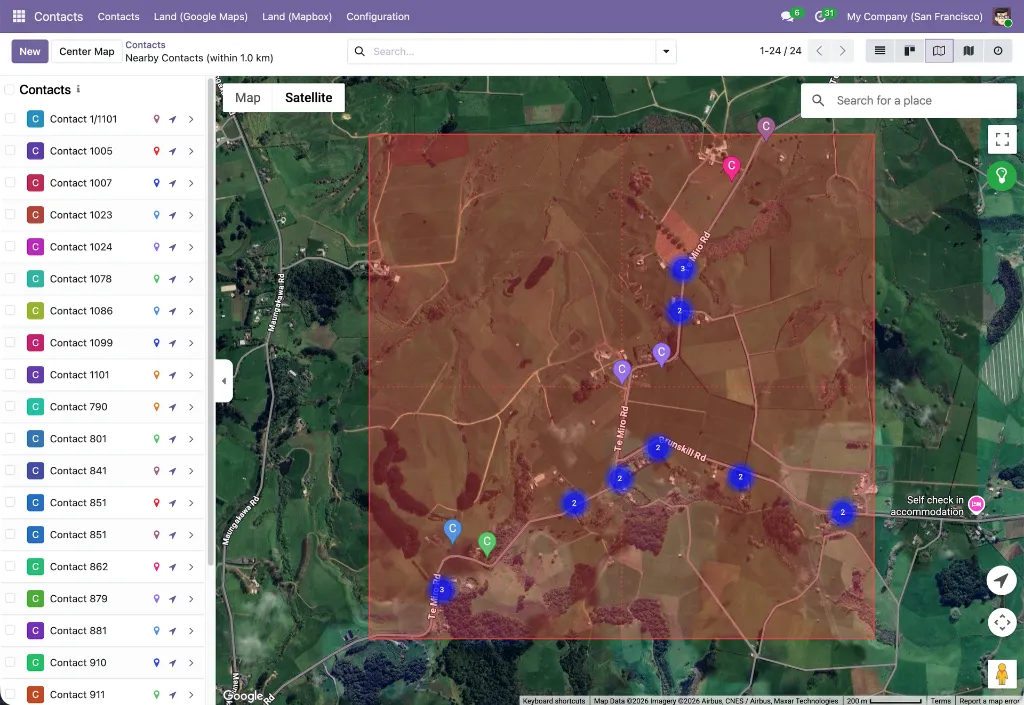
Registers google_map as a first-class Odoo view type. Provides record markers with color coding, a synchronized sidebar, MarkerClusterer for large datasets, overlap handling for co-located records, Alt+drag box multi-selection for bulk actions, in-map place search, a geolocation button, nearby-records search with a configurable radius, full record action support (export, archive, duplicate, delete), embedded map widgets for form views, and full dark mode styling.
Why It Exists
This is the engine behind the Contacts map view. The contacts_google_map module builds on this shared framework — inheriting all navigation, selection, clustering, and action capabilities — rather than implementing them from scratch for Contacts specifically.
Module dependencies: base_google_map
MODULE 03 - FOUNDATION
Web Widget Google Map
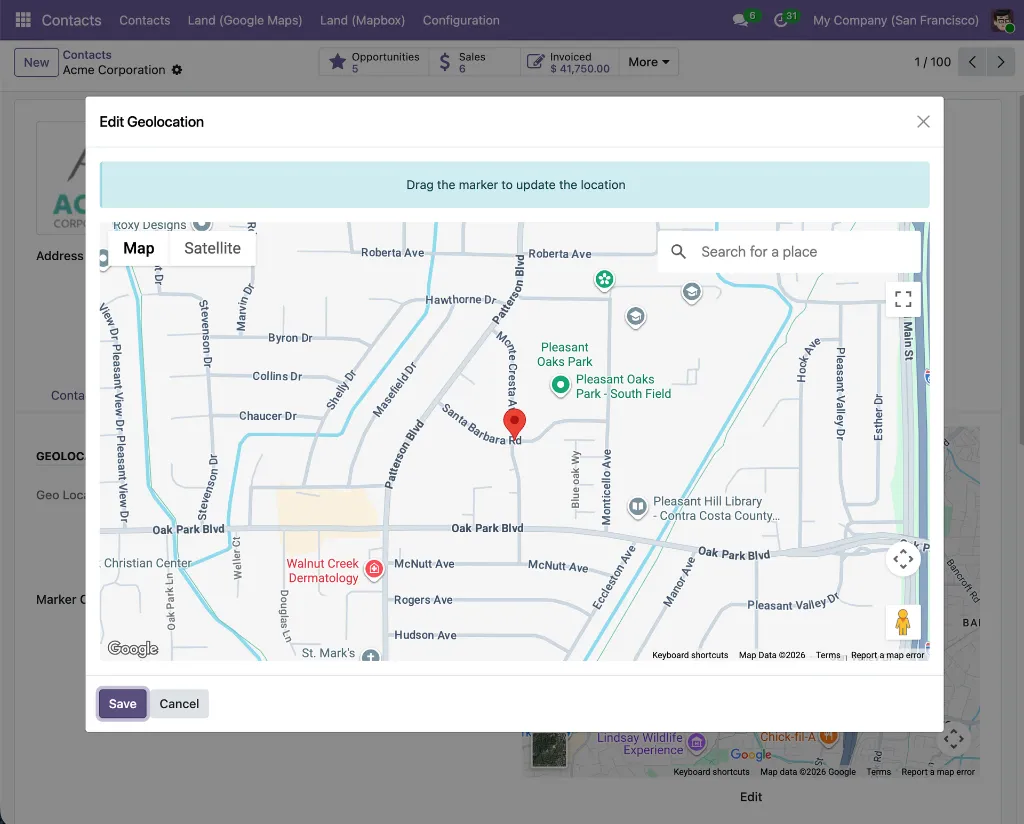
A google_map form widget that embeds a Google Maps preview inside any Odoo form view. An edit button opens an interactive dialog with a draggable AdvancedMarkerElement and a Google Places search box, letting users visually position the marker and confirm coordinates before writing them back to the record. Zoom defaults to 14 for set coordinates, 3 for unset. Read-only mode hides the edit controls for portal and locked record views.
Why It Exists
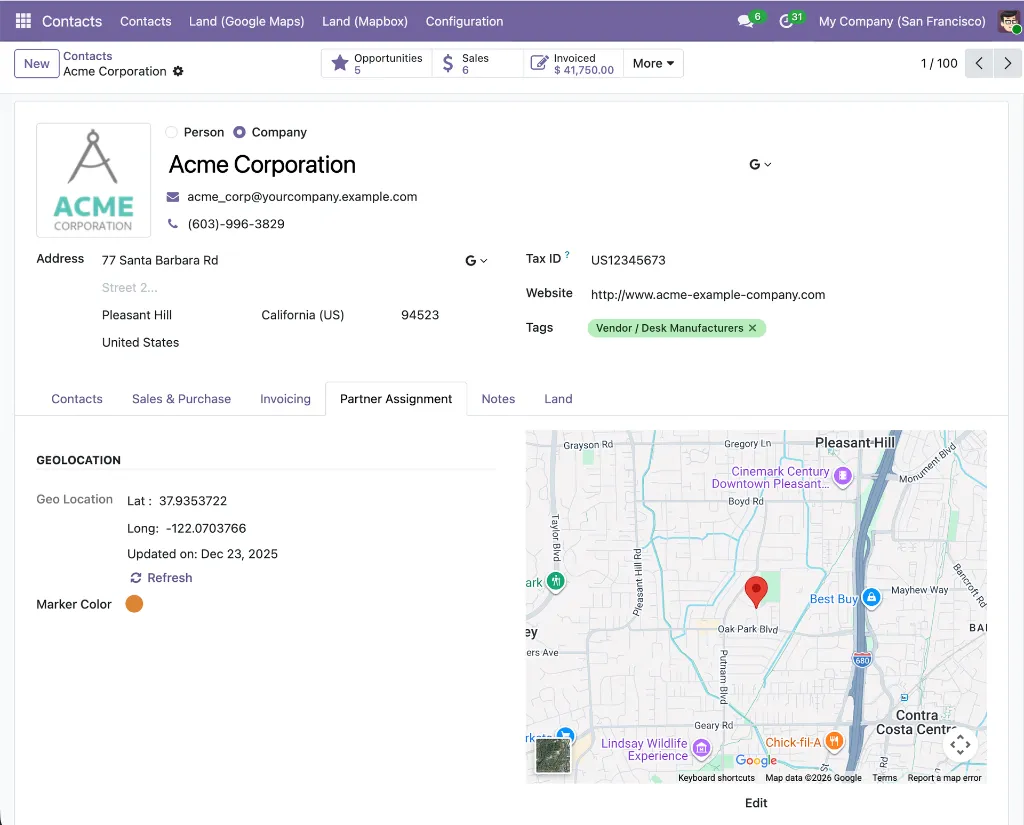
The embedded map on the contact form's Geolocation page is powered by this widget. It gives teams a visual confirmation of a contact's stored location and a precision coordinate editor — both accessible without leaving the form view.
Module dependencies: base_google_map web_view_google_map
MODULE 04 - FOUNDATION
Web Widget Google Place Autocomplete
Provides the gplace_autocomplete_el widget and the Google Places Mapping configuration system. A data-driven engine that maps any Google Places API response property — address components, coordinates, phone, website, display name — to any field on any Odoo model via configuration records rather than code. Two modes: places (businesses and landmarks) and address (streets and routes only). All field writes are atomic. Includes a built-in live test tool, mapping validation, and a per-country street format setting.
Why It Exists
The autocomplete on the Contact form is powered by this module. It handles the partner-specific field mappings — name to name, coordinates to partner_latitude/partner_longitude, address components to street, city, state_id, zip, country_id — through configuration records that are created automatically when contacts_google_autocomplete is installed.
Module dependencies: base_google_map
MODULE 05 - FOUNDATION
Base Google Map: Add Place from Map Click
The abstract foundation for the click-to-create workflow. Provides the google_map.add_place.mixin model mixin with all the logic for fetching Google Place details from the Places API, parsing addresses via the ADR microformat and a locale-aware reverse-geocoding parser supporting US/UK, Canadian, Dutch, Irish, and Russian/CIS address formats, checking for duplicates via the indexed gplace_id field, and opening a pre-populated Odoo quick-create form. Also provides the InMapClickAddPlace OWL component with its green/grey visual zoom indicator.
Why It Exists
All the complex logic for click-to-create — Places API calls, address parsing across locales, duplicate detection, form action building — lives here once and is shared across all application modules. The contacts_google_map_add_place module simply inherits this mixin and provides the partner-specific field overrides.
Module dependencies: web_view_google_map
Application Layer -- Contacts Integrations
MODULE 06 - APPLICATION
Contacts Google Map
Adds a Google Map view to the Contacts application, available in the view switcher alongside list, kanban, and form. Each contact renders as a color-coded pin marker with their avatar displayed in both the sidebar thumbnail and the marker info window for quick identification. A per-contact marker color picker on the Geolocation page enables custom visual categorization. A "Nearby Contacts" smart button on the contact form opens the map filtered to contacts within a configurable radius of that contact's location — with antimeridian wraparound handling for global deployments. An embedded map widget on the Geolocation page provides a location preview without leaving the form. An optional daily cron job auto-geocodes up to 500 contacts with a country but no coordinates.
Why It Exists
The standard Contacts interface has no geographic dimension. This module adds one — making the spatial distribution of an entire contact database visible at a glance, and giving teams a proximity-based navigation tool that works across their full partner list.
Module dependencies: contacts web_view_google_map web_widget_google_map base_geolocalize
MODULE 07 - APPLICATION
Contacts Google Autocomplete
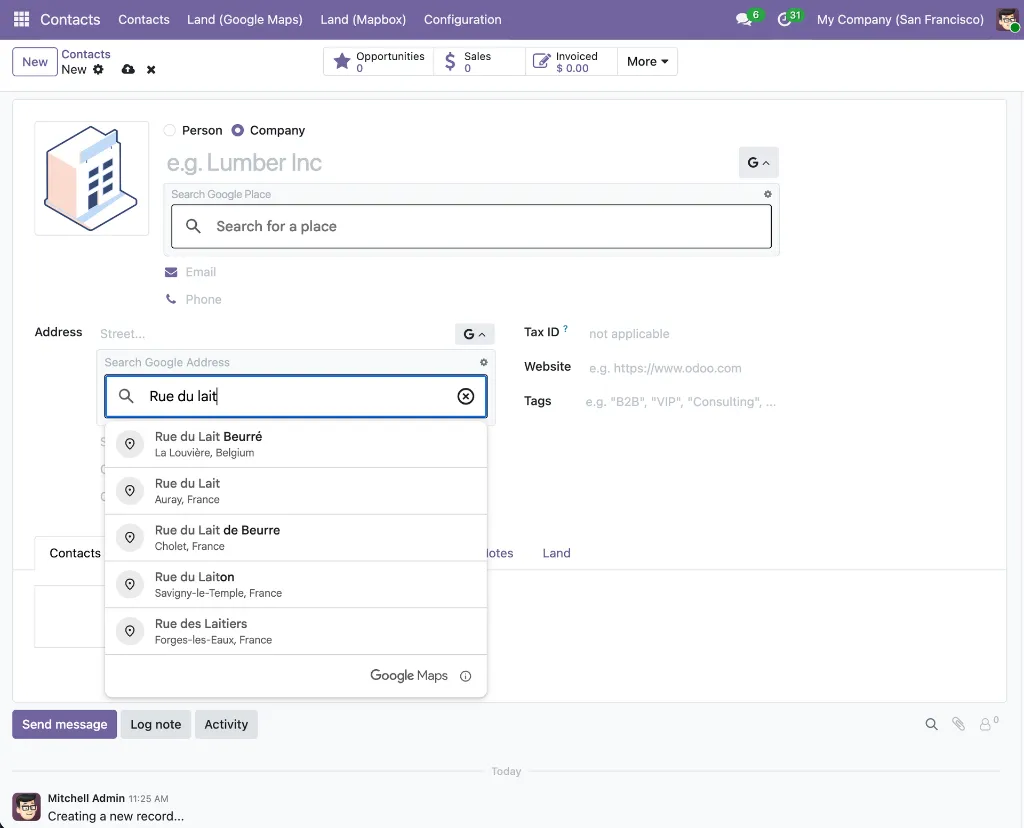
Replaces the standard name and street inputs on the Contact form with Google Places autocomplete fields. The name field uses places mode — showing businesses, landmarks, and points of interest — and when a business is selected, also fills phone and website. The street field uses address mode, restricted to streets and routes. Both autocomplete fields also apply inside inline child-contact sub-forms when adding contacts linked to a company. All address fields (street, street2, city, state, zip, country), geolocation coordinates (latitude, longitude), and contact details are written in a single atomic update. Google Places mapping records for res.partner are created automatically on install — no manual configuration required.
Why It Exists
Manual address entry on contact forms is slow and produces incomplete, inconsistently formatted records. This module ensures every contact created through the name or street field is filled with verified, structured Google Places data — including coordinates — from the moment it is saved.
Module dependencies: contacts web_widget_google_place_autocomplete
MODULE 09 - APPLICATION
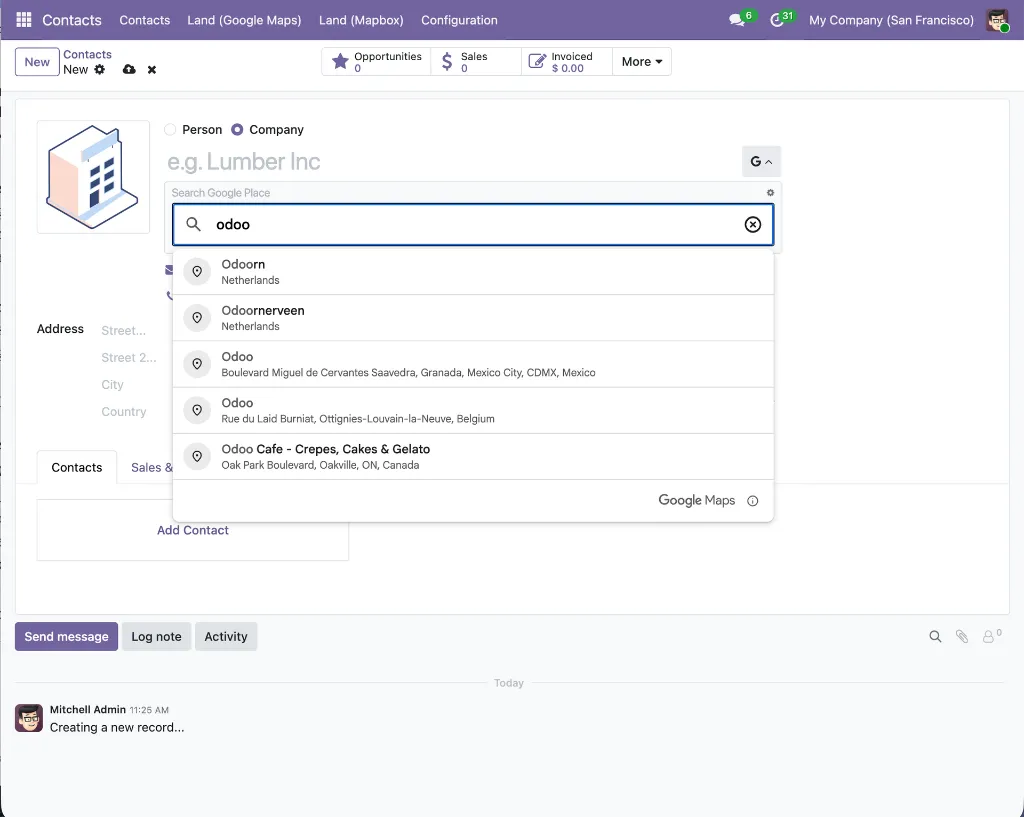
Partner Autocomplete with Google Autocomplete
A unique hybrid widget that combines Odoo's built-in partner autocomplete and Google Places autocomplete on the same Contact name field — without replacing either. A Google icon toggle button beside the name field opens a collapsible panel containing a Google Places autocomplete input. Selecting a place fills all address fields, geolocation, phone, and website atomically. The Odoo partner autocomplete remains active on the same field for finding existing records. The widget applies globally to all res.partner form views via a server-side _get_view() override — no per-module XML changes needed. Supports a no_manual_edit option for data-consistency workflows. Shows a clear validation error in the panel if the mapping configuration is missing rather than failing silently.
Why It Exists
Odoo's native partner autocomplete prevents duplicate records by finding existing partners. Google Places autocomplete enriches new records with verified real-world data. These are complementary needs that previously required choosing one or the other. This module makes both available simultaneously on the same field, across every partner form in the system.
Module dependencies: partner_autocomplete contacts_google_autocomplete