![[v19.0] Google Maps Drawing GeoJSON](/web/image/product.product/21/image_1024/%5Bv19.0%5D%20Google%20Maps%20Drawing%20GeoJSON?unique=959c21c)
![[v19.0] Google Maps Drawing GeoJSON](/web/image/product.product/21/image_128/%5Bv19.0%5D%20Google%20Maps%20Drawing%20GeoJSON?unique=959c21c)
PRODUCT OVERVIEW
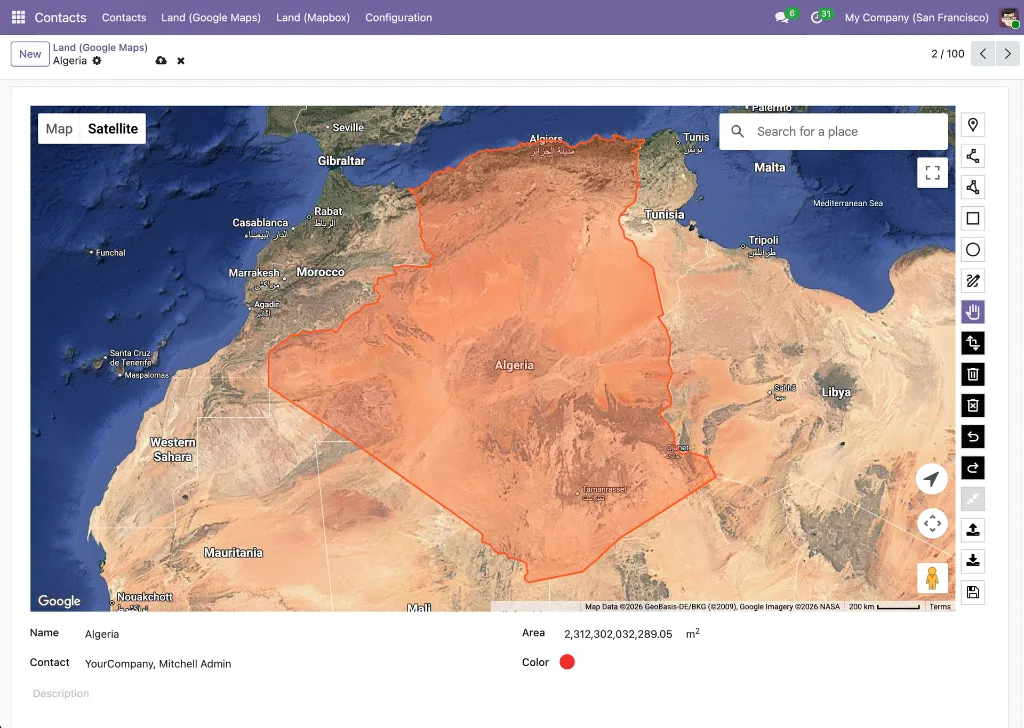
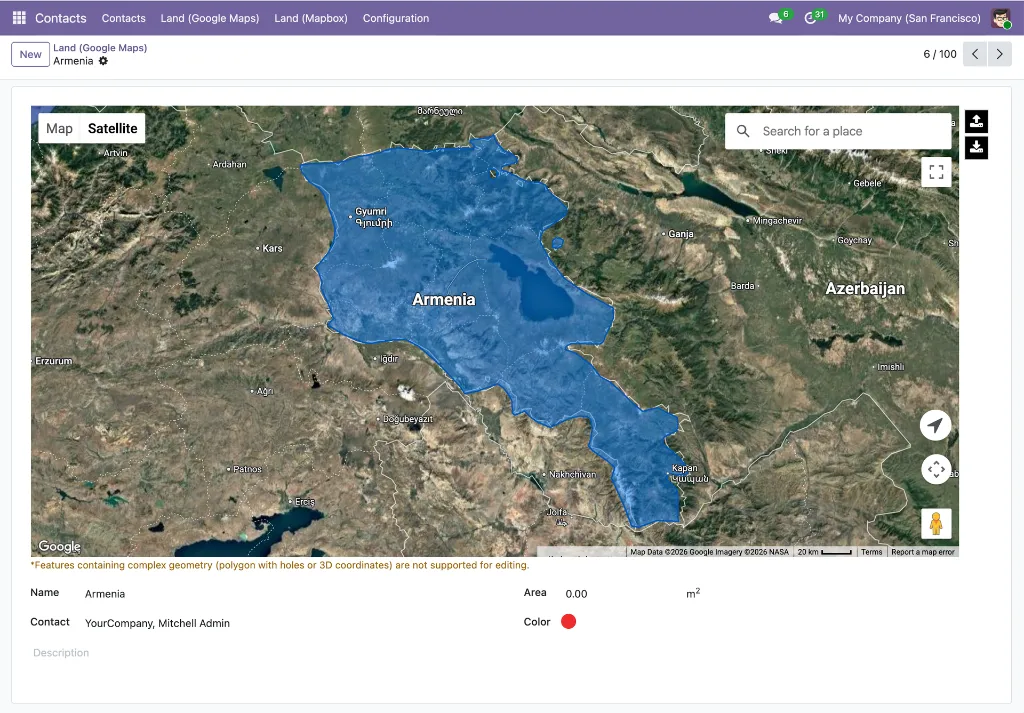
Google Maps Drawing Tools for Odoo brings a full spatial drawing and editing environment directly into the Odoo map view. Users can draw polygons, circles, rectangles, lines, and points on any model that carries geographic data, then save those shapes as structured GeoJSON fields on the record — no external GIS software, no file import/export cycle, no leaving Odoo.
Under the hood, the product uses Terra Draw for interactive editing and switches automatically to Deck.gl's GPU-accelerated renderer when a dataset exceeds the threshold for smooth browser performance. Turf.js provides on-the-fly area and distance calculations, and PostgreSQL JSONB operators enable server-side spatial filtering directly from Odoo domain expressions. The result is a drawing toolkit that handles everything from a handful of sales territories to tens of thousands of GeoJSON features without freezing the browser.
A bundled example module — contact_area — demonstrates the complete integration on the res.partner model, giving developers a working reference they can adapt for any model in minutes.
WHO IT'S FOR
Sales & Territory Managers
You need to define and maintain geographic territories aligned to rep assignments, regional targets, or catchment areas. Drawing Tools lets you draw those boundaries directly on the map and store them as records — no shapefile uploads, no spreadsheet hacks.
Field Service & Operations Teams
Service zones, delivery areas, and coverage boundaries change as business grows. With Drawing Tools you can redraw zone polygons in seconds and instantly see which records fall within the updated boundary.
GIS Analysts & Data Teams
You already work with GeoJSON and spatial data. Drawing Tools gives you a first-class GeoJSON field on any Odoo model, JSONB operators for server-side spatial filtering, and import/export so your existing data flows in without transformation.
Odoo Developers & Integrators
The google.drawing.shape mixin, domain operators, and the contact_area reference module reduce a custom spatial feature from weeks to hours. Add drawing capability to any model by inheriting the mixin and adding a map view.
Real Estate, Construction & Infrastructure
Plot boundaries, project sites, and infrastructure corridors are spatial data that naturally lives alongside the records in your ERP. Drawing Tools makes Odoo the single source of truth for both the record and its geographic footprint.
THE PROBLEM IT SOLVES
Google's Drawing Library Was Deprecated in August 2025
The google.maps.drawing library that most map-drawing integrations relied on was officially deprecated. Solutions built on it stopped working or became unsupported overnight. This product is built entirely on Terra Draw and Deck.gl — no dependency on the deprecated library, no future deprecation risk from the same source.
Odoo Has No Native Drawing Capability
The standard Odoo map view renders markers and clusters, but has no built-in way to draw shapes, define areas, or edit existing geometries. Every team that needs this today either skips the requirement or routes around Odoo with an external tool — then manually syncs the data back.
External GIS Tools Don't Integrate with Your Records
Drawing a territory in QGIS or Google My Maps is useful, but the result is a file — not a linked Odoo record. There is no automatic connection between the drawn boundary and the partners, leads, or tasks that fall within it. Drawing Tools stores the shape directly on the record, so filtering and actions are immediate.
Large Datasets Freeze the Browser
Rendering thousands of GeoJSON features with a standard map library causes visible lag or crashes the browser tab. This product automatically switches from Terra Draw to the Deck.gl GPU renderer above 3,000 features or 5,000 vertices — keeping the map fluid regardless of dataset size.
No Way to Query Shapes in Odoo Domain Expressions
Even if you store GeoJSON in a text field, standard Odoo domain filters can't query inside it. This product adds custom PostgreSQL JSONB operators (json_eq, json_ne, json_contains, json_not_contains) so spatial data is filterable with the same domain syntax used everywhere else in Odoo.
WHAT'S INSIDE
Three modules work together to deliver drawing capability: two shared foundation modules provide the map view infrastructure, and one drawing framework module adds the full spatial editing layer on top.
MODULE 01 - FOUNDATION
Base Google Map
The core infrastructure module that registers the google_map view type as a first-class Odoo view, initialises the Google Maps JavaScript API with the modern @googlemaps/js-api-loader, and provides the shared OWL components — including AdvancedMarkerElement and MarkerClusterer — that all other modules in this suite depend on.Why It Exists
Every module in this suite needs a stable, version-controlled entry point to the Google Maps API and a set of reusable OWL components. base_google_map provides that shared foundation so individual feature modules don't each bundle their own copy of the API loader or reinvent marker rendering.Module dependencies: base
MODULE 02- FOUNDATION
Web View Google Map
Implements the full google_map view type within the Odoo web client. It renders records as clustered map markers, handles view switching between map and list, exposes MapRenderer and MapController OWL components, and manages marker click, hover, and popup behaviour. Any Odoo model with latitude and longitude fields can be displayed in a map view simply by adding a <google_map> view definition.Why It Exists
The map view type is declared in base_google_map but the client-side rendering — how markers appear, how clusters work, how popups open — lives here. Separating declaration from implementation keeps the foundation module minimal and makes the renderer independently upgradeable.Module dependencies: base_google_map
MODULE 03- DRAWING FRAMEWORK
Web View Google Map Drawing
Extends the google_map view with a full spatial drawing and editing toolbar powered by Terra Draw. Users can draw polygons, rectangles, circles, lines, and points directly on the map; edit existing shapes by dragging vertices; and delete or reset drawings without leaving the form or list view. All shapes are stored as structured GeoJSON in a dedicated field on the record.For large datasets the module automatically switches the renderer from Terra Draw's interactive canvas to Deck.gl's GPU-accelerated layer above 3,000 features or 5,000 total vertices — maintaining smooth performance regardless of data volume. Turf.js computes area and perimeter measurements on-the-fly as shapes are drawn. On save, a Douglas-Peucker simplification pass reduces vertex count without compromising visual accuracy. GeoJSON can also be imported from or exported to .geojson files at any time.
Why It Exists
Odoo has no native concept of a geometric shape stored on a record. This module fills that gap with a production-ready drawing layer that covers the full lifecycle: draw → edit → measure → simplify → store → filter → export. The google.drawing.shape mixin makes adding this capability to any custom model a matter of inheriting one class and adding a map view.Custom Domain Operators
The module registers four PostgreSQL JSONB operators directly in Odoo's ORM so GeoJSON fields can be used in standard domain expressions:
- json_eq -- exact GeoJSON equality match
- json_ne -- exclude records with a specific GeoJSON value
- json_contains -- records whose GeoJSON contains a given sub-structure
- json_not_contains -- records whose GeoJSON does not contain a given sub-structure
Module dependencies: web_view_google_map
BONUS EXAMPLE
contact_area -- Working Reference Implementation
Bundled inside web_view_google_map_drawing as an example/ folder, contact_area is a fully working demo module that adds drawing capability to res.partner. It applies the google.drawing.shape mixin, adds a geojson field to contacts, and wires up the drawing toolbar in the partner map view. Install it in a development database to see the complete integration in action — then use it as a template when extending any other model.
HOW IT WORKS
From opening the map to querying records by their drawn boundaries, the workflow is entirely within Odoo — no external tools, no file exports mid-process.
1. There are two distinct entry points depending on what you want to do. To draw or edit a shape on a record, open the record's form view — the google_map_terra_draw widget must be applied to the fields.Json field that stores the GeoJSON data; this renders the map with the full drawing toolbar inline. To browse all saved shapes at once, open the google_map view; every record's stored GeoJSON is rendered on the map, and hovering any shape shows a tooltip with its geometry data — including the total area measurement calculated by Turf.js at save time.
2. Select a drawing mode -- polygon, rectangle, circle, line, or point — and draw directly on the map in the form view. Vertex snapping and freehand modes are both available. When finished, click the Save button on the drawing toolbar to trigger Turf.js measurement calculation and persist the shape.
3. Edit or refine the shape by dragging vertices, adding new ones, or switching to the erase mode to remove sections. When you are satisfied, click the Save button on the toolbar to recalculate measurements and commit the updated geometry.
4. Save the record. The module runs a Douglas-Peucker simplification pass to reduce vertex count, then stores the result as a standard GeoJSON object (RFC 7946) in the record's fields.Json field. No separate geocoding or conversion step is required.
5. Import existing shapes by uploading a .geojson file directly onto the map view — useful for migrating legacy territory data or loading externally authored boundaries without redrawing them.
6. Filter records by shape using standard Odoo domain expressions with the custom JSONB operators. For example, filter contacts whose saved area contains a specific coordinate, or exclude partners with no area defined.
7. For datasets above 3,000 features or 5,000 vertices, the renderer switches automatically from Terra Draw's interactive canvas to Deck.gl's GPU layer — the map stays responsive and no action is required from the user
8. Export the GeoJSON at any time for use in external tools, reporting pipelines, or handoff to other systems.
KEY FEATURES
A full-stack spatial drawing toolkit — from interactive editing to server-side querying — built natively into Odoo.
Drawing & Editing
- Seven drawing modes
Polygon, rectangle, circle, line, point, freehand polygon, and freehand line — covering every common spatial shape type. - Vertex editing
Drag any vertex to reshape an existing geometry. Add or remove vertices without redrawing the entire shape. - Turf.js measurements
Area (m² / km² / acres) and perimeter (m / km / miles) are computed by Turf.js when the user clicks the Save button on the drawing toolbar in the form view. Saved measurements are then visible as hover tooltips on shapes in the google_map view. - GeoJSON import
Upload a .geojson file to populate the field from existing data without manual redrawing. - GeoJSON export
Download the stored shape as a standards-compliant .geojson file at any time.
Performance & Rendering
- Smart renderer switching
Polygon, rectangle, circle, line, point, freehand polygon, and freehand line — covering every common spatial shape type. - Douglas-Peucker simplification
Drag any vertex to reshape an existing geometry. Add or remove vertices without redrawing the entire shape.
Data & Storage
- Standard GeoJSON storage
Shapes are stored in fields.Json following the standard GeoJSON format (RFC 7946) — not a proprietary encoding. The stored value is a valid GeoJSON object, interoperable with any GIS tool, mapping library, or service that understands the format, and queryable directly in PostgreSQL as JSONB. - Custom JSONB domain operators
json_eq, json_ne, json_contains, and json_not_contains plug into standard Odoo domains so spatial filtering works everywhere domains work: views, actions, automated rules, and reports. - google.drawing.shape mixin
Adds the GeoJSON field, the drawing toolbar hook, and the simplification logic to any model with a single _inherit declaration.
Developer Experience
- contact_area reference module
A complete, installable example that demonstrates the mixin on res.partner — copy, rename, adapt. - No deprecated Google Drawing Library
Built entirely on Terra Draw and Deck.gl; no dependency on the google.maps.drawing namespace deprecated in August 2025 - Odoo-native architecture
OWL components, standard view inheritance, and ORM operators mean the drawing tools follow Odoo upgrade conventions rather than fighting them.
Use Cases & Benefits
Territory Management Without Spreadsheets
Draw rep territories, franchise zones, or regional boundaries directly on the Odoo map. Each territory is a record — assignable, filterable, and visible to the right users without exporting to an external tool.
Service Area Definition in Seconds
Field service teams can draw or update delivery zones and service coverage areas on the fly. The updated boundary is stored immediately and any domain-based filtering picks it up without a sync delay.
Legacy GeoJSON Migration
Import existing shapefiles converted to GeoJSON and attach them to the correct Odoo records in one step. No redrawing, no custom import script — just upload and save.
Spatial Filtering in Standard Domains
The custom JSONB operators make GeoJSON fields filterable everywhere Odoo domains are used — scheduled actions, email filters, report groupings, and security rules — without writing raw SQL.
Smooth Performance at Any Scale
Whether you have 10 polygons or 50,000 features, the automatic Terra Draw ↔ Deck.gl switch keeps rendering fluid. No manual configuration, no separate "large dataset mode" to enable.
Accurate Shape Measurements On-the-Fly
Turf.js area and perimeter readouts update as you draw, so sales territory sizing, coverage calculations, or infrastructure planning decisions can be made immediately — no post-processing required.
Fast Custom Model Integration
The google.drawing.shape mixin and the contact_area example reduce adding drawing capability to a custom model from a multi-week project to an afternoon of configuration and testing.
Future-Proof Architecture
No dependency on the deprecated Google Drawing Library means you won't face a forced migration when that API is removed. Terra Draw and Deck.gl are actively maintained, vendor-neutral libraries with long support horizons.
WHAT'S IN THE BUNDLE
Three modules — two shared infrastructure layers and one drawing framework — plus a bonus example module that puts everything together on the res.partner model.
FOUNDATION
1. base_google_map
Google Maps API loader, OWL component library, and google_map view type declaration
2. web_view_google_map
Full google_map view renderer: markers, clustering, popups, and view switching
DRAWING FRAMEWORK
3. web_view_google_map_drawing
Terra Draw toolbar, Deck.gl GPU renderer, Turf.js measurements, GeoJSON field, JSONB operators, and google.drawing.shape mixin
Bonus example (included in web_view_google_map_drawing)
4. contact_area
Reference implementation: drawing capability applied to res.partner, ready to install in a development database