![[v19.0] Sales Google Maps](/web/image/product.product/18/image_1024/%5Bv19.0%5D%20Sales%20Google%20Maps?unique=a709429)
![[v19.0] Sales Google Maps](/web/image/product.product/18/image_128/%5Bv19.0%5D%20Sales%20Google%20Maps?unique=a709429)
Foundation Layer -- Shared Infrastructure
MODULE 01 - FOUNDATION
Base Google Map
The root of the suite. Centralizes Google Maps API key and Map ID configuration in Settings → General Settings → Google Maps. Provides the shared JavaScript API loader with automatic retry logic, library caching, and authentication error detection, as well as the base OWL map component with error handling, offline detection, resize support, and ARIA accessibility that all map views in the suite inherit.
Why It Exists
A single, shared configuration point means the API key is entered once and every module uses it automatically. The shared loader ensures the Google Maps JavaScript API is loaded exactly once per session — no conflicts, no duplicate requests, no per-module API configuration.
Module dependencies: web base_geolocalize
MODULE 02 - FOUNDATION
Web View Google Map
Registers google_map as a first-class Odoo view type alongside list, kanban, and form. Provides the complete map view framework: AdvancedMarkerElement rendering with color coding, a synchronized collapsible sidebar, MarkerClusterer for large datasets, overlap handling for co-located records, Alt+drag box multi-selection, in-map Google Places search, a geolocation button, nearby-records search with configurable radius and bounding box overlay, full record action support, and dark mode styling. Also provides grouping support — a single-level Many2one group-by with 20-color palette — which the Sales map view relies on for its customer-grouped design.
Why It Exists
The sale_google_map module builds its entire map experience on top of this shared engine — inheriting marker rendering, sidebar behavior, grouping, clustering, and all interaction patterns. Without this foundation, every capability would need to be built from scratch for Sales specifically.
Module dependencies: base_google_map
Application Layer -- Sales Integration
MODULE 03 - APPLICATION
Sales Google Map
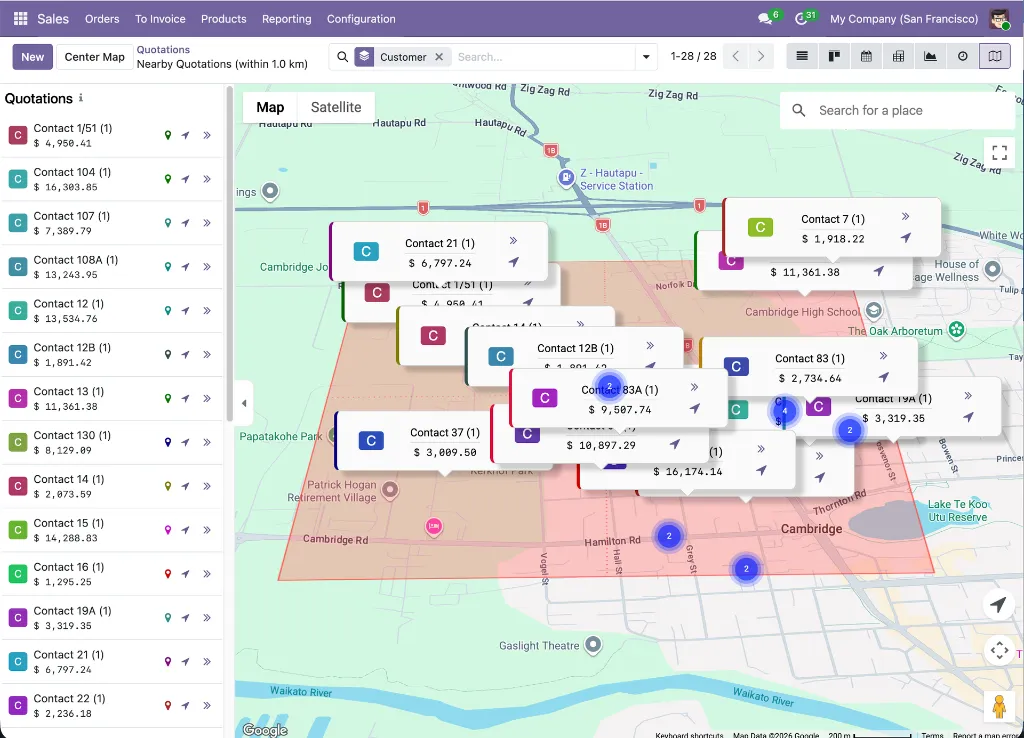
Adds a customer-grouped Google Map view to the Quotations, Orders, Orders to Invoice, Orders to Upsell, and Customers lists in Odoo Sales. Records are grouped by customer (partner) — one AdvancedMarkerElement per customer — showing the customer's name with order count, aggregated amount_total formatted to locale, and avatar_128 profile photo on the marker card. A color-coded left border matches each group's assigned color from the 20-color palette.
Two action buttons appear on every marker and sidebar entry: an arrow button that opens a filtered list of all orders for that customer, and a location-arrow button that triggers a nearby-customer search centered on that position. The sidebar lists all customer groups with avatar, name, order count, and revenue total; clicking a sidebar entry pans and zooms the map to that customer's marker, which briefly triggers a hover animation for visual confirmation.
All groups are expanded automatically when the map loads — using openGroupsByDefault: true on the initial web_read_group RPC — so all markers are visible immediately without manual group expansion. A 200ms debounced update handles subsequent filter and search changes. If the view is loaded without a group-by applied, a notification guides the user to group records before markers will appear.
Why It Exists
Sales orders are inherently customer-centric — plotting them one per order would flood the map with stacked markers at the same address and make the view unreadable. The customer-grouped design collapses all orders into a single actionable marker per customer, showing aggregated revenue rather than individual order lines, keeping the map clean and meaningful regardless of how many orders a customer has.
Module dependencies: sale_management web_view_google_map